Lab 9: Multiple Regression I

Fabio Setti

PSYC 6802 - Introduction to Psychology Statistics

Today’s Packages and Data 🤗

Install Packages Code
install.packages("GGally")
install.packages("devtools")
devtools::install_github("quinix45/FabioFun")
# package 'devtools' must be installed first
library(GGally)
library(tidyverse)
library(FabioFun)
# I am setting a theme for all the plots
theme_set(theme_classic(base_size = 16, accent = "#7a0b80",
                        base_family = 'serif'))

The GGally package (Schloerke et al., 2024) builds upon ggplot2 and includes many functions for creating complex plots. We will be using it to create scatterplot matrices.

As you may have guessed, this is my package 🫣 I use it both to save some functions that I find may be useful in the future. I’ll show some functions to create interactive 3D plots and APA style regression tables.

The flextable package (Gohel et al., 2024) allows to create highly customizable tables. The function that I use to create APA style Word tables makes heavy use of this package.

Data

Today we’ll be looking at data from the 2024 World Happiness report.

dat <- rio::import("https://fabio-setti.netlify.app/data/World_happiness_2024.csv")

Predicting Country Happiness

In our data we have many variables that are likely related to happiness. I will just pick 2 of them for the purpose of this Lab. Let’s say that we want to evaluate how Freedom and Corruption predict Happiness. If we run two separate regressions, we find that both have reasonably high \(R^2\) values:

reg_free <- lm(Happiness_score ~ Freedom, dat)
summary(reg_free)

Call:
lm(formula = Happiness_score ~ Freedom, data = dat)

Residuals:
    Min      1Q  Median      3Q     Max 
-2.5273 -0.5317  0.1337  0.6656  1.7318 

Coefficients:
            Estimate Std. Error t value Pr(>|t|)    
(Intercept)   2.6234     0.3035   8.644 1.22e-14 ***
Freedom       4.6849     0.4732   9.901  < 2e-16 ***
---
Signif. codes:  0 '***' 0.001 '**' 0.01 '*' 0.05 '.' 0.1 ' ' 1

Residual standard error: 0.9065 on 138 degrees of freedom
Multiple R-squared:  0.4153,    Adjusted R-squared:  0.4111 
F-statistic: 98.03 on 1 and 138 DF,  p-value: < 2.2e-16
reg_corr <- lm(Happiness_score ~ Corruption, dat)
summary(reg_corr)

Call:
lm(formula = Happiness_score ~ Corruption, data = dat)

Residuals:
    Min      1Q  Median      3Q     Max 
-3.5303 -0.7029  0.3538  0.7954  1.8762 

Coefficients:
            Estimate Std. Error t value Pr(>|t|)    
(Intercept)   9.1072     0.6077   14.99  < 2e-16 ***
Corruption   -4.2279     0.7106   -5.95  2.1e-08 ***
---
Signif. codes:  0 '***' 0.001 '**' 0.01 '*' 0.05 '.' 0.1 ' ' 1

Residual standard error: 1.058 on 138 degrees of freedom
Multiple R-squared:  0.2041,    Adjusted R-squared:  0.1984 
F-statistic:  35.4 on 1 and 138 DF,  p-value: 2.1e-08

Well, That’s just the correlation 🤷

As we have learned, regression with one predictor is just a contrived way of calculating correlations among variables. We can better visualize the relation among out 3 variables with the ggpairs() function from GGally:

# here I am selecting the 3 columns that I wantr to plot
ggpairs(dat[,c(3, 7,9)])
  • Lower part: scatterplot between variables
  • Diagonal: variable distribution
  • Upper part: correlation between variables

Notably, Freedom and Corruption are also correlated.
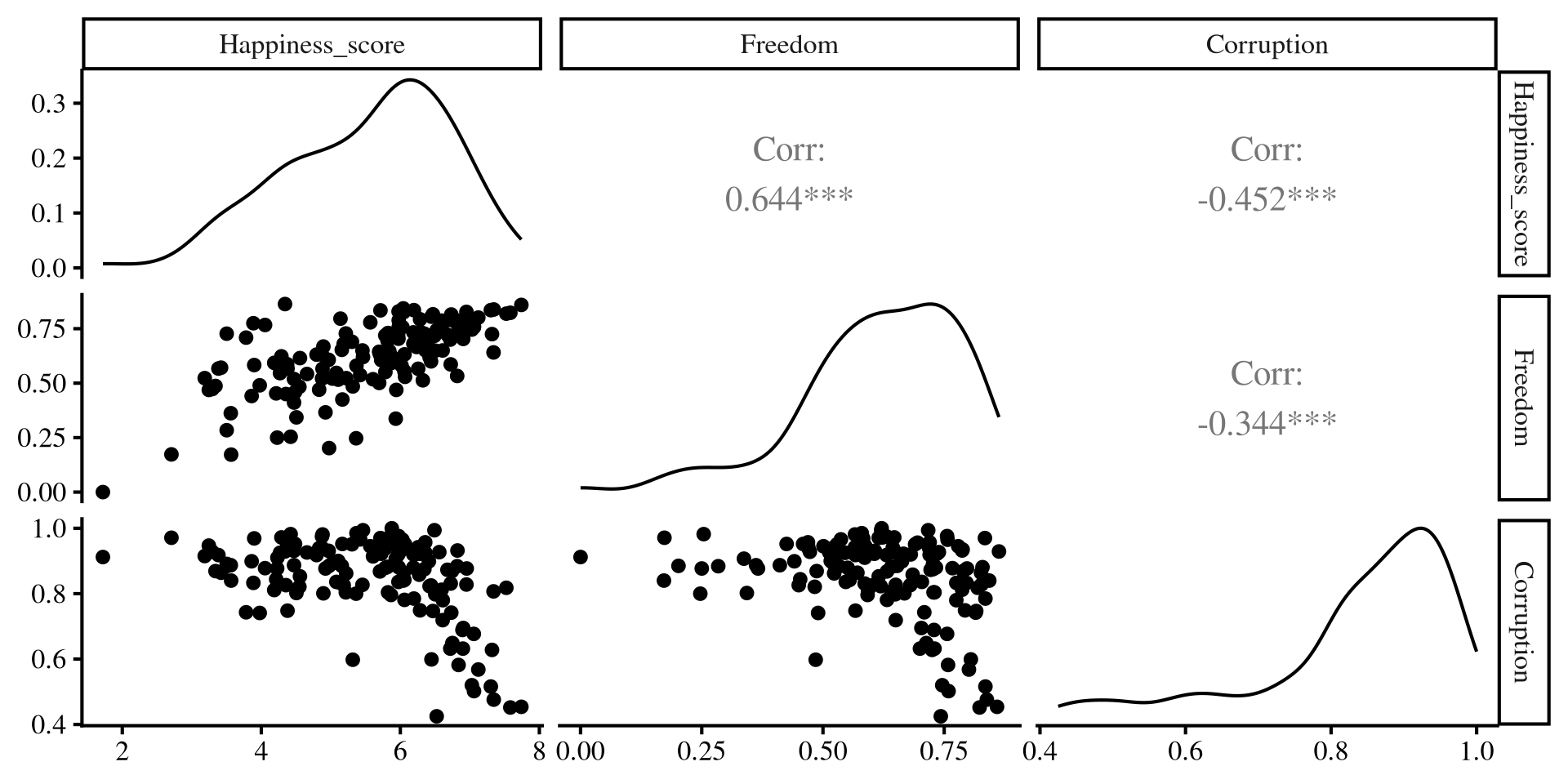
Separate regressions miss the points that our predictors share information!

Multiple Independent Variables

reg_multi <- lm(Happiness_score ~ Freedom + Corruption, dat)
summary(reg_multi)

Call:
lm(formula = Happiness_score ~ Freedom + Corruption, data = dat)

Residuals:
    Min      1Q  Median      3Q     Max 
-2.3574 -0.4326  0.1503  0.5999  1.7335 

Coefficients:
            Estimate Std. Error t value Pr(>|t|)    
(Intercept)   5.0938     0.6875   7.409 1.18e-11 ***
Freedom       4.0320     0.4792   8.415 4.63e-14 ***
Corruption   -2.4415     0.6168  -3.959 0.000121 ***
---
Signif. codes:  0 '***' 0.001 '**' 0.01 '*' 0.05 '.' 0.1 ' ' 1

Residual standard error: 0.8618 on 137 degrees of freedom
Multiple R-squared:  0.4753,    Adjusted R-squared:  0.4677 
F-statistic: 62.06 on 2 and 137 DF,  p-value: < 2.2e-16

We can include both predictors in our regression by adding variables in the lm() function like so lm(DV ~ IV1 + IV2 + ..., dat). for now I will note two things:

  1. Both slopes have changed and are not as large as they were in the individual regressions. The regression equations is now:

\[\mathrm{Happiness} = 5.09 + 4.03 \times \mathrm{Freedom} - 2.44 \times \mathrm{Corruption}\]

  1. The \(R^2\) is roughly \(.48\), which is lower than the sum of the \(R^2\) from the two individual regressions from before (\(.41 + .2 = . 61\)).

What is going on here? 🤔 a graphical illustration may provide some intuition!

Individual regression plots

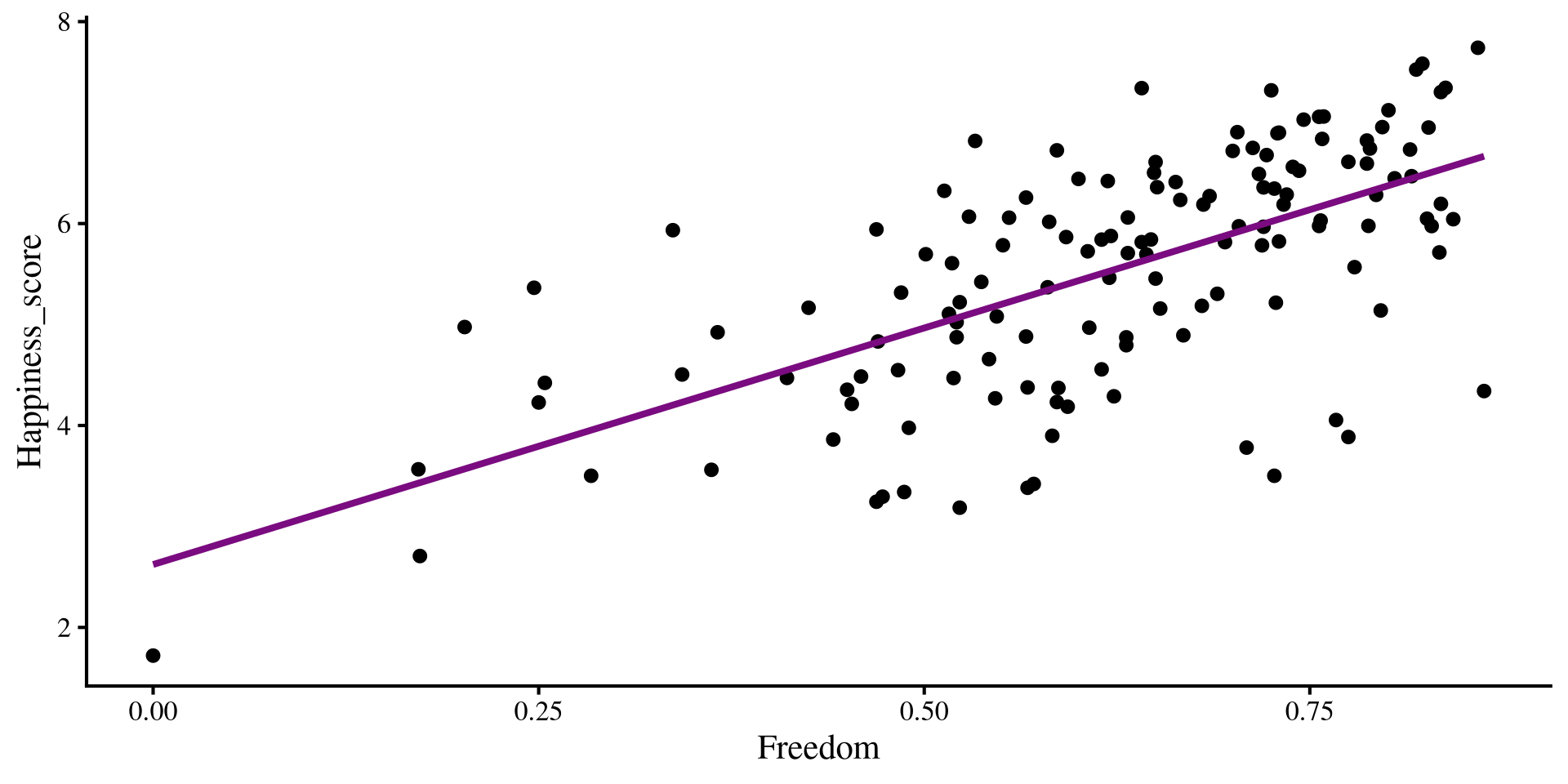
Below I plot the individual regression lines for Freedom and Corruption predicting Happiness.

Plot Code
ggplot(dat,  
 aes(x = Freedom, y = Happiness_score)) +
 geom_point() + 
    geom_smooth(method = "lm",  
                se = FALSE)
Plot Code
ggplot(dat,  
 aes(x = Corruption, y = Happiness_score)) +
 geom_point() + 
    geom_smooth(method = "lm",  
                se = FALSE)
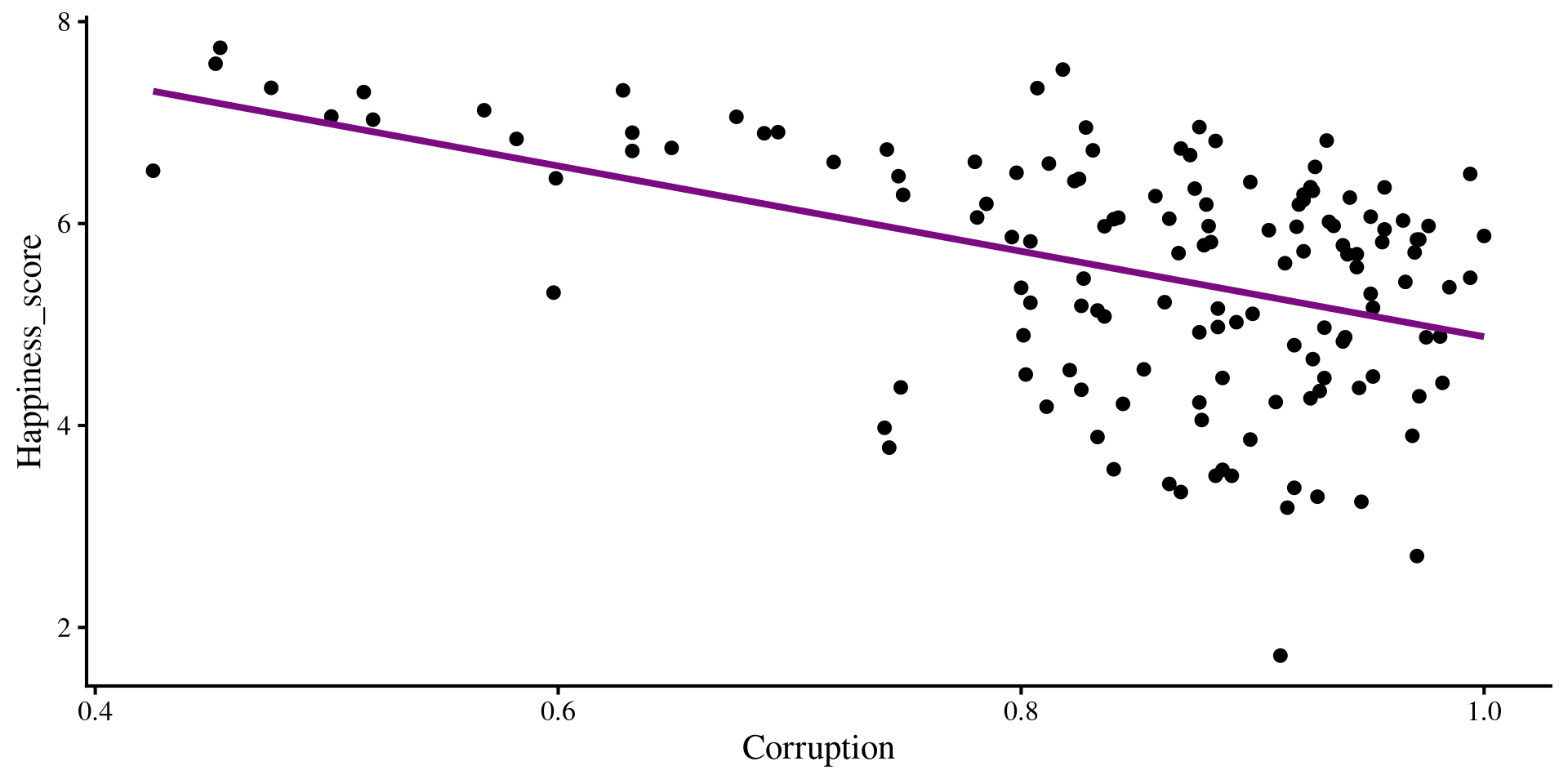
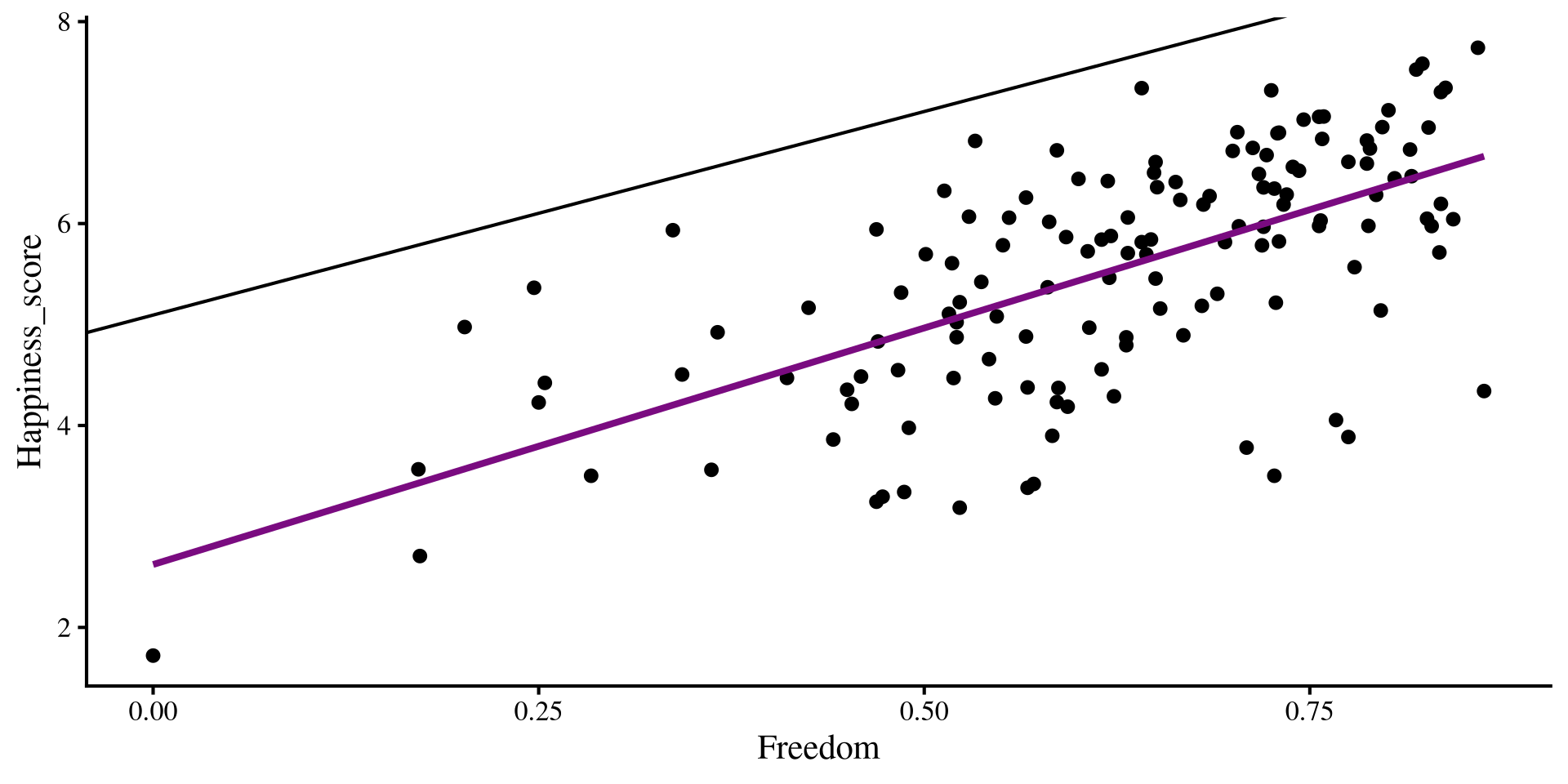
Now, what happens if we try to overlay the regression lines that we got from our multiple regression? Will they “fit the data” better that the regression lines shown here?

Adding Multiple regression Lines

if we add our multiple regression lines to the plot… (🥁 drum roll)

Plot Code
ggplot(dat,  
 aes(x = Freedom, y = Happiness_score)) +
 geom_point() + 
    geom_smooth(method = "lm",  
                se = FALSE) +
    geom_abline(intercept = coef(reg_multi)[1], 
                slope = coef(reg_multi)[2])
Plot Code
ggplot(dat,  
 aes(x = Corruption, y = Happiness_score)) +
 geom_point() + 
    geom_smooth(method = "lm",  
                se = FALSE)+
    geom_abline(intercept = coef(reg_multi)[1], 
                slope = coef(reg_multi)[3])
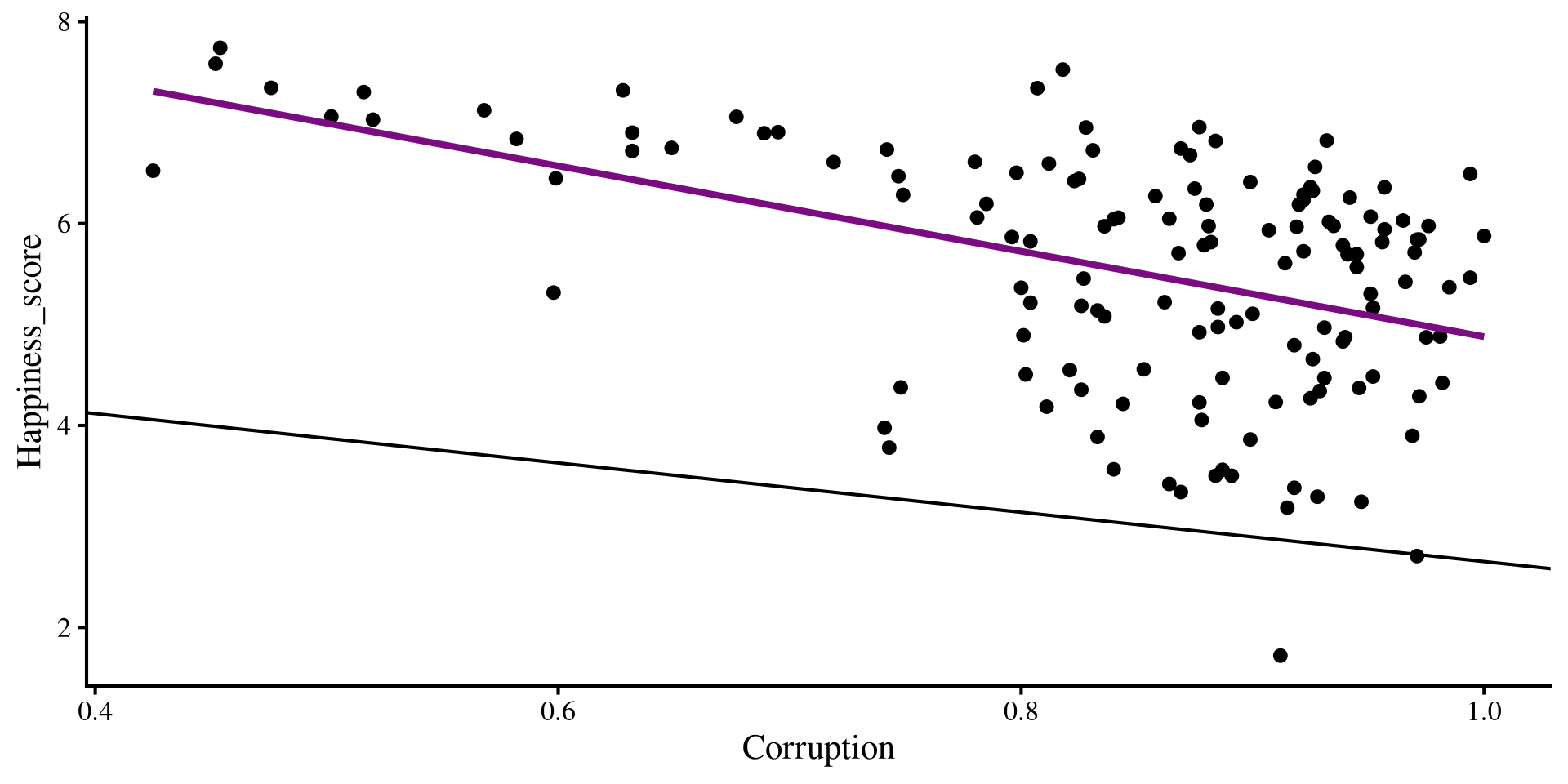
Wait, we are way off now 🤨 And here I thought multiple regression would be better 😑 …Unsurprisingly, the multiple regression is fine, our perspective is the problem!

A better Perspective

We have 3 variables, Freedom, Corruption, and Happiness, but we are looking at them in 2 dimensions with the individual scatterplots. We need a 3D scatterplot!

# run "devtools::install_github("quinix45/FabioFun")" if you haven't installed the package yet
library(FabioFun)

nice_3D_plot(y = dat$Happiness_score,
             x1 = dat$Freedom,
             x2 = dat$Corruption,
             dot_labels = dat$Country_name,
             axis_names = c("Happiness", 
                            "Freedom", 
                            "Corruption"))

What is happening is that the scatterplots are only the sides of this box ‼️

Multiple regression works on this plot on the right, not the individual ones; multiple regression operates on a different dimension.

The Regression Plane

The results from multiple regression create a regression plane, which is the 3D version of a regression line.

nice_3D_plot(y = dat$Happiness_score,
             x1 = dat$Freedom,
             x2 = dat$Corruption,
             dot_labels = dat$Country_name,
             axis_names = c("Happiness", 
                            "Freedom", 
                            "Corruption"),
             reg_plane = TRUE)

The plane works exactly as the regression line. its surface is the best predition of happiness given a value of Freedom and Corruption. The residuals are now the distance from any of the dots to the plane!

Question: What would the plot look like with one extra variable?

Added Variable Plots

If the 3D plot is a bit much for you, you can also visualize the results of multiple regression with added variable plots. To do that, we can pass out lm() object to the avPlots() function from car:

car::avPlots(reg_multi)
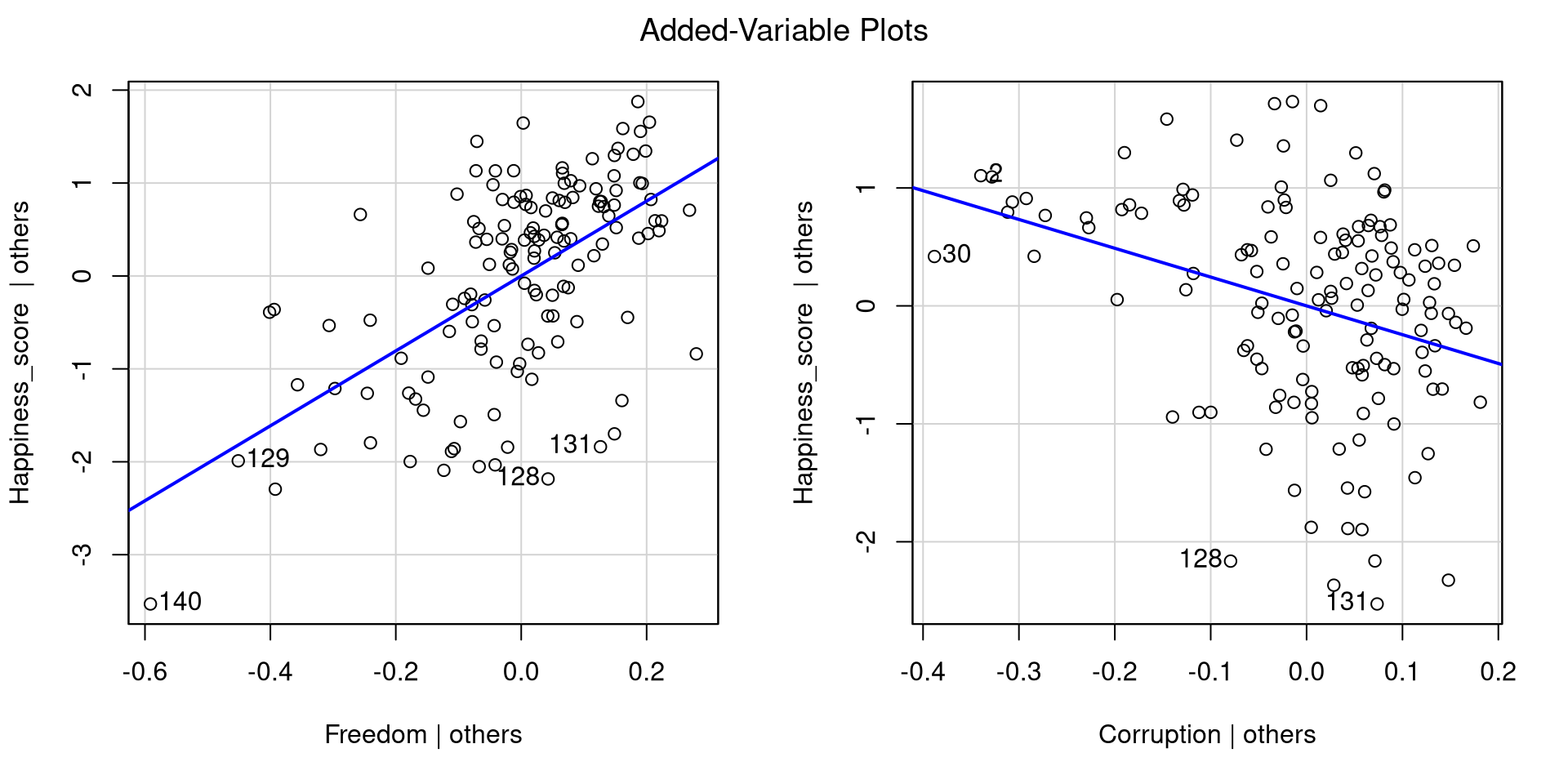
Essentially, added variable plots give you a visual representation of the relation between an IV and the DV after accounting for all other IVs.

Added variable plots have the advantage of being able to show multiple regression results when more than 2 IVs are involved. Why? Because with 3 IVs you would need a 4D plot, and humans can’t really do that 😔

Interpreting Multiple Regression

summary(reg_multi)

Call:
lm(formula = Happiness_score ~ Freedom + Corruption, data = dat)

Residuals:
    Min      1Q  Median      3Q     Max 
-2.3574 -0.4326  0.1503  0.5999  1.7335 

Coefficients:
            Estimate Std. Error t value Pr(>|t|)    
(Intercept)   5.0938     0.6875   7.409 1.18e-11 ***
Freedom       4.0320     0.4792   8.415 4.63e-14 ***
Corruption   -2.4415     0.6168  -3.959 0.000121 ***
---
Signif. codes:  0 '***' 0.001 '**' 0.01 '*' 0.05 '.' 0.1 ' ' 1

Residual standard error: 0.8618 on 137 degrees of freedom
Multiple R-squared:  0.4753,    Adjusted R-squared:  0.4677 
F-statistic: 62.06 on 2 and 137 DF,  p-value: < 2.2e-16

Now that we have looked at our results graphically for a while, let’s interpret the numbers that we get.

  • intercept: the expected value of Happiness when both Freedom and Corruption are at 0.

  • Slope of Freedom: the expected change in Happiness for 1-unit increase in Freedom, controlling for Corruption.

  • Slope of corruption: the expected change in Happiness for 1-unit increase in Corruption, controlling for Freedom.

  • The \(R^2\) is the variance in Happiness jointly explained by Corruption and Freedom.

Note: Instead of “controlling for”, you may also hear “accounting for” or “holding constant”. They are all the same thing.

Checking Residuals

Because now we have multiple IVs, we need need to check the residuals against each of them. We can use the residualPlots() function from car to quickly get residual plots for all of our predictors:

car::residualPlots(reg_multi, fitted = FALSE, test = FALSE)
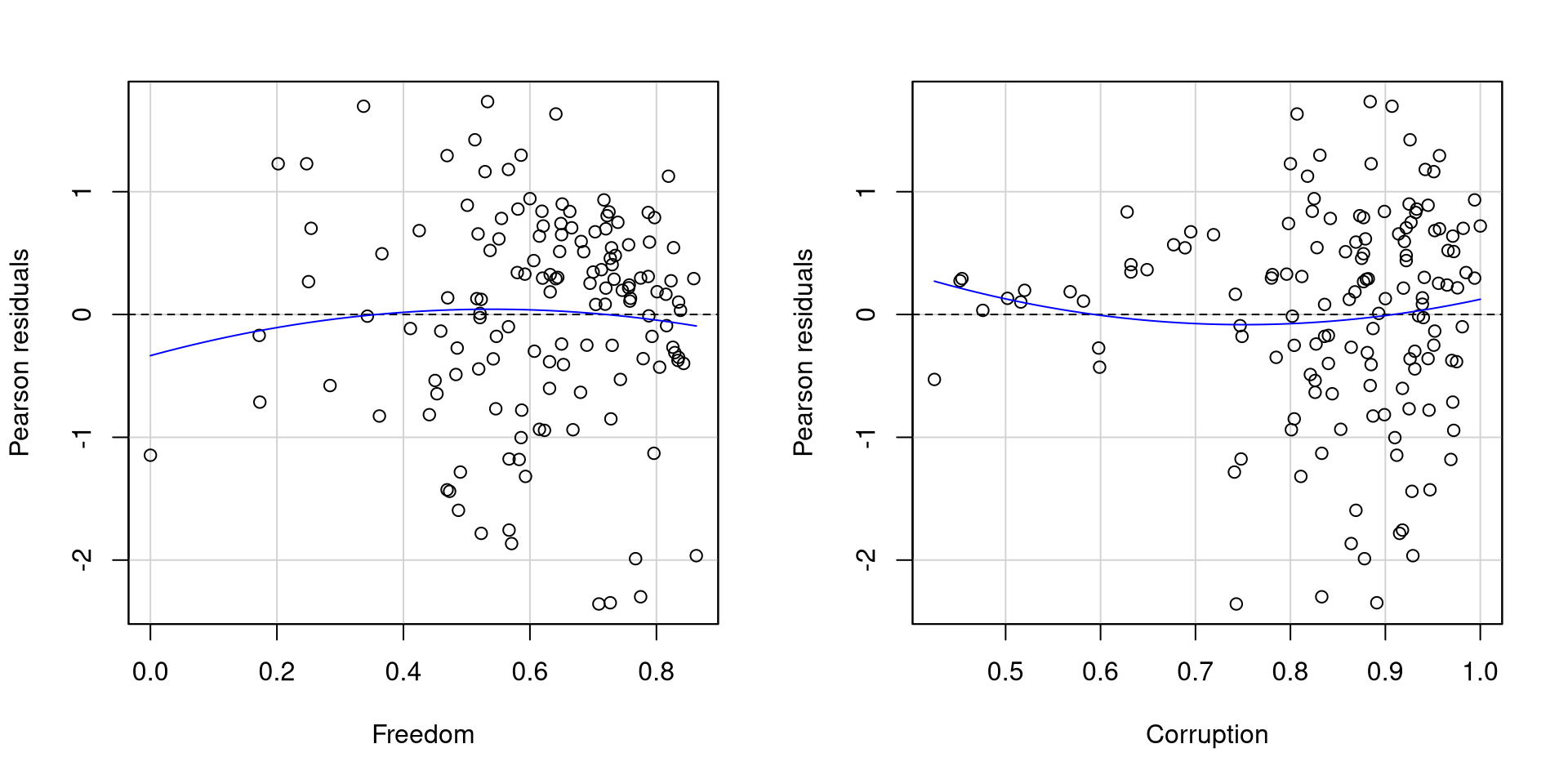
As far as residuals go, I would say that these two plots are not too bad.

The residuals of Freedom probably look better than those of Corruption mostly because Corruption has more points clustered at higher values and few points at lowe values.

The Scale of Our Variables and Interpretation

Our regression intercept and slope are:

coef(reg_multi)
(Intercept)     Freedom  Corruption 
   5.093774    4.032015   -2.441528 

If we look at the range of our variables, it should be apparent why the “1-unit increase in the IV” is not very meaningful in our case:

range(dat$Happiness_score)
[1] 1.721 7.741
range(dat$Freedom)
[1] 0.000 0.863
range(dat$Corruption)
[1] 0.425 1.000

Because of the way Freddom and Happiness are measures, a “1-unit” increase is already out of range, making the value of the slopes not very representative of the data.

Once again, standardizing our variables can help us produce more interpretable results:

dat$Happiness_std <- scale(dat$Happiness_score)[,1]
dat$Freedom_std <- scale(dat$Freedom)[,1]
dat$Corruption_std <- scale(dat$Corruption)[,1]


And now all the variables are on the same measurement unit. As a reminder, a value of 0 now represents the mean of the variable, and a value of -1/+1 represents a value 1 SD below/above the mean.

Standardized Multiple Regression

reg_std <- lm(Happiness_std ~ Freedom_std + Corruption_std, dat)
summary(reg_std)

Call:
lm(formula = Happiness_std ~ Freedom_std + Corruption_std, data = dat)

Residuals:
    Min      1Q  Median      3Q     Max 
-1.9957 -0.3663  0.1272  0.5079  1.4675 

Coefficients:
                 Estimate Std. Error t value Pr(>|t|)    
(Intercept)     1.305e-16  6.166e-02   0.000 1.000000    
Freedom_std     5.546e-01  6.591e-02   8.415 4.63e-14 ***
Corruption_std -2.609e-01  6.591e-02  -3.959 0.000121 ***
---
Signif. codes:  0 '***' 0.001 '**' 0.01 '*' 0.05 '.' 0.1 ' ' 1

Residual standard error: 0.7296 on 137 degrees of freedom
Multiple R-squared:  0.4753,    Adjusted R-squared:  0.4677 
F-statistic: 62.06 on 2 and 137 DF,  p-value: < 2.2e-16

Now that the variables have been standardized, when can interpret the slopes as follows:

  • When controlling for Corruption, 1 SD increase in Freedom will result in a \(0.55\) SD units increase in Happiness.

  • When controlling for Freedom, 1 SD increase in Corruption will result in a \(0.26\) SD units decrease in Happiness.

In general, I believe you should always report standardized regression results, because your readers always know the scale of all your variables and how to interpret regression coefficients.

APA Style Table for Regression Results

because I hate creating tables manually, at some point I made function that does that for me ✨ Also, creating big tables by hand is generally not a good idea: you waste time and likely make typos.

library(FabioFun)
reg_tab <- regression_flextable(reg_std, 
                                var_names = c("Freedom", "Corruption"), 
                                intercept = FALSE)
reg_tab

Variable

B

t

p

95%CI

R2

Freedom

0.55

8.41

<.001***

[0.42; 0.68]

Corruption

-0.26

-3.96

<.001***

[-0.39; -0.13]

R2=0.48,F(2,137)=62.06,p<.001R^2=0.48,F(2,137)=62.06,p<.001***

# save to Word document (will be saved to current working directory)
flextable::save_as_docx(reg_tab, path = "table.docx")

Feel free to use this instead of creating regression tables manually.

the regression_flextable() function I made takes in an lm() object and has some optional arguments (see help page). Here I rename the regression coefficients with the var_names = argument.

You can save the table as a .docx file (Word document) by using the save_as_docx() function from the flextable() package. You specify the file name in the path = argument.

Categorical Variables

So far, we have only seen categorical IVs in ANOVA. Because ANOVA is a regression, we can indeed use categorical predictors in a regression. The catch is that we need to trick the regression into thinking that the categorical predictors are numeric variables 🧐

The one categorical variable we have in our data is Region, which describes what world region the country is in.

table(dat$Region)

        Africa           Asia      Caribbean Eastern Europe   Middele East 
            40             22              2             23             11 
 North America        Oceania  South America Western Europe 
             8              2             11             21 

Idea: we think that if we use the mean of Happiness of each of these regions, we will improve our predictions! (this should sound familiar)

Now, we need to somehow express the Region variable in some numeric fashion, such that the regression switches to using the mean of Happiness by Region when it’s predicting Happiness of a country from that region 💡

There actually are many ways of doing this, but we will make use of the fact that regression slopes are the “change in Y per 1-unit change in X”. We will focus on the trick known as dummy coding!

Dummy Coding With Factor Variables

Factor variables have the advantage of automatically doing dummy coding for you! I will filter for just a few regions to make the example a bit easier to follow:

dat_filt <- dat %>% 
   filter(Region %in% c("Africa", "Asia", "Western Europe", "Eastern Europe"))

Let’s turn Region into a factor variable and investigate first:

dat_filt$Region <- factor(dat_filt$Region)

We can now use the contrasts() function to see that R has done dummy coding for us behind the scenes:

contrasts(dat_filt$Region)
               Asia Eastern Europe Western Europe
Africa            0              0              0
Asia              1              0              0
Eastern Europe    0              1              0
Western Europe    0              0              1

If we look at each row, you can see each variable is assigned a vector of \(0\)s and \(1\)s. Crucially, each vector uniquely identifies the region (e.g., 0, 0, 0 corresponds to Africa)

If we look at the columns, we can see that a \(1\) appears on when the column name corresponds to the row name. Also, there is no column for Africa because we don’t need it, just leaving 0,0,0 will automatically represent Africa.

What does this mean for a regression?

Regression With a Categorical Variable

reg_cat <- lm(Happiness_score ~ Region, dat_filt)
summary(reg_cat)

Call:
lm(formula = Happiness_score ~ Region, data = dat_filt)

Residuals:
     Min       1Q   Median       3Q      Max 
-1.77776 -0.47449  0.07755  0.55595  1.46692 

Coefficients:
                     Estimate Std. Error t value Pr(>|t|)    
(Intercept)            4.3991     0.1133  38.837  < 2e-16 ***
RegionAsia             1.0857     0.1902   5.710 1.12e-07 ***
RegionEastern Europe   1.5537     0.1875   8.288 4.84e-13 ***
RegionWestern Europe   2.3537     0.1931  12.192  < 2e-16 ***
---
Signif. codes:  0 '***' 0.001 '**' 0.01 '*' 0.05 '.' 0.1 ' ' 1

Residual standard error: 0.7164 on 102 degrees of freedom
Multiple R-squared:  0.6205,    Adjusted R-squared:  0.6094 
F-statistic:  55.6 on 3 and 102 DF,  p-value: < 2.2e-16

We get 3 “slopes” each corresponding to the regions that did not have all 0s. Let’s look at the mean Happiness for each region:

dat_filt %>% 
   group_by(Region) %>% 
    summarise(Happ_mean = mean(Happiness_score))
# A tibble: 4 × 2
  Region         Happ_mean
  <fct>              <dbl>
1 Africa              4.40
2 Asia                5.48
3 Eastern Europe      5.95
4 Western Europe      6.75

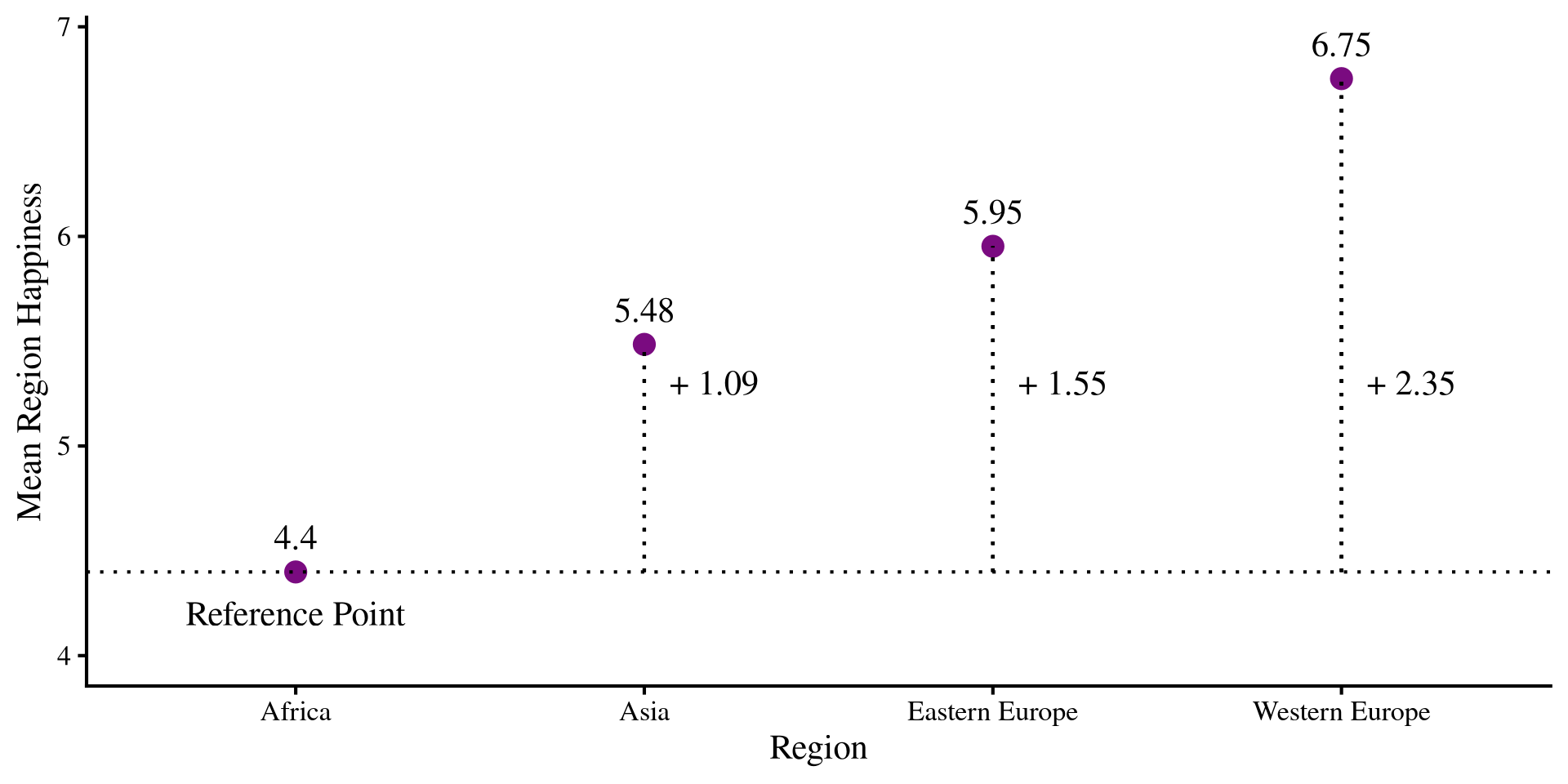
You should see that the intercept is the mean Happiness for Africa, while the “slopes” are the differences from each of the other regions happiness from that of Africa!

The Graphical intuition

What is happening is that we have a reference group, which is the one coded a all 0s, Africa in our case. All other slopes will be the mean differences from the reference group.

the intercept and the slopes are:

     Coefficient Value
1      Intercept  4.40
2           Asia  1.09
3 Eastern Europe  1.55
4 Western Europe  2.35

The slopes represent the change in mean Happiness for each region from the reference group!

Plot Code
happ_means <- dat_filt %>% 
   group_by(Region) %>% 
    summarise(Happ_mean = mean(Happiness_score))

# reference mean 
ref <- as.numeric(happ_means[1,2])

ggplot(happ_means, aes(x = Region, y = Happ_mean)) +
  geom_point(size = 4, color = "#7a0b80") +
  geom_text(aes(label = round(Happ_mean, 2)), vjust = -1) +
  geom_hline(yintercept = ref, lty = 3) +
  geom_segment(x = "Asia", 
               xend = "Asia", 
               y = ref,
               yend = as.numeric(happ_means[2,2]), lty = 3) +
 geom_segment(x = "Eastern Europe", 
               xend = "Eastern Europe", 
               y = ref,
               yend = as.numeric(happ_means[3,2]), lty = 3) +
geom_segment(x = "Western Europe", 
               xend = "Western Europe", 
               y = ref,
               yend = as.numeric(happ_means[4,2]), lty = 3) +
annotate("text", x = 1,  y = 4.2, label = "Reference Point") +
annotate("text", x = 2.2,  y = 5.3, label = paste("+", round(coef(reg_cat)[2], 2))) +
annotate("text", x = 3.2,  y = 5.3, label = paste("+", round(coef(reg_cat)[3], 2))) +
annotate("text", x = 4.2,  y = 5.3, label = paste("+", round(coef(reg_cat)[4], 2))) +
ylim(c(4, 6.9)) +
ylab("Mean Region Happiness")
Why Does this work?

I think it is worthwhile to dive a bit more into why dummy coding works. The regression from two slides ago implied the following regression equation:

\[\mathrm{Happiness} = 4.40 + 1.09 \times \mathrm{Asia} + 1.55 \times \mathrm{Eastern Europe} + 2.35 \times \mathrm{Western Europe}\]

if you recall, the intercept is “the expected value of Y when all other variables are 0”. If we apply it to this equation we get \(4.40\), the mean happiness of Africa. This is the case because Africa is represented by 0,0,0.

intercept <- coef(reg_cat)[1]
slopes <- coef(reg_cat)[-1]

# the intercept + all slopes multiplied by 0. Will give the mean happiness for Africa
intercept + sum(slopes*c(0,0,0))
(Intercept) 
   4.399075 

Similarly, we know that Western Europe is represented as 0, 0, 1. So, to get the mean Happiness of Western Europe, we run:

# mean happiness of western Europe (equivalent to doing 4.40 + 2.35)
intercept + sum(slopes*c(0,0,1))
(Intercept) 
   6.752762 

For “1-unit increase” in Western Europe, the mean of Happiness goes from the reference of \(4.40\) to \(6.75\).

The Moral of the Story

So, dummy coding is one way of tricking regression into treating categorical variables as continuous. Dummy ccoding is a type of contrast , and as we have seen in Lab 7, the numbers that we choose for contrasts can be whatever we like as long as they proportionally represent the comparison we are interested in.

For example, nothing prevents me from changing the \(1s\) in the dummy coding to \(3s\). The significance tests will be equivalent:

contrasts(dat_filt$Region)[contrasts(dat_filt$Region) == 1] <- 3
contrasts(dat_filt$Region)
               Asia Eastern Europe Western Europe
Africa            0              0              0
Asia              3              0              0
Eastern Europe    0              3              0
Western Europe    0              0              3

However, this is impractical! Our coefficients are now interpreted as \(\frac{1}{3}\) the mean difference comepared to the reference group. No one would want that 🤷

reg_cat <- lm(Happiness_score ~ Region, dat_filt)
summary(reg_cat)

Call:
lm(formula = Happiness_score ~ Region, data = dat_filt)

Residuals:
     Min       1Q   Median       3Q      Max 
-1.77776 -0.47449  0.07755  0.55595  1.46692 

Coefficients:
                     Estimate Std. Error t value Pr(>|t|)    
(Intercept)           4.39908    0.11327  38.837  < 2e-16 ***
RegionAsia            0.36191    0.06338   5.710 1.12e-07 ***
RegionEastern Europe  0.51789    0.06249   8.288 4.84e-13 ***
RegionWestern Europe  0.78456    0.06435  12.192  < 2e-16 ***
---
Signif. codes:  0 '***' 0.001 '**' 0.01 '*' 0.05 '.' 0.1 ' ' 1

Residual standard error: 0.7164 on 102 degrees of freedom
Multiple R-squared:  0.6205,    Adjusted R-squared:  0.6094 
F-statistic:  55.6 on 3 and 102 DF,  p-value: < 2.2e-16

References

Gohel, D., ArData, Jager, C., Daniels, E., Skintzos, P., Fazilleau, Q., Nazarov, M., Robert, T., Barrowman, M., Yasumoto, A., Julian, P., Browning, S., Thériault, R., Jobert, S., & Newman, K. (2024). Flextable: Functions for Tabular Reporting.
Schloerke, B., Cook, D., Larmarange, J., Briatte, F., Marbach, M., Thoen, E., Elberg, A., Toomet, O., Crowley, J., Hofmann, H., & Wickham, H. (2024). GGally: Extension to ’Ggplot2’.