Lab 8: Quadratic regression and non-linear alternatives

PSYC 7804 - Regression with Lab

Fabio Setti

Spring 2025

Today’s Packages and Data 🤗

Install Packages Code
# install.packages("tidyverse")
install.packages("lubridate")
install.packages("splines2")
library(tidyverse)
theme_set(theme_classic(base_size = 14, 
                        base_family = 'serif'))
library(lubridate)
library(splines2)


The lubridate package (Spinu et al., 2024) provides many functions to help you work with date and times.

The splines2 package (Wang et al., 2024) can be used to calculate splines.

Data
NY_waeth <- rio::import("https://github.com/quinix45/PSYC-7804-Regression-Lab-Slides/raw/refs/heads/main/Slides%20Files/Data/NYC_Weather_2016_2022.csv")

str(NY_waeth, vec.len = 2)
'data.frame':   59760 obs. of  10 variables:
 $ time                 : chr  "2016-01-01T00:00" "2016-01-01T01:00" ...
 $ temperature_2m (°C)  : num  7.6 7.5 7.1 6.6 6.3 ...
 $ precipitation (mm)   : num  0 0 0 0 0 ...
 $ rain (mm)            : num  0 0 0 0 0 ...
 $ cloudcover (%)       : num  69 20 32 35 34 ...
 $ cloudcover_low (%)   : num  53 4 3 5 4 ...
 $ cloudcover_mid (%)   : num  0 0 0 0 0 ...
 $ cloudcover_high (%)  : num  72 56 99 100 100 ...
 $ windspeed_10m (km/h) : num  10 9.8 9.7 9.2 9.1 ...
 $ winddirection_10m (°): num  296 287 285 281 279 ...

The data includes weather recordings in NY for every hour of the day over a period of roughly 7 years (lots of data 😱). This is a bit too granular for what we need to do, so let’s do some data cleaning!

Working with Dates

This Data provides a good opportunity to show how you can work with dates in R! Although I will only show one function here, the lubridate package is your friend if you work a lot with dates and times in your research.

We want to turn the time variable into a date in days that R recognizes. we would use the ymd() function normally, but the correct format should be YYYY-MM-DD. Instead we also have the time here, which we do not need:
NY_waeth$time[1:3]
[1] "2016-01-01T00:00" "2016-01-01T01:00" "2016-01-01T02:00"
We can do some string manipulation to remove the last 6 characters!
# substr() takes a sting and extract characters from (1 here) to (10 here)

NY_waeth$time <- substr(NY_waeth$time, 1, 10)
NY_waeth$time[1:3]
[1] "2016-01-01" "2016-01-01" "2016-01-01"
Now we can turn the time variable into a date:
NY_waeth$time <- lubridate::ymd(NY_waeth$time)
class(NY_waeth$time)
[1] "Date"
It is interesting to note that dates in R are interpreted as the time that has passed since the Unix Epoch, January 1st, 1970. This is how most software/computers keep track of time 🤓
NY_waeth$time[1]
[1] "2016-01-01"
as.numeric(NY_waeth$time[1])/365
[1] 46.03014
So “2016-01-01” is 46 years after January 1st, 1970.

Summarizing and Filtering the Data

We still have 23 measurements per day over 7 years, which is a bit much. For now, let’s reduce our data to just the average temperature each day in 2021.
We will be using some functions from the dplyr package, which is always loaded by tidyverse. Let’s get the average for each day:
Temp_avg <- NY_waeth %>% 
              select(time, `temperature_2m (°C)`) %>%
                group_by(time) %>% 
          summarise(Temp_C = mean(`temperature_2m (°C)`))

str(Temp_avg)
tibble [2,490 × 2] (S3: tbl_df/tbl/data.frame)
 $ time  : Date[1:2490], format: "2016-01-01" "2016-01-02" ...
 $ Temp_C: num [1:2490] 5.41 2.39 3.01 0.1 -6.78 ...

The tidyverse Pipe Operator %>%

The %>% operator, AKA the pipe operator, passes the element on its left to the function to its right. It is helpful to do multiple operations without needing to redefine an object on every line.

For the Americans 🦅, let’s also transform temperature to Fahrenheit (The inferior way of measuring temperature 😤)
Temp_avg$Temp_F <- (Temp_avg$Temp_C * 9/5) + 32 
Now let’s filter the data fo the year 2021. We can take advantage of the fact that Dates in R are treated as numbers:
Temp_avg_2021 <- Temp_avg %>% 
                  filter(time >= "2021-01-01", 
                         time <= "2021-12-30")
str(Temp_avg_2021)
tibble [364 × 3] (S3: tbl_df/tbl/data.frame)
 $ time  : Date[1:364], format: "2021-01-01" "2021-01-02" ...
 $ Temp_C: num [1:364] 0.729 5.463 2.25 2.75 3.125 ...
 $ Temp_F: num [1:364] 33.3 41.8 36 37 37.6 ...


✨ clean data ✨

Plot The Data

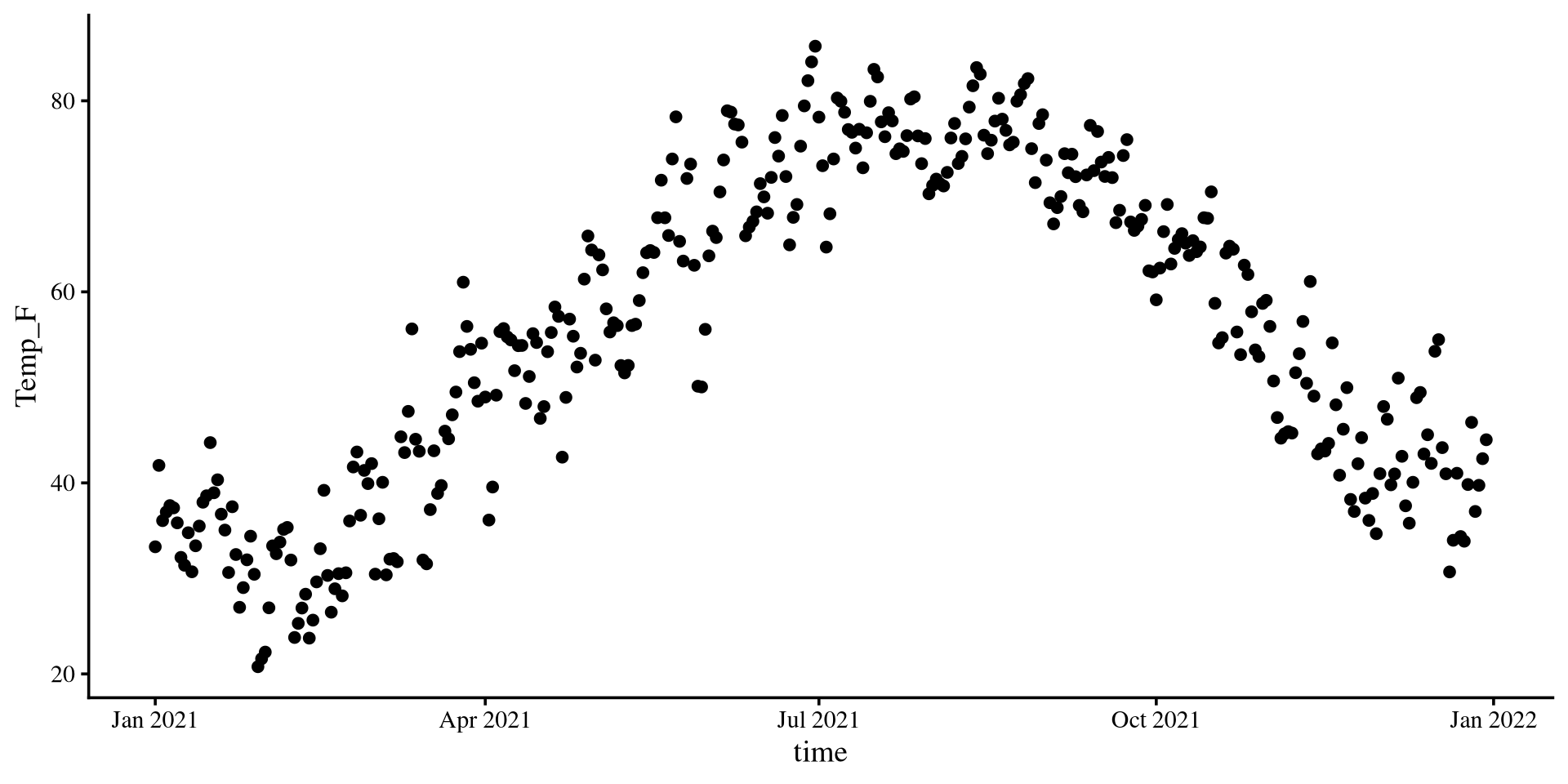
Let’s see what is the temperature trend in NY for the year 2021.

ggplot(Temp_avg_2021,
       aes(x = time, y = Temp_F)) +
        geom_point()

Quite clearly, we need a quadratic curve here.

Plot The Data

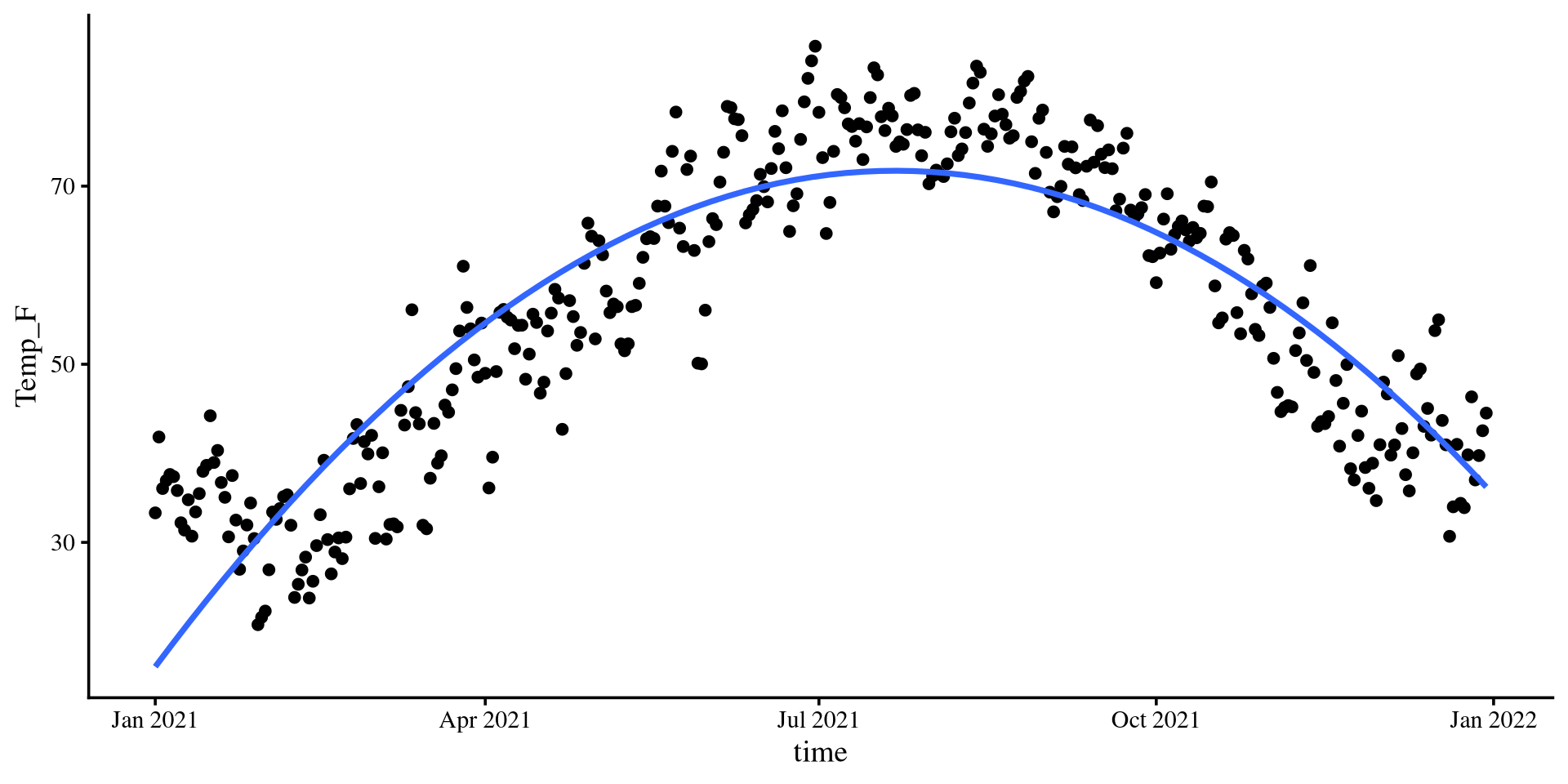
Let’s see what is the temperature trend in NY for the year 2021.

ggplot(Temp_avg_2021,
       aes(x = time, y = Temp_F)) +
        geom_point() +
geom_smooth(method = "lm", 
            formula = y ~ poly(x, 2), 
            se = FALSE)

The quadratic line fits very well. Let’s see if the loess line agrees.
Plot The Data

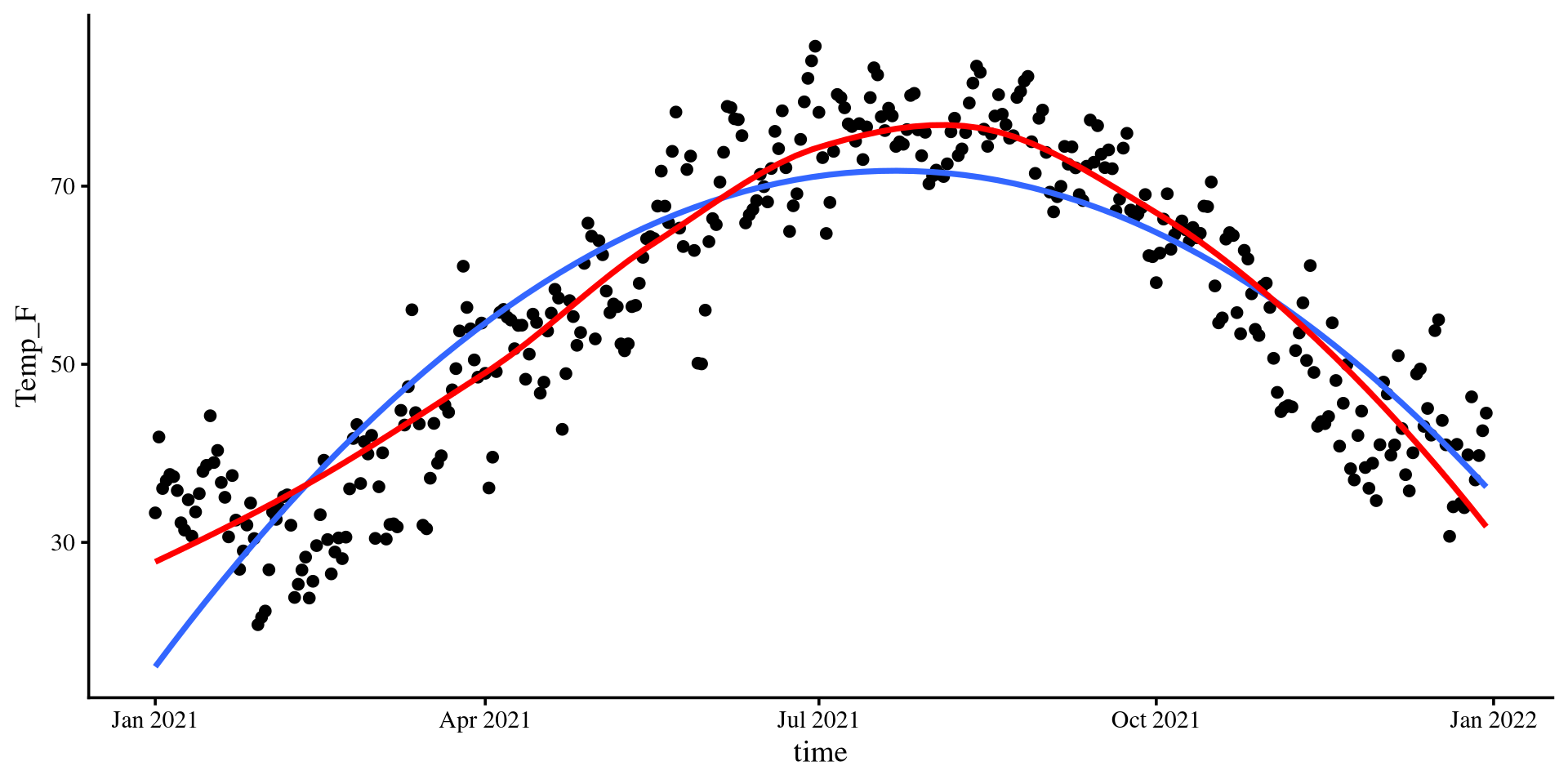
Let’s see what is the temperature trend in NY for the year 2021.

ggplot(Temp_avg_2021,
       aes(x = time, y = Temp_F)) +
        geom_point()  +
geom_smooth(method = "lm", 
           formula = y ~ poly(x, 2), 
           se = FALSE) +
geom_smooth(method = "loess", 
            col = "red",
           se = FALSE)

The loess line is pretty close to the quadratic one!

Let’s run a quadratic regression with time as the predictor…
Quadratic Regression: Centering Variables

I will first show the “manual” way of running a quadratic regression, and I will show the slightly more practical way later (if you are not interested in interpreting coefficients).
First, let’s create the quadratic version of the time variable
# dates don't like the "^", so we need to turn it into a numeric first 

Temp_avg_2021$time2 <- as.numeric(Temp_avg_2021$time)^2


Oh wait…this does not work too well 🫤
cor(Temp_avg_2021$time2, as.numeric(Temp_avg_2021$time))
[1] 0.9999969

We will not be able to interpret our regression coefficients (the linear term specifically) with such multicollinearity, as discussed in Lab 7

💡 We need to center our variables first 💡

To center a variable we just subtract the mean

\[X_{\mathrm{centered}} = X - \bar{X}\]

Temp_avg_2021$time_cent <- Temp_avg_2021$time - mean(Temp_avg_2021$time)
# btw, check out what the time_cent variable looks like now!

# we create the quadratic term by squaring the centered variable
Temp_avg_2021$time_cent2 <- as.numeric(Temp_avg_2021$time_cent)^2

And the mulitcollinearity problem is solved 🪄

cor(Temp_avg_2021$time_cent2, 
    as.numeric(Temp_avg_2021$time_cent))
[1] 0
Now we are good to proceed with our quadratic regression.

Quadratic Regression

quad_reg <- lm(Temp_F ~ time_cent + time_cent2 , 
               data = Temp_avg_2021)

summary(quad_reg)

Call:
lm(formula = Temp_F ~ time_cent + time_cent2, data = Temp_avg_2021)

Residuals:
     Min       1Q   Median       3Q      Max 
-18.8248  -5.4369   0.3819   5.0293  25.2432 

Coefficients:
              Estimate Std. Error t value Pr(>|t|)    
(Intercept)  7.116e+01  6.140e-01  115.90   <2e-16 ***
time_cent    5.562e-02  3.896e-03   14.28   <2e-16 ***
time_cent2  -1.367e-03  4.145e-05  -32.98   <2e-16 ***
---
Signif. codes:  0 '***' 0.001 '**' 0.01 '*' 0.05 '.' 0.1 ' ' 1

Residual standard error: 7.81 on 361 degrees of freedom
Multiple R-squared:  0.7815,    Adjusted R-squared:  0.7803 
F-statistic: 645.7 on 2 and 361 DF,  p-value: < 2.2e-16

\(\widehat{\mathrm{F_{temp}}} = b_0 + b_1 \times \mathrm{time} + b_2 \times \mathrm{time}^2\)

\(\widehat{\mathrm{F_{temp}}} = 71.16 + 0.06 \times \mathrm{time} - 0.001 \times \mathrm{time}^2\)

  • 71.16 is the expected temperature in Fahrenheit when time is 0. Our variable is centered, so 0 represent the middle of the year, roughly July 2nd
  • 0.06 is the expected slope of the tangent line when time is 0 (confusing 😕)
  • -0.001 is the expected change in the slope of the tangent line per unit-change in time (even more confusing 😕😕)
  • We need some graphical help because some of this stuff honestly makes no sense in words 🤷

\(b_0\) in Quadratic Regression

Plot code
ggplot(Temp_avg_2021,
       aes(x = time, y = Temp_F)) +
        geom_point(alpha = .5, shape = 1)  +
  geom_point( aes(y = coef(quad_reg)[1], 
                  x = mean(Temp_avg_2021$time)),
              size = 3.5,
              col = "red") +
geom_smooth(method = "lm", 
           formula = y ~ poly(x, 2), 
           se = FALSE) +
geom_segment(x = 0, 
               xend = mean(Temp_avg_2021$time), 
               y = coef(quad_reg)[1],
               yend = coef(quad_reg)[1],
               linetype = 2) +
geom_segment(x = mean(Temp_avg_2021$time), 
             xend = mean(Temp_avg_2021$time), 
             y = 0,
             yend = coef(quad_reg)[1],
             linetype = 2)

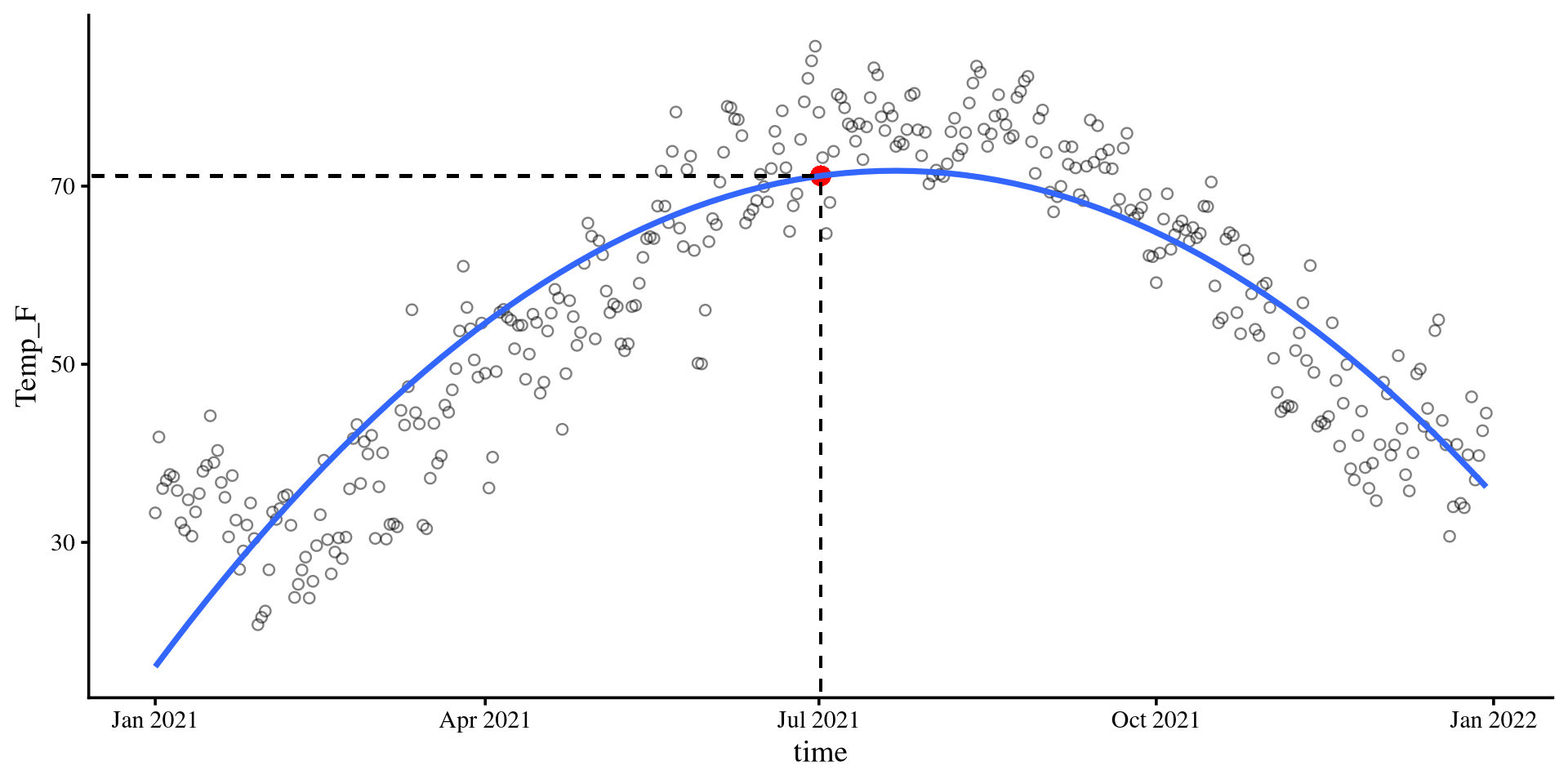
\[b_0 = 71.16\]

Given that the time variable was centered, 0 corresponds to the middle of the year, July 2nd.

The expected temperature on July 2nd (when time = 0) given the quadratic regression equation is indeed 71.16 degrees Fahrenheit.
\(b_1\) in Quadratic Regression

Plot code
ggplot(Temp_avg_2021,
       aes(x = time, y = Temp_F)) +
        geom_point(alpha = .5, shape = 1)  +
geom_smooth(method = "lm", 
            formula = y ~ poly(x, 2), 
            se = FALSE) +
geom_segment(x = mean(Temp_avg_2021$time) - 130, 
             xend = mean(Temp_avg_2021$time) + 130, 
             y = coef(quad_reg)[1] - coef(quad_reg)[2]*130,
             yend = coef(quad_reg)[1] + coef(quad_reg)[2]*130,
             linetype = 1,
             linewidth = .7,
             col = "red")

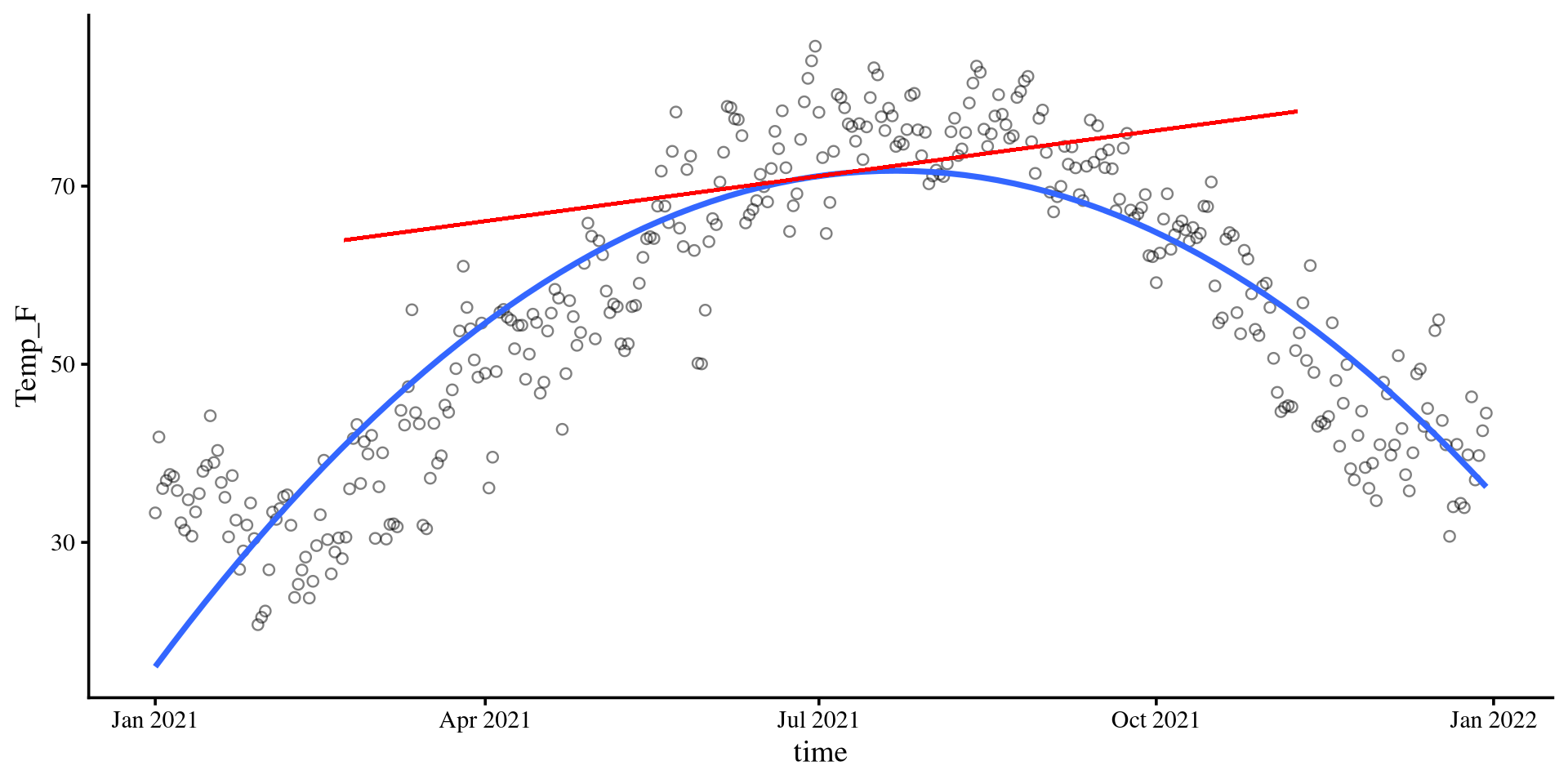
\[b_1 = 0.06\]

The slope of the tangent line when time is at 0. The tangent line is the red line in the plot on the right.

For this to make a bit more sense, we also need to look at \(b_2\).

Slope-ception 🤔

If you think about it, in linear regression, the slope, \(b_1\), is also the slope of the tangent line to the regression line.
\(b_2\) in Quadratic Regression

Plot code
x_val <- 100

# accurate calculations, there is rounding error in the equation on the slides
slope_new <- coef(quad_reg)[2] + 2*coef(quad_reg)[3]*x_val

ggplot(Temp_avg_2021,
       aes(x = time, y = Temp_F)) +
        geom_point(alpha = .5, shape = 1)  +
geom_smooth(method = "lm", 
            formula = y ~ poly(x, 2), 
            se = FALSE) +
geom_segment(x = (mean(Temp_avg_2021$time) + x_val) - 130, 
             xend = (mean(Temp_avg_2021$time) + x_val) + 130, 
             y =  (coef(quad_reg)[1] + coef(quad_reg)[2]*x_val + coef(quad_reg)[3]*x_val^2) - (slope_new*130),
             yend = (coef(quad_reg)[1] + coef(quad_reg)[2]*x_val + coef(quad_reg)[3]*x_val^2) + (slope_new*130),
             linetype = 1,
             linewidth = .7,
             col = "red") 

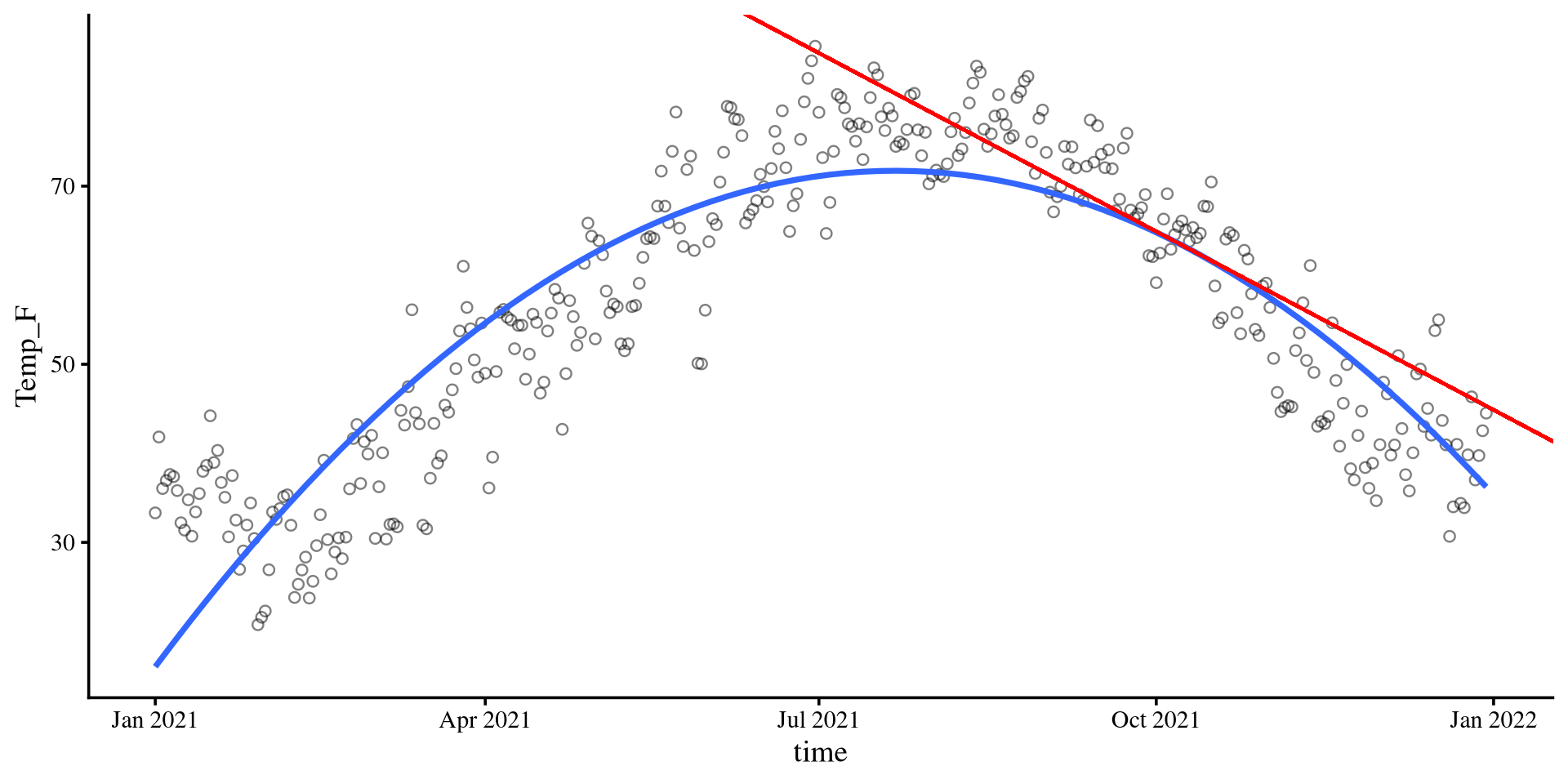
\[b_2 = - 0.001\]

\(b_2\) lets us calculate the slope of the tangent line at any point of the curve. The value of \(b_2\), describes the change of the slope of the tangent line per 1-unit change in time. More formally,

\[b_{\mathrm{tang}} = b_1 + 2b_2 X\]
For example, if time = 100, then the slope of the tangent line is given by \(b_{\mathrm{tang}} = .06 + 2\times -.001 \times100 = -.14\). Indeed, the tangent line goes downwards, as its slope suggests.
Why \(b_2\) is What You care about

So why do we care about slopes of tangent lines? Well, generally, we don’t. The thing that we care about is that the slope of tangent lines changes at all. This is what a non-zero \(b_2\) value tells us.

What would it mean for the slope of the tangent line to be constant across every \(X\) value? What happens if \(b_2 = 0\)?

We can check our quadratic regression equation, so \(\hat{Y} = b_0 + b_1X + 0X^2\)\(\hat{Y} = b_0 + b_1X\)

Oh, we are back to the linear regression formula 🙃 If the slope of the tangent line is always constant, we have a line.

So, \(b_2\) informs us about 3 things:

1. Whether the line bends at all (i.e., is \(b_2 \neq 0\))

2. How much the line bends, which it depends on the magnitude of \(b_2\) (more extreme \(b_2\) values imply steeper curves)

3. The direction of the bend. If the sign of \(b_2\) is positive, the curve will be a bell, if the sign is negative, it will be a U, as in our case.

Climbing to the top ☝️ (or bottom 👇)

Plot code
# accurate calculations, there is rounding error in the equation on the slides
top <- -1*(coef(quad_reg)[2]/(2*coef(quad_reg)[3]))

Y_val <- (coef(quad_reg)[1] + coef(quad_reg)[2]*top + coef(quad_reg)[3]*top^2)

# this is the formula for the tangent slope. if you print this, you will see that it equals exactly 0. This means that the X value provided is the top of the curve, which is the only point where the tangent slope is exactly 0

slope_new <- coef(quad_reg)[2] + 2*coef(quad_reg)[3]*top


ggplot(Temp_avg_2021,
       aes(x = time, y = Temp_F)) +
        geom_point(alpha = .5, shape = 1)  +
  geom_point(aes(y = Y_val, 
                x = mean(Temp_avg_2021$time) + top),
              size = 3.5,
              col = "red") +
geom_smooth(method = "lm", 
           formula = y ~ poly(x, 2), 
           se = FALSE) +
geom_segment(x = 0, 
               xend = mean(Temp_avg_2021$time) + top, 
               y = Y_val,
               yend = Y_val,
               linetype = 2) +
geom_segment(x = mean(Temp_avg_2021$time) + top, 
             xend = mean(Temp_avg_2021$time) + top, 
             y = 0,
             yend = Y_val,
             linetype = 2) +
geom_segment(x = mean(Temp_avg_2021$time) -130, 
             xend = mean(Temp_avg_2021$time) + 130, 
             y =  Y_val,
             yend = Y_val,
             linetype = 1,
             linewidth = .7,
             col = "red") 
Last but not least, we can find the top (or bottom if \(b_2 > 0\)) of our curve (which is also the turning point). The formula is \(\mathrm{top} = -\frac{b_1}{2b_2}\).

For us that would mean that the predicted highest average temperature is around:

# accurate calculations, there is rounding error in slide regression coefficients
-1*(coef(quad_reg)[2]/(2*coef(quad_reg)[3]))
time_cent 
 20.34353 
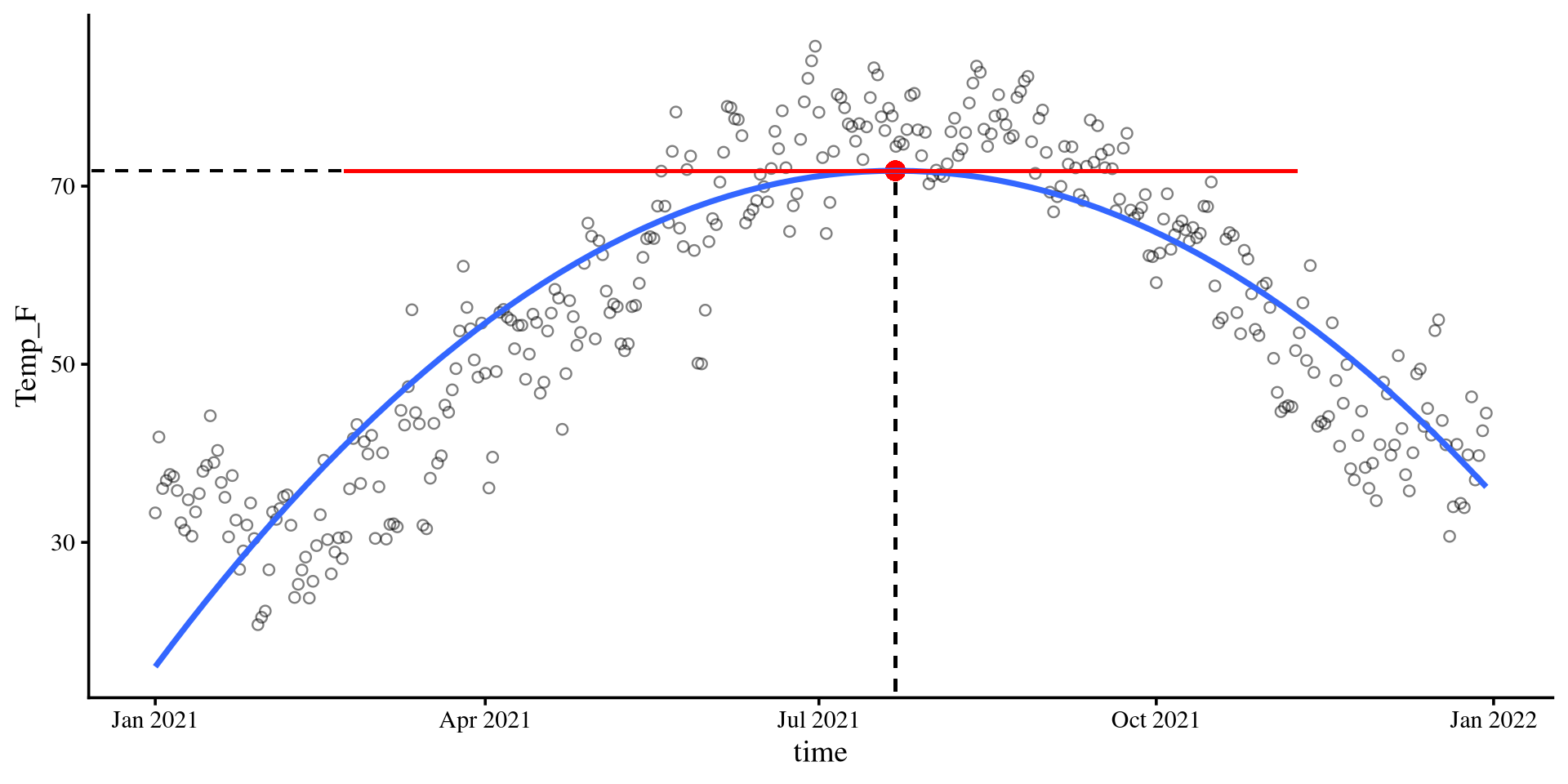
July 22nd

Why does \(-\frac{b_1}{2b_2}\) always finds the top/bottom? Turns out that \(-\frac{b_1}{2b_2}\) finds the \(X\) point where the slopes of the tangent line is exactly 0. That means that the tangent line is perfectly flat, which happens only at the top/bottom of a quadratic function.
This concept of “finding the top (or bottom)” happens to be the foundation of almost all estimation algorithms in statistics.

Bootsrap CI for Maximum/Minimum point

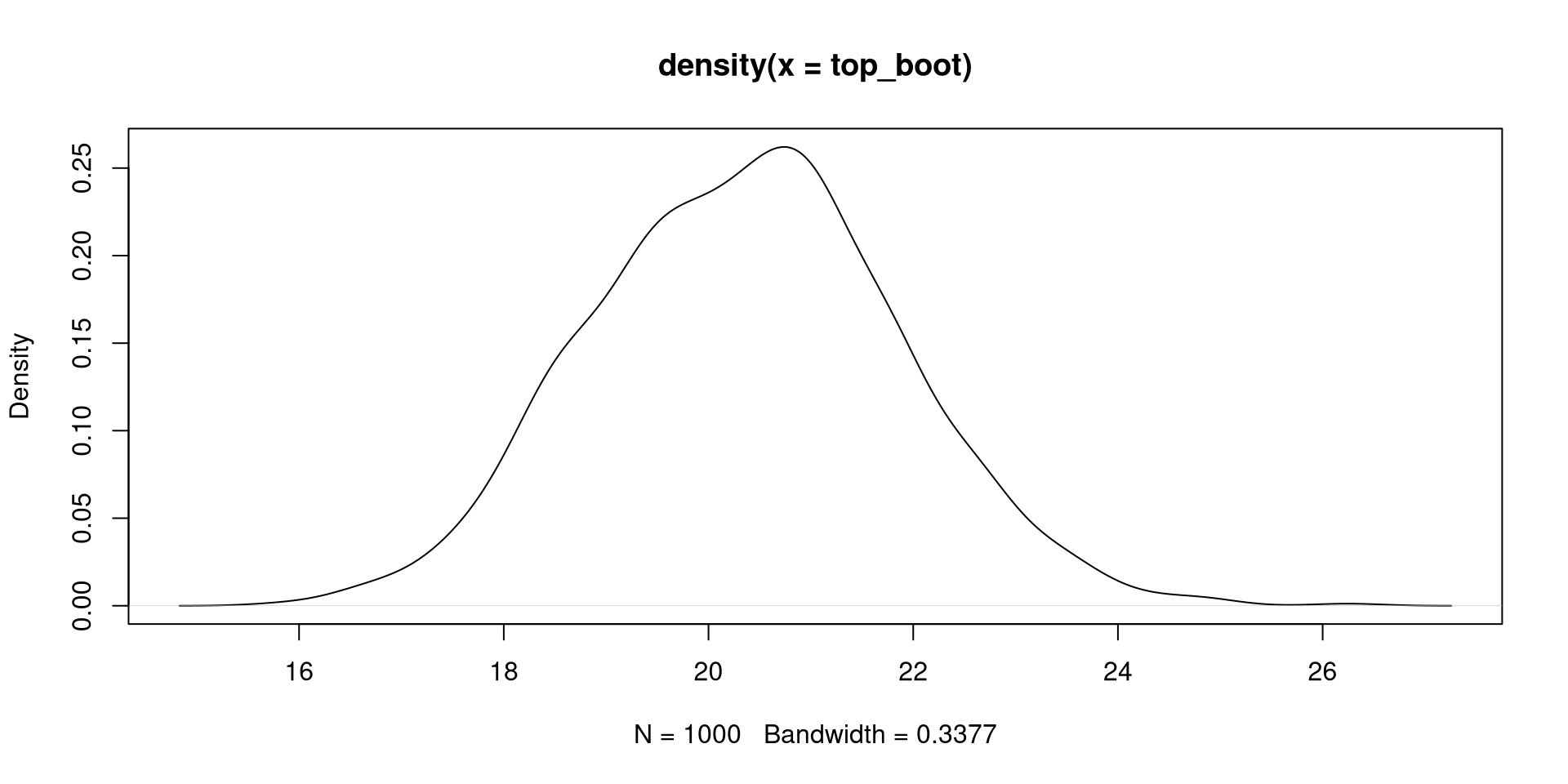
We can create a 95% CI for the time value at which we expect the maximum temperature with bootstrapping.

First we create the bootstrapped regression:
boot_quad <- car::Boot(quad_reg, R = 1000)
Then we need to calculate \(-\frac{b_1}{2b_2}\) for all our 1000 bootstrap samples (very easy actually!). The bootstrap samples are saved in the t element of boot_quad:
# View(boot_quad$t)
# we can compute -b1/(2*b2) for all sample at once with this

top_boot <- -boot_quad$t[,2]/(2*boot_quad$t[,3])
The 95% CI for the time value at which we expect the highest temperatures is:
quantile(top_boot, c(.025, .975))
    2.5%    97.5% 
17.52118 23.30733 
And the full distribution
plot(density(top_boot))
How Many Polynomials do I need?

It is my opinion that will almost never need more than a quadratic term if you are doing research in Psychology. In our case, we are dealing with a physical phenomenon (temperature), so higher polynomials may not be as far fetched.

How do we find out how many polynomials we need? Since we are just adding additional variables to the regression model, we can use in \(\Delta R^2\) just as we did in Lab 6.


We can easily add polynomials to regressions thanks to the poly() function:
reg_lin <- lm(Temp_F ~ time, data = Temp_avg_2021)  
reg_quad <- lm(Temp_F ~ poly(time, 2), data = Temp_avg_2021)  
reg_cube <- lm(Temp_F ~ poly(time, 3), data = Temp_avg_2021)  
reg_fourth <- lm(Temp_F ~ poly(time, 4), data = Temp_avg_2021) 
reg_fifth <- lm(Temp_F ~ poly(time, 5), data = Temp_avg_2021) 


The poly() Function

Be careful! It may seem that the poly() function saves us a lot of time, but it calculates orthogonal polynomials. Do not interpret the regression coefficients of regressions that use poly() functions! For more, see this link.

Comparing Polynomial Regressions

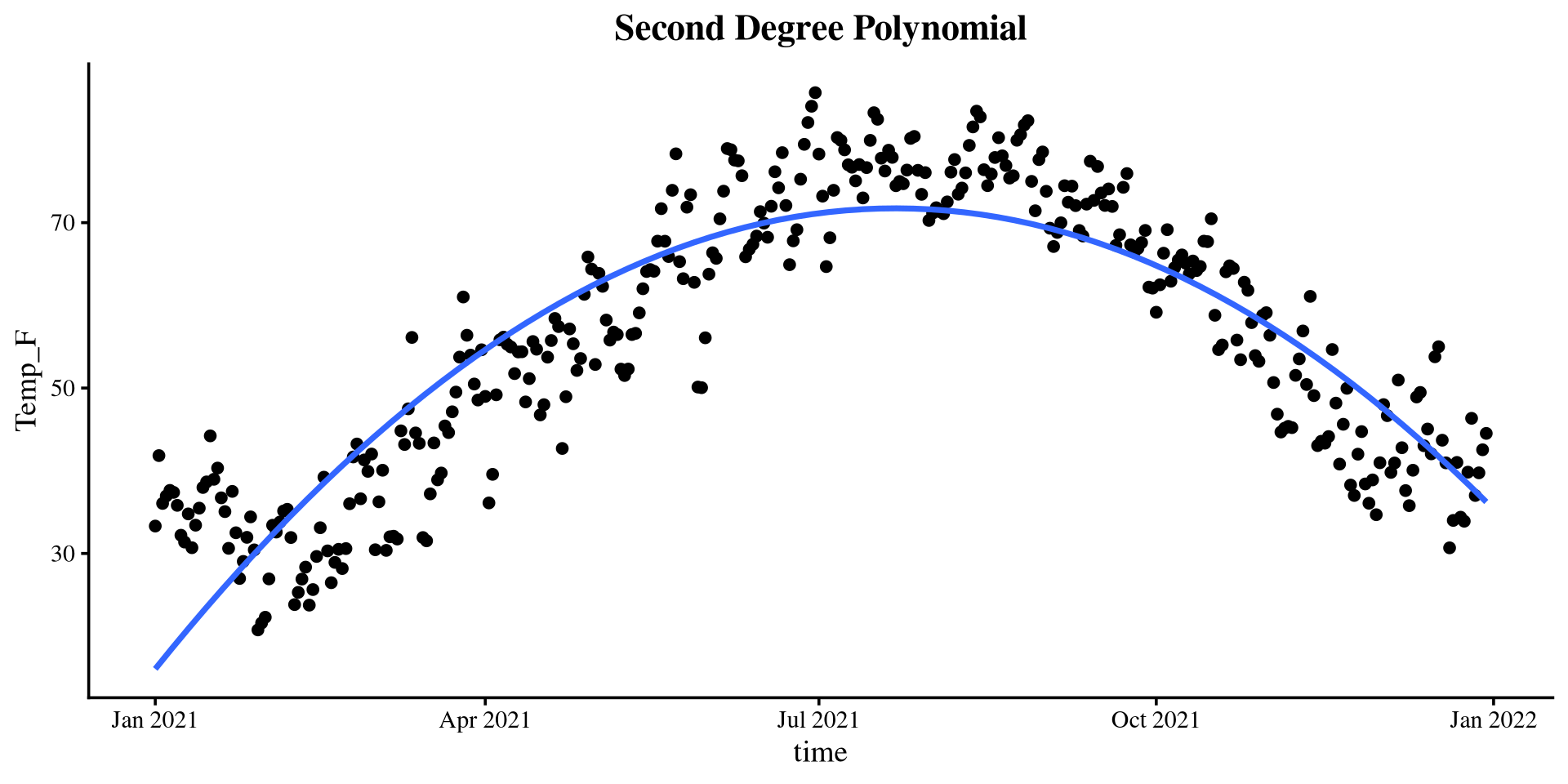
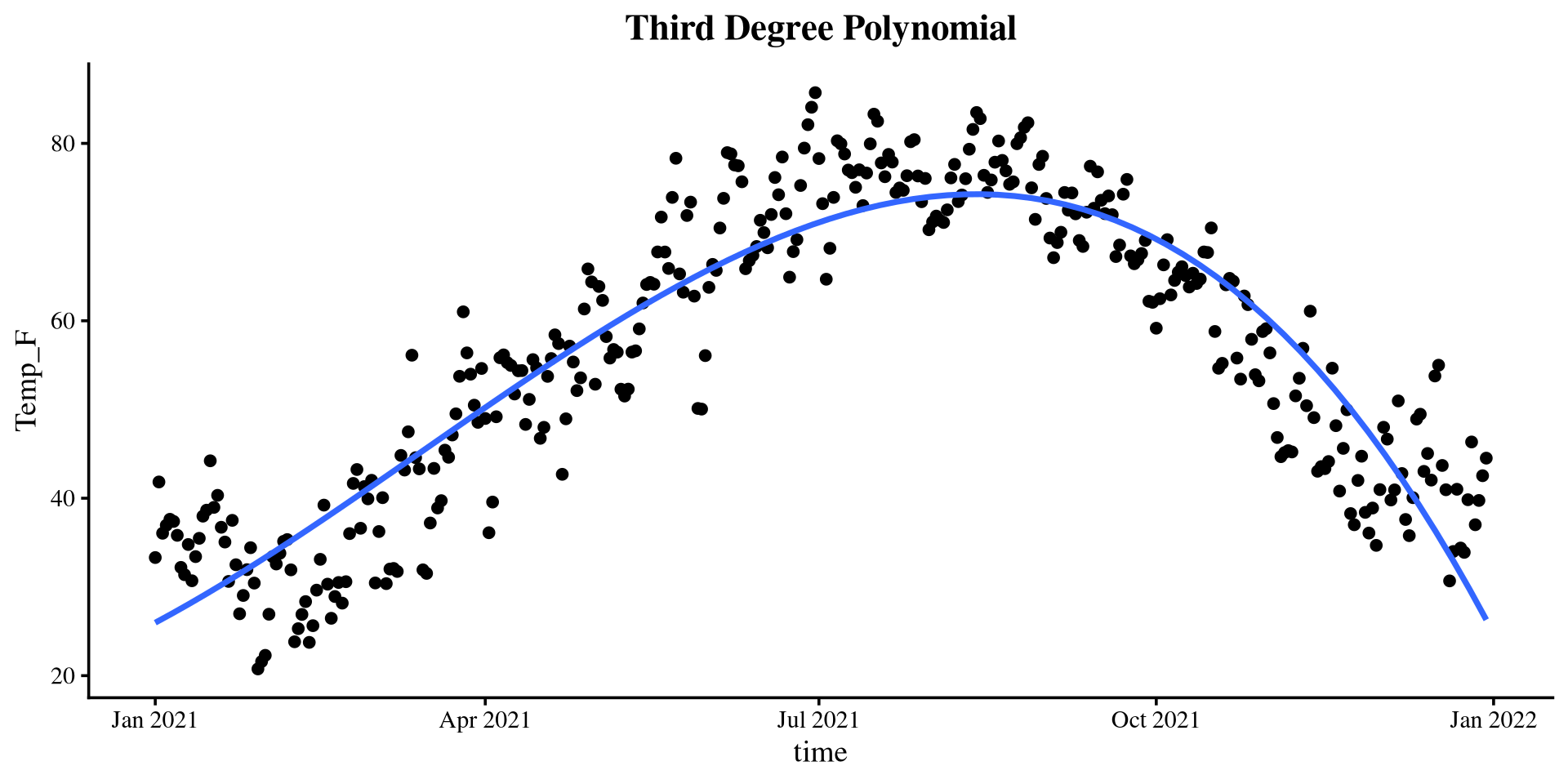
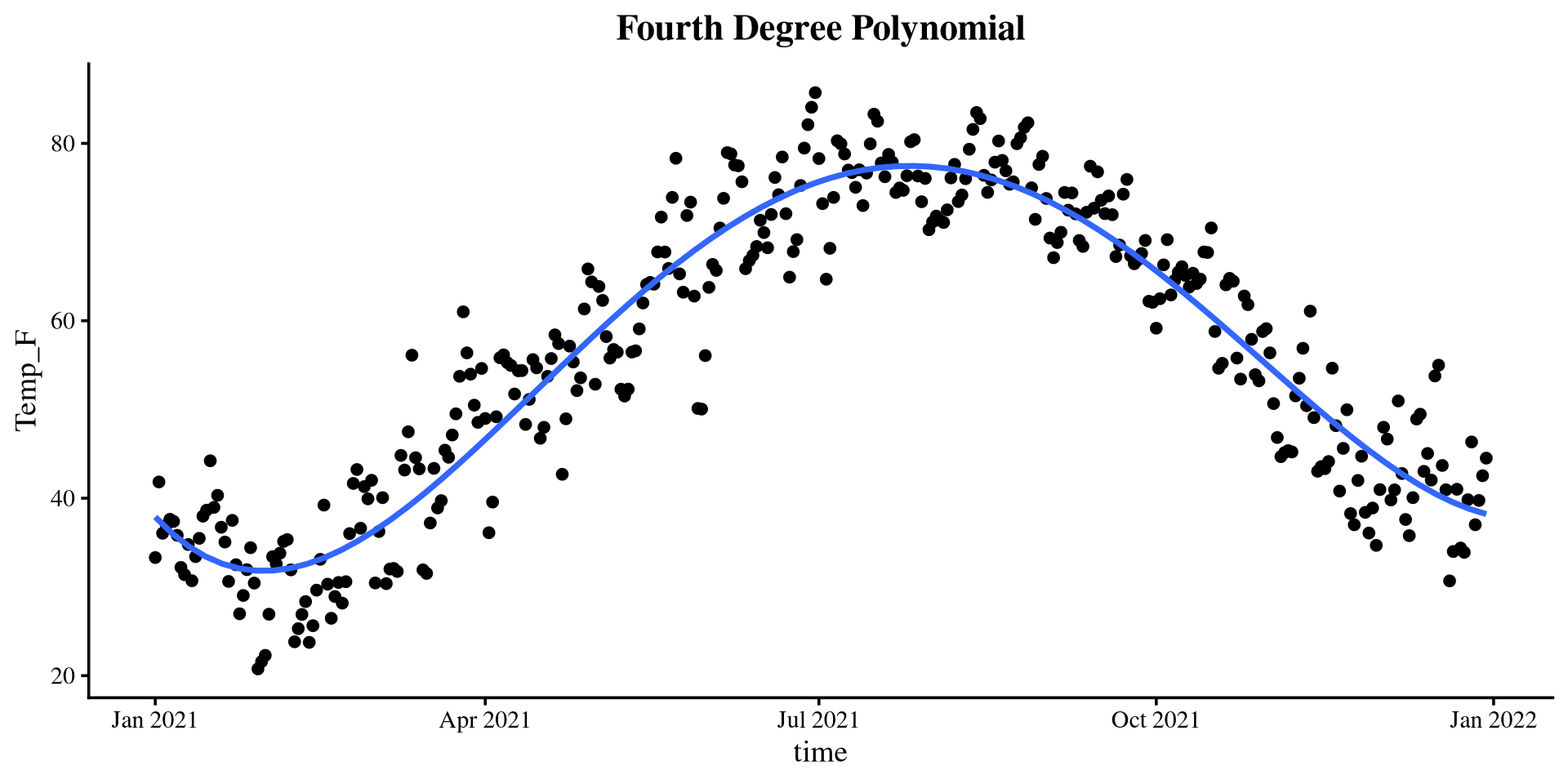
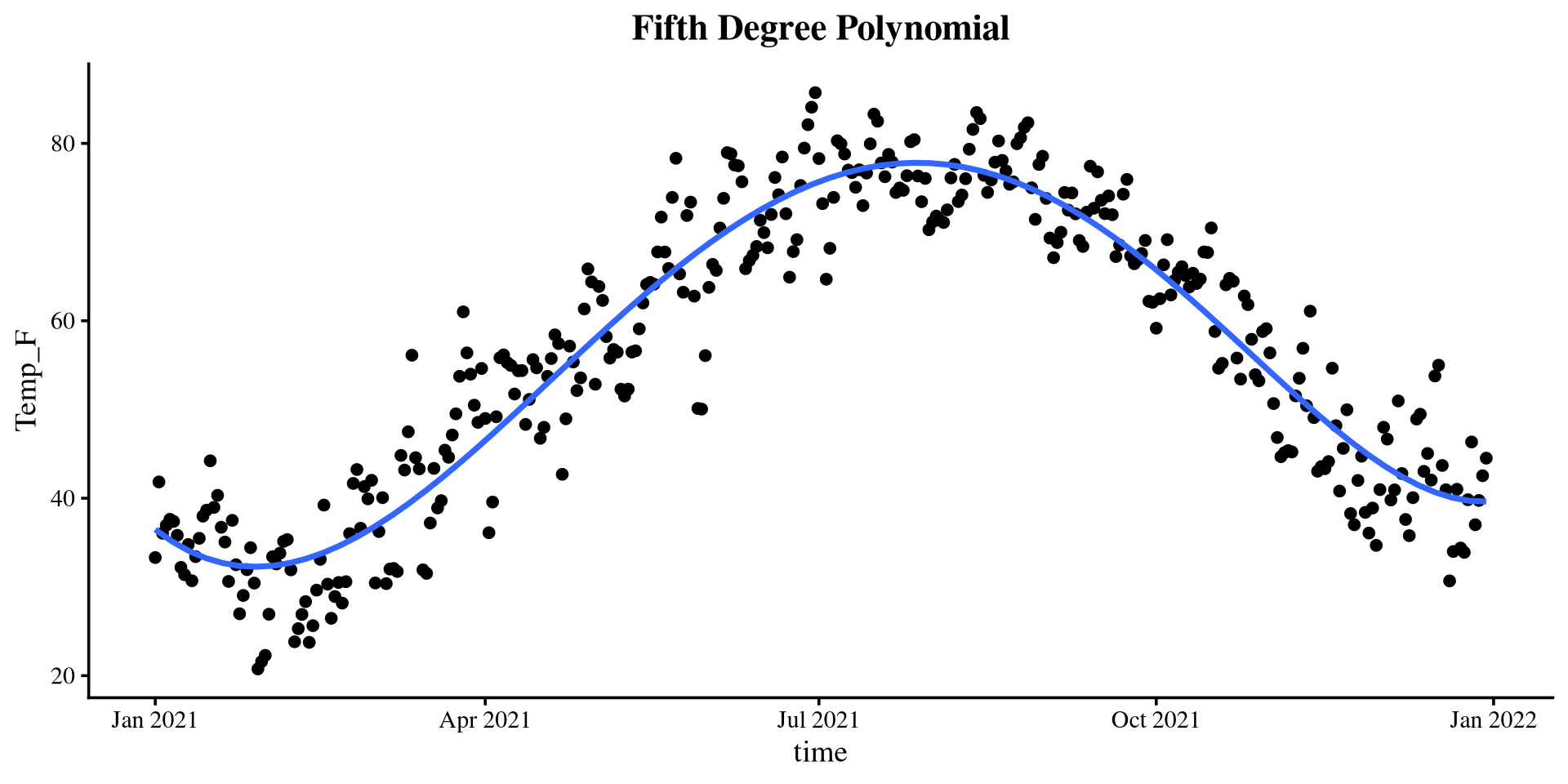
The \(\Delta R^2\) suggests that there is a significant \(R^2\) improvement up to a polynomial of the 4th degree. Here are the \(R^2\) values of the 5 regression models:

c(summary(reg_lin)$r.squared,
  summary(reg_quad)$r.squared,
  summary(reg_cube)$r.squared,
  summary(reg_fourth)$r.squared,
  summary(reg_fifth)$r.squared)
[1] 0.1233529 0.7815182 0.8341097 0.8943139 0.8950277

The 5th degree polynomial offers essentially no improvement.

anova(reg_lin, reg_quad, reg_cube, reg_fourth, reg_fifth)
Analysis of Variance Table

Model 1: Temp_F ~ time
Model 2: Temp_F ~ poly(time, 2)
Model 3: Temp_F ~ poly(time, 3)
Model 4: Temp_F ~ poly(time, 4)
Model 5: Temp_F ~ poly(time, 5)
  Res.Df   RSS Df Sum of Sq         F Pr(>F)    
1    362 88352                                  
2    361 22019  1     66332 2244.6235 <2e-16 ***
3    360 16719  1      5300  179.3593 <2e-16 ***
4    359 10651  1      6068  205.3219 <2e-16 ***
5    358 10579  1        72    2.4343 0.1196    
---
Signif. codes:  0 '***' 0.001 '**' 0.01 '*' 0.05 '.' 0.1 ' ' 1


Let’s quickly look at what the polynomial regression lines look like.

Plotting polynomials

Piecewise Regression

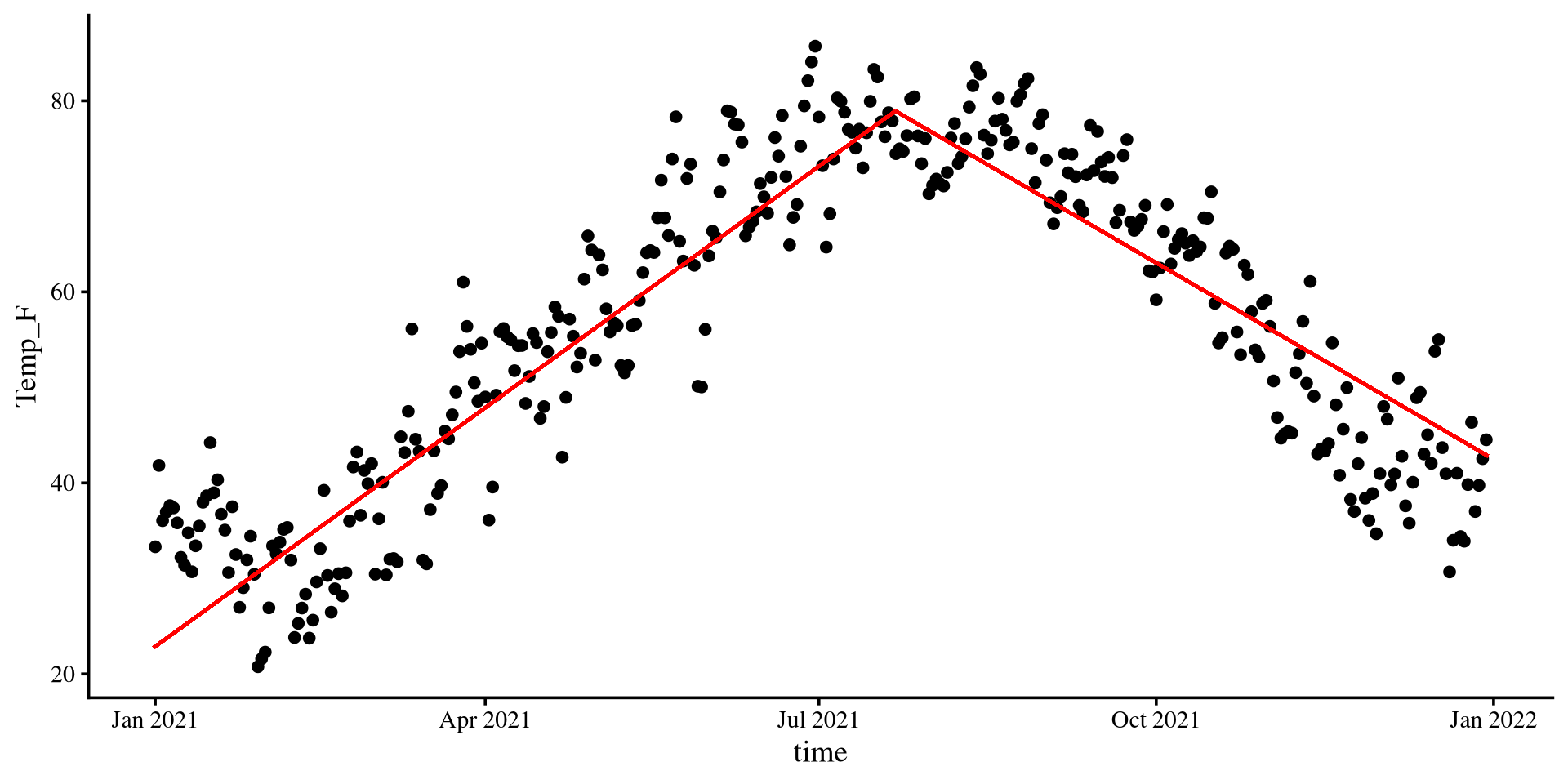
In piecewise regression we effectively divide our data into sections that we run separate regression on. You can divide your data in however many sections you want, but usually you should not need more than 2 separate segments.
But how do we divide the data? You have to decide it based on what you know about your data/theory 😀
In the case of this data, I think that a good cut-point is the top of the quadratic regression from before!
  • Why? Because we know that the top is the turning point of the quadratic line. If I need to fit two lines to the data, that is probably my best option given what I know.
The plot on the right shows the segments if we divide the data in this way.
Plot code
# split data with cut-point (cleaner code in 2 slides, can't be bothered to change it)

Temp_avg_2021$D1 <- ifelse(Temp_avg_2021$time_cent >= 20.34353, 0*Temp_avg_2021$time_cent, 1*Temp_avg_2021$time_cent)
Temp_avg_2021$D2 <- ifelse(Temp_avg_2021$time_cent < 20.34353, 0*Temp_avg_2021$time_cent, 1*Temp_avg_2021$time_cent)


reg_piece <- lm(Temp_F ~ D1 + D2, data = Temp_avg_2021)

intercept <- coef(reg_piece)[1]
D1 <- coef(reg_piece)[2]
D2 <- coef(reg_piece)[3]


ggplot(Temp_avg_2021,
       aes(x = time, y = Temp_F)) +
        geom_point() +
geom_segment(x = min(Temp_avg_2021$time_cent) + mean(Temp_avg_2021$time), 
             xend = 20.34353 + mean(Temp_avg_2021$time), 
             y = intercept + min(Temp_avg_2021$time_cent)*D1 ,
             yend = intercept,
             linetype = 1,
             linewidth = .7,
             col = "red") +
geom_segment(xend = max(Temp_avg_2021$time_cent) + mean(Temp_avg_2021$time), 
             x = 20.34353 + mean(Temp_avg_2021$time), 
             yend = intercept + max(Temp_avg_2021$time_cent)*D2 ,
             y = intercept,
             linetype = 1,
             linewidth = .7,
             col = "red") +  
  theme(plot.title = element_text(hjust = 0.5, face = "bold"))
Setting up Piecewise

There are multiple ways to set up piecewise regression in R. I find the following method the most intuitive:

\[ \hat{Y} = b_0 + b_1\times D_1 + b_2 \times D_2 \]

Where \(b_1\) represent the slope of the first segment and \(b_2\) represents the slope of the second segment.

We need to create \(D_1\) and \(D_2\). The trick is to get the original predictor, time_cent in our case, and split its value across the segments.

So, if we choose our cut-point to be around the top or the quadratic curve, roughly \(20.34\):

  • \(D_1:\) Make all values after \(20.34\) become \(0\).
  • \(D_2:\) Make all values before \(20.34\) become \(0\).

We will use the ifelse() function to make our life easier.

ifelse() syntax: ifelse(CONDITION, if CONDITION TRUE do something, if CONDITION FALSE do something)

# an example
ifelse(c(2,3) > 2.5, "bigger", "smaller")
[1] "smaller" "bigger" 

Creating \(D_1\) and \(D_2\)

  • Creating \(D_1\):
Temp_avg_2021$D1 <- ifelse(Temp_avg_2021$time_cent >= 20.34353, 
                           0, Temp_avg_2021$time_cent)
  • Creating \(D_2\):
Temp_avg_2021$D2 <- ifelse(Temp_avg_2021$time_cent < 20.34353, 
                           0, Temp_avg_2021$time_cent)
If you look at our variables on the left and scroll until July 22nd, you should see how the temp_cent variable has been split between \(D_1\) and \(D_2\).

Running The Piecewise Regression

Now we can simply run our piecewise regression by using \(D_1\) and \(D_2\) as predictors:

piece_reg <- lm(Temp_F ~ D1 + D2, data = Temp_avg_2021)
summary(piece_reg)

Call:
lm(formula = Temp_F ~ D1 + D2, data = Temp_avg_2021)

Residuals:
     Min       1Q   Median       3Q      Max 
-18.8270  -5.4317  -0.1449   5.5464  18.7796 

Coefficients:
             Estimate Std. Error t value Pr(>|t|)    
(Intercept) 78.933629   0.728574  108.34   <2e-16 ***
D1           0.309589   0.007800   39.69   <2e-16 ***
D2          -0.199029   0.007816  -25.46   <2e-16 ***
---
Signif. codes:  0 '***' 0.001 '**' 0.01 '*' 0.05 '.' 0.1 ' ' 1

Residual standard error: 7.196 on 361 degrees of freedom
Multiple R-squared:  0.8145,    Adjusted R-squared:  0.8135 
F-statistic: 792.6 on 2 and 361 DF,  p-value: < 2.2e-16
As we saw from the plot some slides ago, the slope of the first segment, \(D_1\) is positive, and that slope of the second segment, \(D_2\) is negative. \(R^2\) is also quite good at \(81\%\).
You can interpret these slopes as you would normal regression slopes. Just remember where \(D_1\) ends and \(D_2\) begins when you interpret the slopes.

3D visualization? Out of Curiosity…

The 3D visualization of a piecewise regression is actually kinda funny:

library(FabioFun)

nice_3D_plot(y = Temp_avg_2021$Temp_F,
             x1 = Temp_avg_2021$D1,
             x2 = Temp_avg_2021$D2,
             axis_names = c("Temperature", 
                            "D1", 
                            "D2"),
             reg_plane = TRUE)
You can tell that there actually is no “depth” to this figure, and all the dots are on the side of the box. The 3D representation just “folds” the 2D plot from some slides ago at the cut-off point!
The 2D visualization is clearly better, but just thought I would show this 🤷

Spline Regression

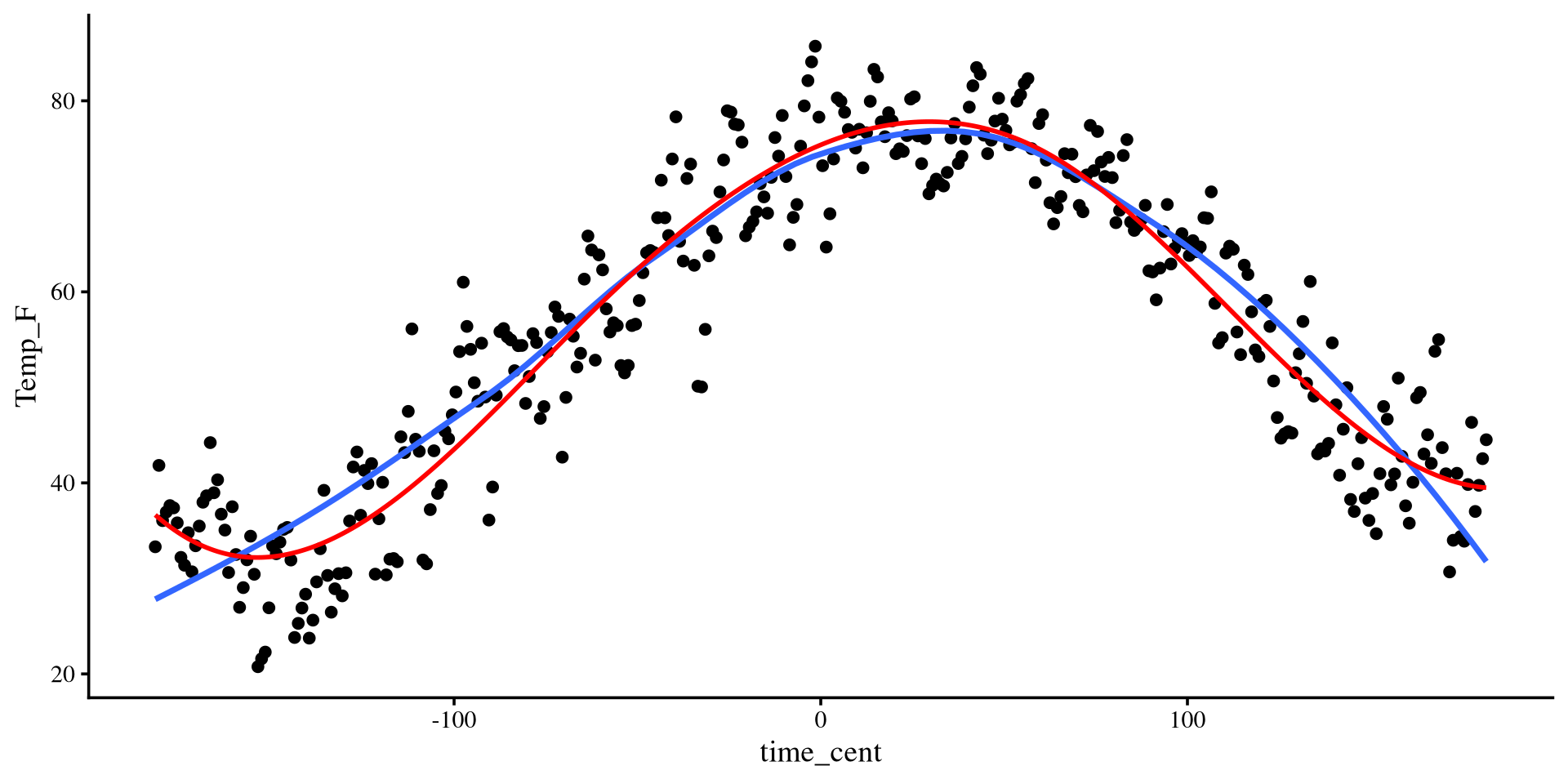
Spline regression is quite similar to loess regression. Spline regression is a piecewise regression with many segments, and is very similar to loess regression.

spline_fit <- lm(Temp_F ~ splines2::bsp(Temp_avg_2021$time_cent, df = 5), 
                 data = Temp_avg_2021)
summary(spline_fit)

Call:
lm(formula = Temp_F ~ splines2::bsp(Temp_avg_2021$time_cent, 
    df = 5), data = Temp_avg_2021)

Residuals:
     Min       1Q   Median       3Q      Max 
-17.9151  -3.8278   0.1797   3.8033  16.5899 

Coefficients:
                                                Estimate Std. Error t value
(Intercept)                                       36.645      1.577  23.230
splines2::bsp(Temp_avg_2021$time_cent, df = 5)1  -13.622      2.989  -4.557
splines2::bsp(Temp_avg_2021$time_cent, df = 5)2   27.560      1.981  13.912
splines2::bsp(Temp_avg_2021$time_cent, df = 5)3   55.720      2.728  20.423
splines2::bsp(Temp_avg_2021$time_cent, df = 5)4    4.128      2.213   1.865
splines2::bsp(Temp_avg_2021$time_cent, df = 5)5    2.851      2.301   1.239
                                                Pr(>|t|)    
(Intercept)                                      < 2e-16 ***
splines2::bsp(Temp_avg_2021$time_cent, df = 5)1 7.13e-06 ***
splines2::bsp(Temp_avg_2021$time_cent, df = 5)2  < 2e-16 ***
splines2::bsp(Temp_avg_2021$time_cent, df = 5)3  < 2e-16 ***
splines2::bsp(Temp_avg_2021$time_cent, df = 5)4    0.063 .  
splines2::bsp(Temp_avg_2021$time_cent, df = 5)5    0.216    
---
Signif. codes:  0 '***' 0.001 '**' 0.01 '*' 0.05 '.' 0.1 ' ' 1

Residual standard error: 5.423 on 358 degrees of freedom
Multiple R-squared:  0.8955,    Adjusted R-squared:  0.8941 
F-statistic: 613.8 on 5 and 358 DF,  p-value: < 2.2e-16

We can use the bsp() function form the splines2 package to define our spline regression. the df = arguments sets the number of independent segments. here I choose 5 segments.

The coefficients are not that helpful. Let’s look at the visualization.

Visulizing Spline Regression

The visualization for spline regression requires you calculate the predictions from the regression model (unless I decide to make a function at some point):

pred_data <- seq(min(Temp_avg_2021$time_cent),
                 max(Temp_avg_2021$time_cent))

pred <- predict(spline_fit, 
                newdata = list(time_cent = pred_data))

# The code to generate the plot is in the drop down menu
You can see that the spline regression line (red) is very similar to the loess regression line (blue). The two methods are quite similar.
Also note that the spline regression line is smooth. This is because by default the slpine2 package uses 3rd degree polynomial segments. (see help(bsp))
plot-code
ggplot(Temp_avg_2021,
       aes(x = time_cent, y = Temp_F)) +
        geom_point() +
  geom_smooth(method = "loess", 
              formula = y ~ x,
              se = FALSE) +
  geom_line(aes(x = pred_data,
                y = pred),
            col = "red",
            size = 1) 
References

Fox, J., Weisberg, S., Price, B., Adler, D., Bates, D., Baud-Bovy, G., Bolker, B., Ellison, S., Firth, D., Friendly, M., Gorjanc, G., Graves, S., Heiberger, R., Krivitsky, P., Laboissiere, R., Maechler, M., Monette, G., Murdoch, D., Nilsson, H., … R-Core. (2024). Car: Companion to Applied Regression (Version 3.1-3) [Computer software]. https://cran.r-project.org/web/packages/car/index.html
Spinu, V., Grolemund, G., Wickham, H., Vaughan, D., Lyttle, I., Costigan, I., Law, J., Mitarotonda, D., Larmarange, J., Boiser, J., & Lee, C. H. (2024). Lubridate: Make Dealing with Dates a Little Easier (Version 1.9.4) [Computer software]. https://cran.r-project.org/web/packages/lubridate/index.html
Wang, W., cre, & Yan, J. (2024). Splines2: Regression Spline Functions and Classes (Version 0.5.3) [Computer software]. https://cran.r-project.org/web/packages/splines2/index.html
Wickham, H., & RStudio. (2023). Tidyverse: Easily Install and Load the ’Tidyverse (Version 2.0.0) [Computer software]. https://cran.r-project.org/web/packages/tidyverse/index.html