Lab 4: Introduction To Two-Predictor Regression

PSYC 7804 - Regression with Lab

Fabio Setti

Spring 2025

Today’s Packages and Data 🤗

Install Packages Code
install.packages("GGally")
install.packages("plotly")
# made some changes to the package, the updated version
devtools::install_github("quinix45/FabioFun")
# Should be installed already
# install.packages("rio")
# install.packages("tidyverse")
library(GGally)
library(plotly)
library(tidyverse)
theme_set(theme_classic(base_size = 16, 
                        base_family = 'serif'))


The GGally package (Schloerke et al., 2024) builds upon ggplot2 and includes many functions for creating complex plots.

The plotly package (Sievert et al., 2024) is a Python and R package used to create interactive visualizations with JavaScript elements.

Data


WH_2024 <- rio::import("https://github.com/quinix45/PSYC-7804-Regression-Lab-Slides/raw/refs/heads/main/Slides%20Files/Data/World_happiness_2024.csv")

# let's peak at our variables
str(WH_2024, vec.len = 2)
'data.frame':   140 obs. of  9 variables:
 $ Country_name           : chr  "Finland" "Denmark" ...
 $ Region                 : chr  "Western Europe" "Western Europe" ...
 $ Happiness_score        : num  7.74 7.58 ...
 $ Log_GDP                : num  1.84 1.91 ...
 $ Social_support         : num  1.57 1.52 ...
 $ Healthy_life_expectancy: num  0.695 0.699 0.718 0.724 0.74 ...
 $ Freedom                : num  0.859 0.823 0.819 0.838 0.641 ...
 $ Generosity             : num  0.142 0.204 0.258 0.221 0.153 ...
 $ Corruption             : num  0.454 0.452 0.818 0.476 0.807 ...

Variables of Interest

We eventually want to look at how Log_GDP and Freedom impact Happiness_score across the countries in our data. Let’s first explore the variables.

  • The correlation matrix for the variables:
# selecting just the variables of interest makes code cleaner later
reg_vars <- WH_2024[, c("Happiness_score",
                        "Log_GDP",
                        "Freedom")]

# Just the correlation table
cor(reg_vars)
                Happiness_score   Log_GDP   Freedom
Happiness_score       1.0000000 0.7685037 0.6444511
Log_GDP               0.7685037 1.0000000 0.4148856
Freedom               0.6444511 0.4148856 1.0000000
  • Some descriptive statistics:
psych::describe(reg_vars)
                vars   n mean   sd median trimmed  mad  min  max range  skew
Happiness_score    1 140 5.53 1.18   5.80    5.60 1.21 1.72 7.74  6.02 -0.52
Log_GDP            2 140 1.38 0.43   1.43    1.40 0.50 0.00 2.14  2.14 -0.50
Freedom            3 140 0.62 0.16   0.64    0.64 0.15 0.00 0.86  0.86 -1.00
                kurtosis   se
Happiness_score    -0.29 0.10
Log_GDP            -0.42 0.04
Freedom             1.16 0.01

Helpful Visualization

The ggpairs() function from the GGally package creates a visualizations that provides a lot of information in one go!

ggpairs(reg_vars)
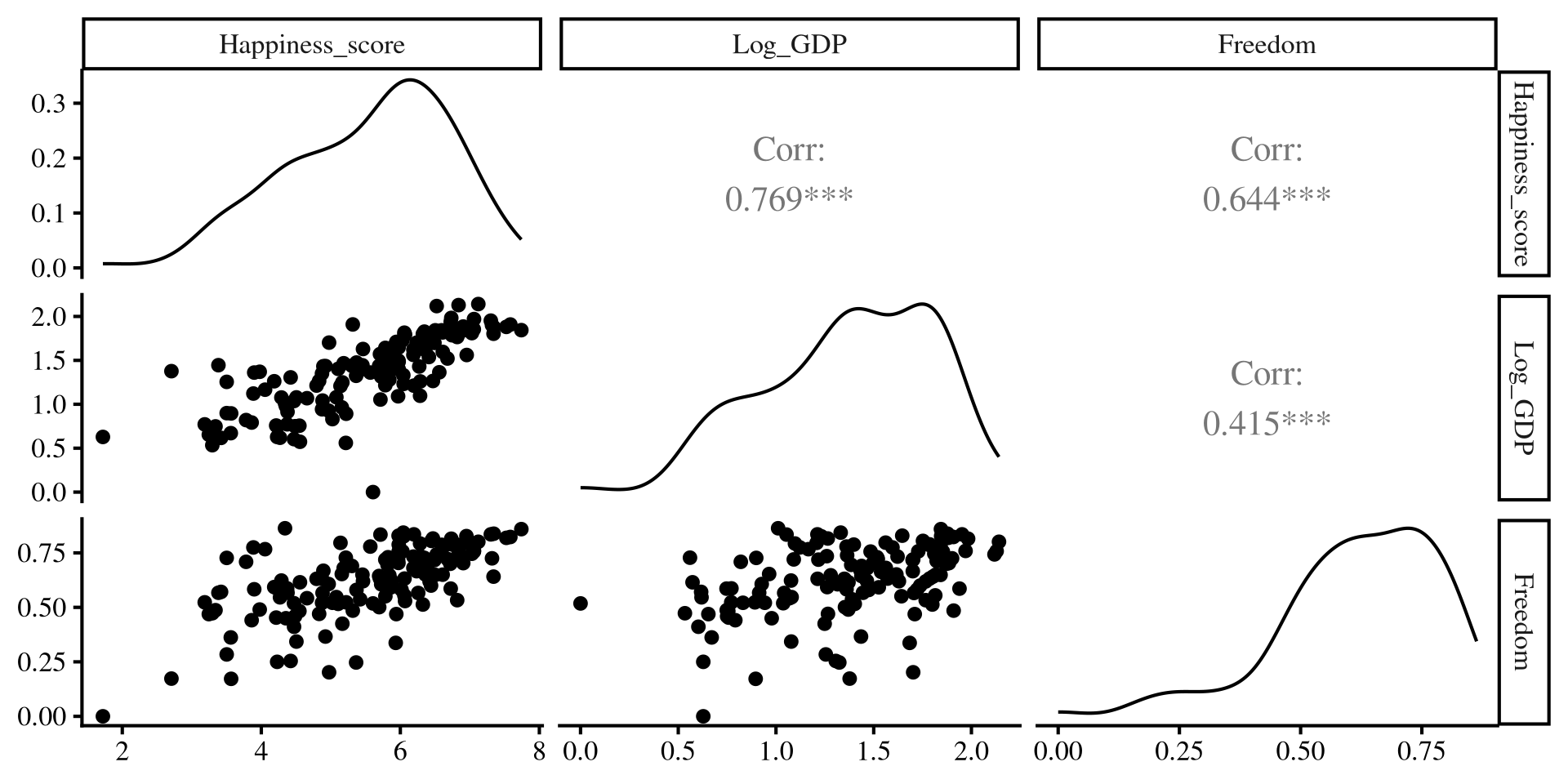

  • Upper triangle: correlations among variables
  • Long diagonal: distribution of variables
  • Lower diagonal: scatterplots among variables

Individual Regressions

  • Log_GDP only regression
reg_GDP <- lm(Happiness_score ~ Log_GDP, 
              reg_vars)
summary(reg_GDP)

Call:
lm(formula = Happiness_score ~ Log_GDP, data = reg_vars)

Residuals:
     Min       1Q   Median       3Q      Max 
-2.82003 -0.37094  0.05679  0.40998  3.02053 

Coefficients:
            Estimate Std. Error t value Pr(>|t|)    
(Intercept)   2.5865     0.2183   11.85   <2e-16 ***
Log_GDP       2.1355     0.1514   14.11   <2e-16 ***
---
Signif. codes:  0 '***' 0.001 '**' 0.01 '*' 0.05 '.' 0.1 ' ' 1

Residual standard error: 0.7585 on 138 degrees of freedom
Multiple R-squared:  0.5906,    Adjusted R-squared:  0.5876 
F-statistic: 199.1 on 1 and 138 DF,  p-value: < 2.2e-16
  • Freedom only regression
reg_free <- lm(Happiness_score ~ Freedom, 
              reg_vars)
summary(reg_free)

Call:
lm(formula = Happiness_score ~ Freedom, data = reg_vars)

Residuals:
    Min      1Q  Median      3Q     Max 
-2.5273 -0.5317  0.1337  0.6656  1.7318 

Coefficients:
            Estimate Std. Error t value Pr(>|t|)    
(Intercept)   2.6234     0.3035   8.644 1.22e-14 ***
Freedom       4.6849     0.4732   9.901  < 2e-16 ***
---
Signif. codes:  0 '***' 0.001 '**' 0.01 '*' 0.05 '.' 0.1 ' ' 1

Residual standard error: 0.9065 on 138 degrees of freedom
Multiple R-squared:  0.4153,    Adjusted R-squared:  0.4111 
F-statistic: 98.03 on 1 and 138 DF,  p-value: < 2.2e-16

Regression With Both Predictors

reg_full <- lm(Happiness_score ~ Log_GDP + Freedom, 
          reg_vars)

summary(reg_full)

Call:
lm(formula = Happiness_score ~ Log_GDP + Freedom, data = reg_vars)

Residuals:
     Min       1Q   Median       3Q      Max 
-2.10592 -0.23908  0.09905  0.34516  2.68875 

Coefficients:
            Estimate Std. Error t value Pr(>|t|)    
(Intercept)   1.4372     0.2327   6.175 7.05e-09 ***
Log_GDP       1.6821     0.1384  12.154  < 2e-16 ***
Freedom       2.8592     0.3621   7.897 8.28e-13 ***
---
Signif. codes:  0 '***' 0.001 '**' 0.01 '*' 0.05 '.' 0.1 ' ' 1

Residual standard error: 0.6311 on 137 degrees of freedom
Multiple R-squared:  0.7187,    Adjusted R-squared:  0.7146 
F-statistic:   175 on 2 and 137 DF,  p-value: < 2.2e-16

As you can see, the regression coefficients of the two predictors change when both variables are included 🧐


Let’s visualize what is happening!

Individual Regression plots

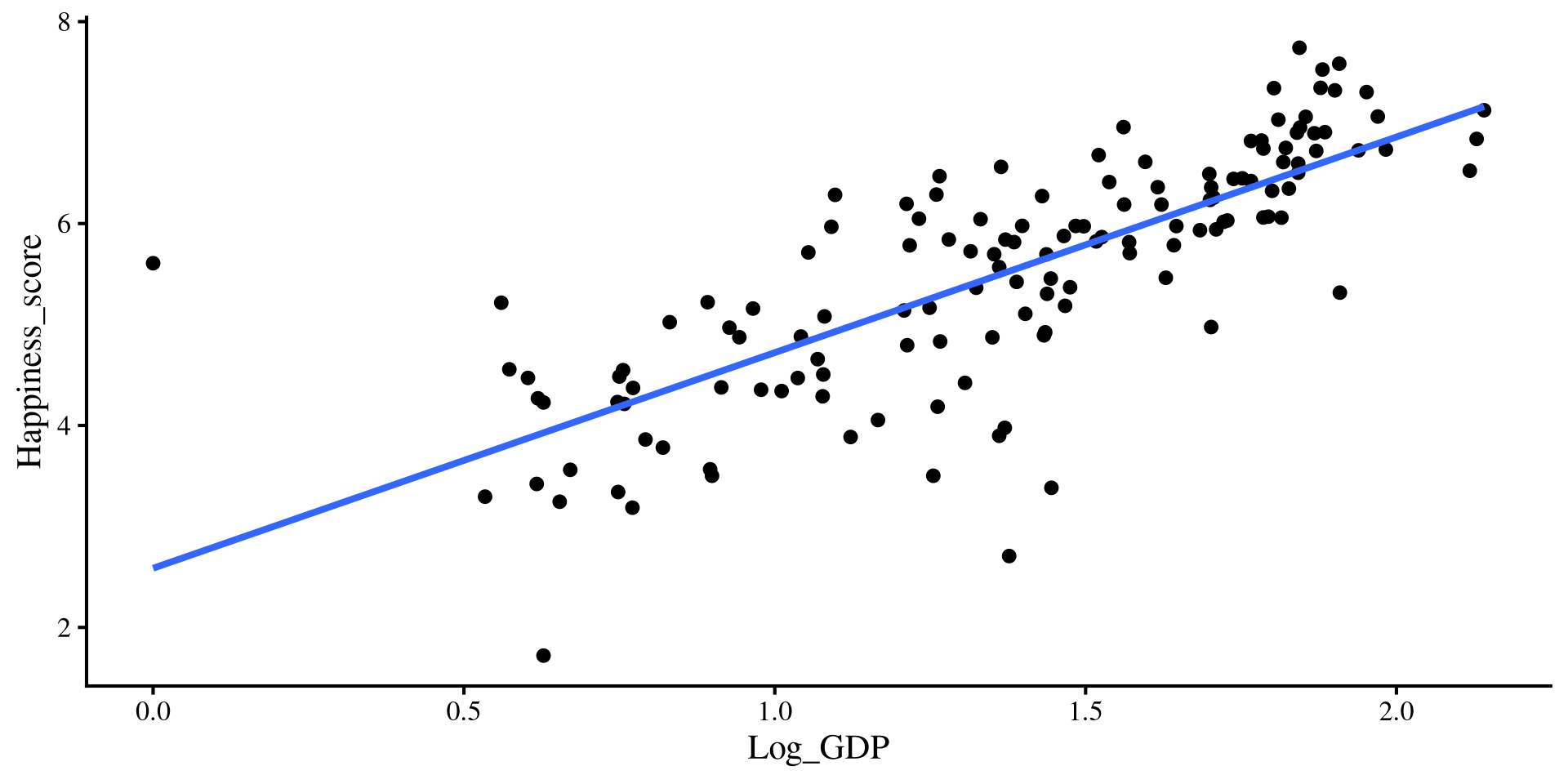
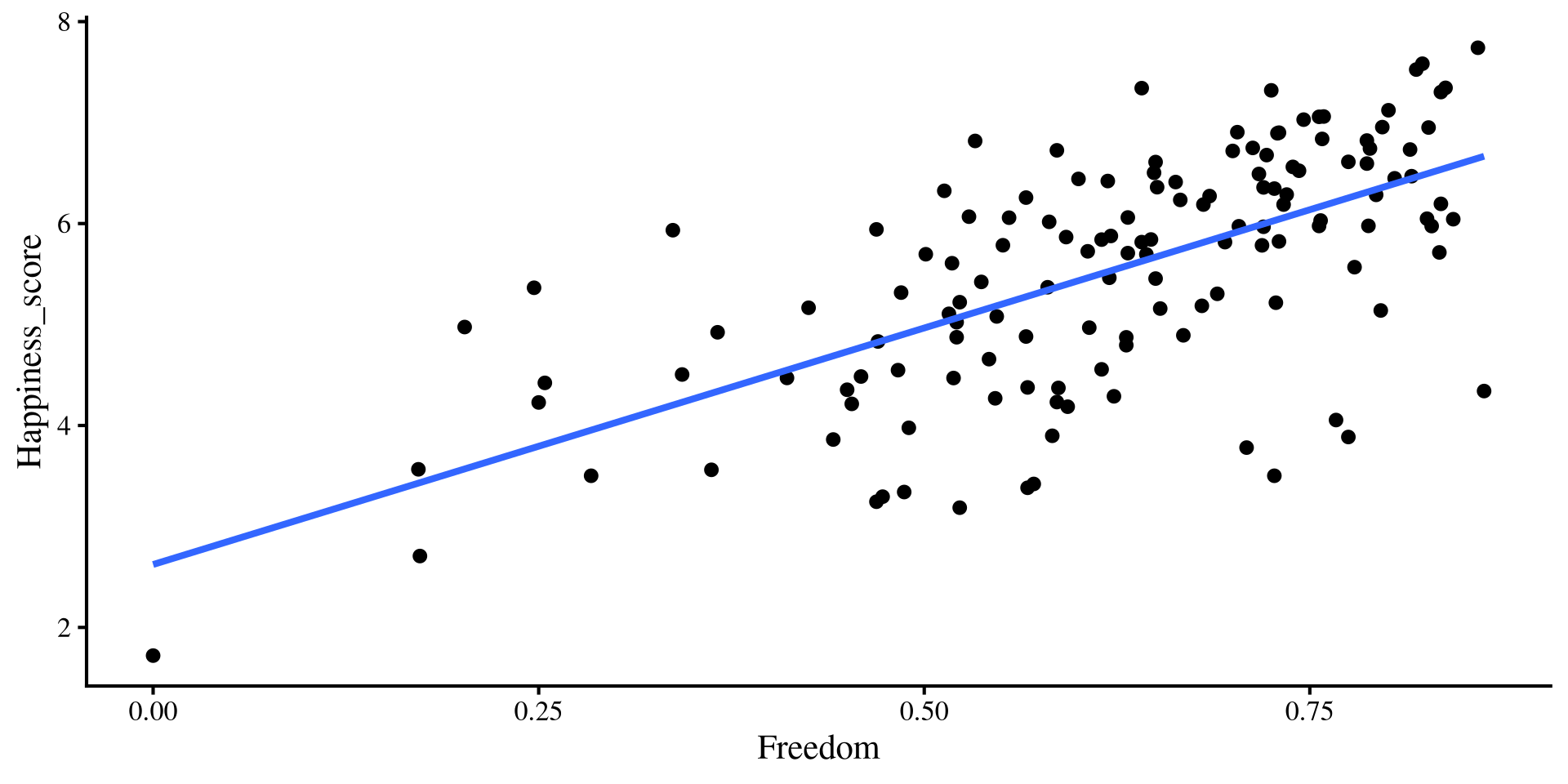
These are the equivalent plots to the individual regressions:

Plot Code
  ggplot(reg_vars,  
 aes(x = Log_GDP, y = Happiness_score)) +
 geom_point() + 
    geom_smooth(method = "lm", 
                formula = "y~x", 
                se = FALSE)
Plot Code
  ggplot(reg_vars,  
 aes(x = Freedom, y = Happiness_score)) +
 geom_point() + 
    geom_smooth(method = "lm", 
                formula = "y~x", 
                se = FALSE)
Adding Slopes from multiple regression?

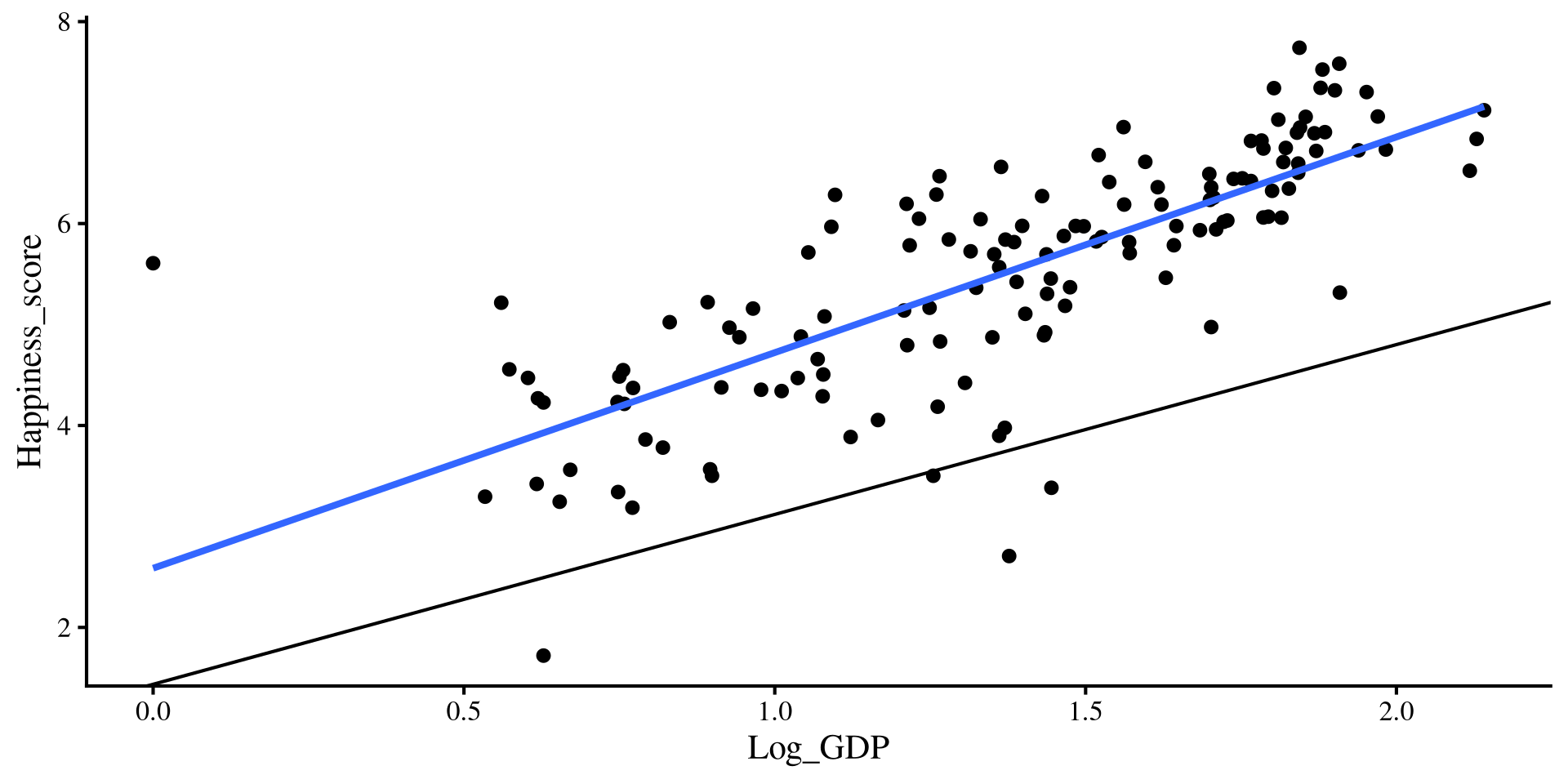
Let’s add the regression lines estimated from the regression with both predictors…

Plot Code
  ggplot(reg_vars,  
 aes(x = Log_GDP, y = Happiness_score)) +
 geom_point() + 
    geom_smooth(method = "lm", 
                formula = "y~x", 
                se = FALSE) +
    geom_abline(intercept = coef(reg_full)[1], 
                slope = coef(reg_full)[2])
Plot Code
  ggplot(reg_vars,  
 aes(x = Freedom, y = Happiness_score)) +
 geom_point() + 
    geom_smooth(method = "lm", 
                formula = "y~x", 
                se = FALSE) +
    geom_abline(intercept = coef(reg_full)[1], 
                slope = coef(reg_full)[3])
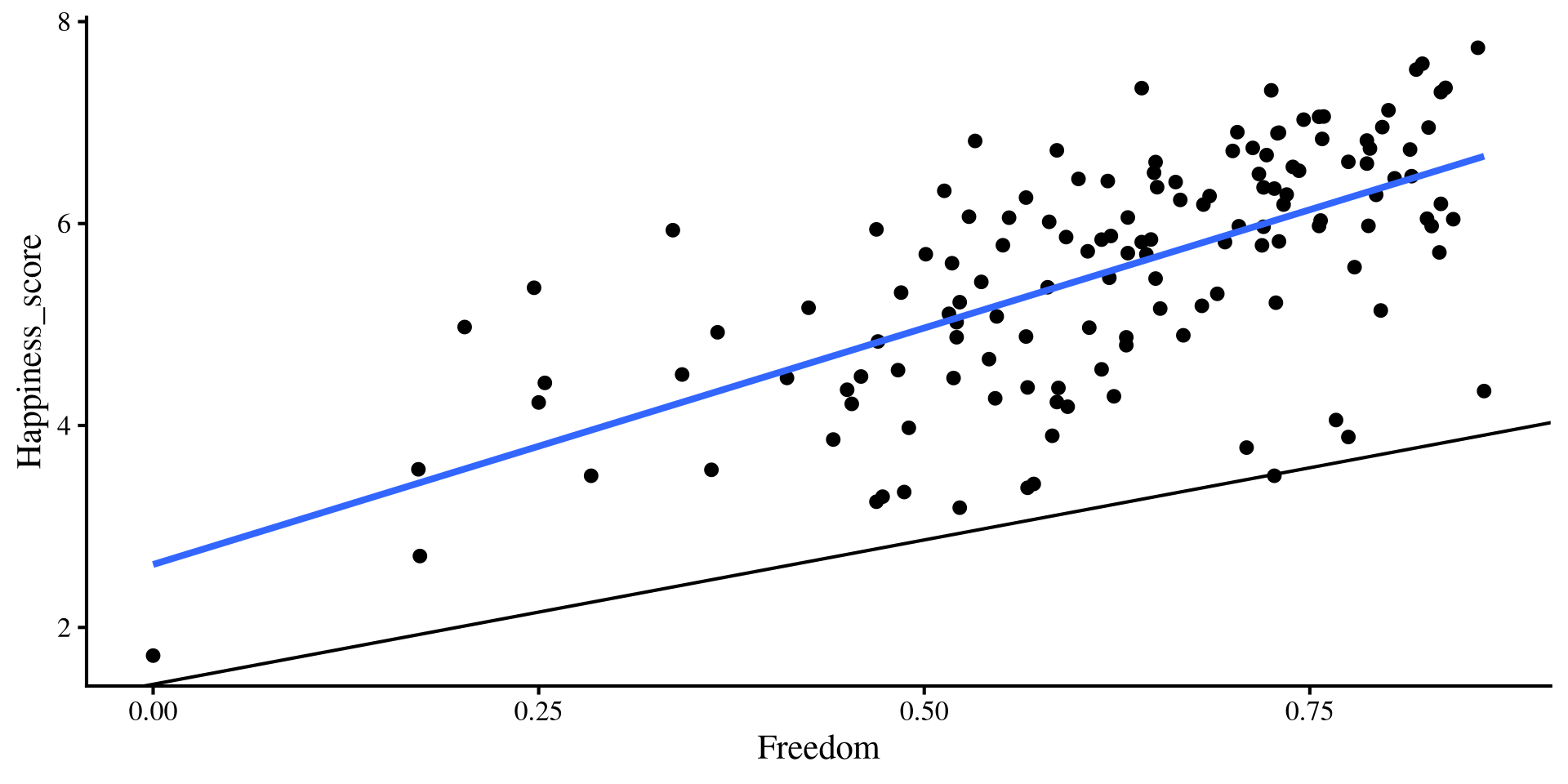
Hold up, the lines from the multiple regression results seem way off !?

💡 Maybe we need a change of perspective!

Looking Inside the Box

Now that we are dealing with 3 variables (Log_GDP, Freedom, Happiness_score), our data points are in a 3D box, not a 2D plot.

I made a function for making interactive 3D plots easily

# run "devtools::install_github("quinix45/FabioFun")" if you haven't installed the package yet

library(FabioFun)

nice_3D_plot(y = reg_vars$Happiness_score,
             x1 = reg_vars$Log_GDP,
             x2 = reg_vars$Freedom,
             dot_labels = WH_2024$Country_name,
             axis_names = c("Happiness", 
                            "GDP", 
                            "Freedom"))

The 2D plots from the previous slide are just the sides of the box 🤓

The Regression Plane

Remember that in linear regression with 1 predictor we are looking for the line that on average is closest to all point. When we have 2 predictors we are looking for the plane that is closest to all the points!

nice_3D_plot(y = reg_vars$Happiness_score,
             x1 = reg_vars$Log_GDP,
             x2 = reg_vars$Freedom,
             dot_labels = WH_2024$Country_name,
             axis_names = c("Happiness", 
                            "GDP", 
                            "Freedom"),
             plane_res = 20,
             # add regression plane
             reg_plane = TRUE) 

Question?

If this is the representation of regression with 2 predictors, what happens once we have 3 or more predictors? Can we visualize that?

Interpretation of Results

Now that we have a sense of what we are looking at, let’s interpret the output:

summary(reg_full)

Call:
lm(formula = Happiness_score ~ Log_GDP + Freedom, data = reg_vars)

Residuals:
     Min       1Q   Median       3Q      Max 
-2.10592 -0.23908  0.09905  0.34516  2.68875 

Coefficients:
            Estimate Std. Error t value Pr(>|t|)    
(Intercept)   1.4372     0.2327   6.175 7.05e-09 ***
Log_GDP       1.6821     0.1384  12.154  < 2e-16 ***
Freedom       2.8592     0.3621   7.897 8.28e-13 ***
---
Signif. codes:  0 '***' 0.001 '**' 0.01 '*' 0.05 '.' 0.1 ' ' 1

Residual standard error: 0.6311 on 137 degrees of freedom
Multiple R-squared:  0.7187,    Adjusted R-squared:  0.7146 
F-statistic:   175 on 2 and 137 DF,  p-value: < 2.2e-16

    \(\widehat{\mathrm{Happiness}} = 1.44 + 1.68\times \mathrm{Log\_GDP} + 2.86\times \mathrm{Freedom}\)


  • \(b_0 = 1.44\): the expected happpiness_score when GDP and Freedom are at 0.
  • \(b_1 = 1.68\): the expected increase in happpiness_score per each 1-unit increase in Log_GDP when accounting for Freedom.
  • \(b_2 = 2.86\): the expected increase in happpiness_score per each 1-unit increase in Freedom when accounting for GDP.

\(b_1\) and \(b_2\) are partial regression coefficients. We will come back to this in Lab 5, so stay tuned.

Back to our friend R 2

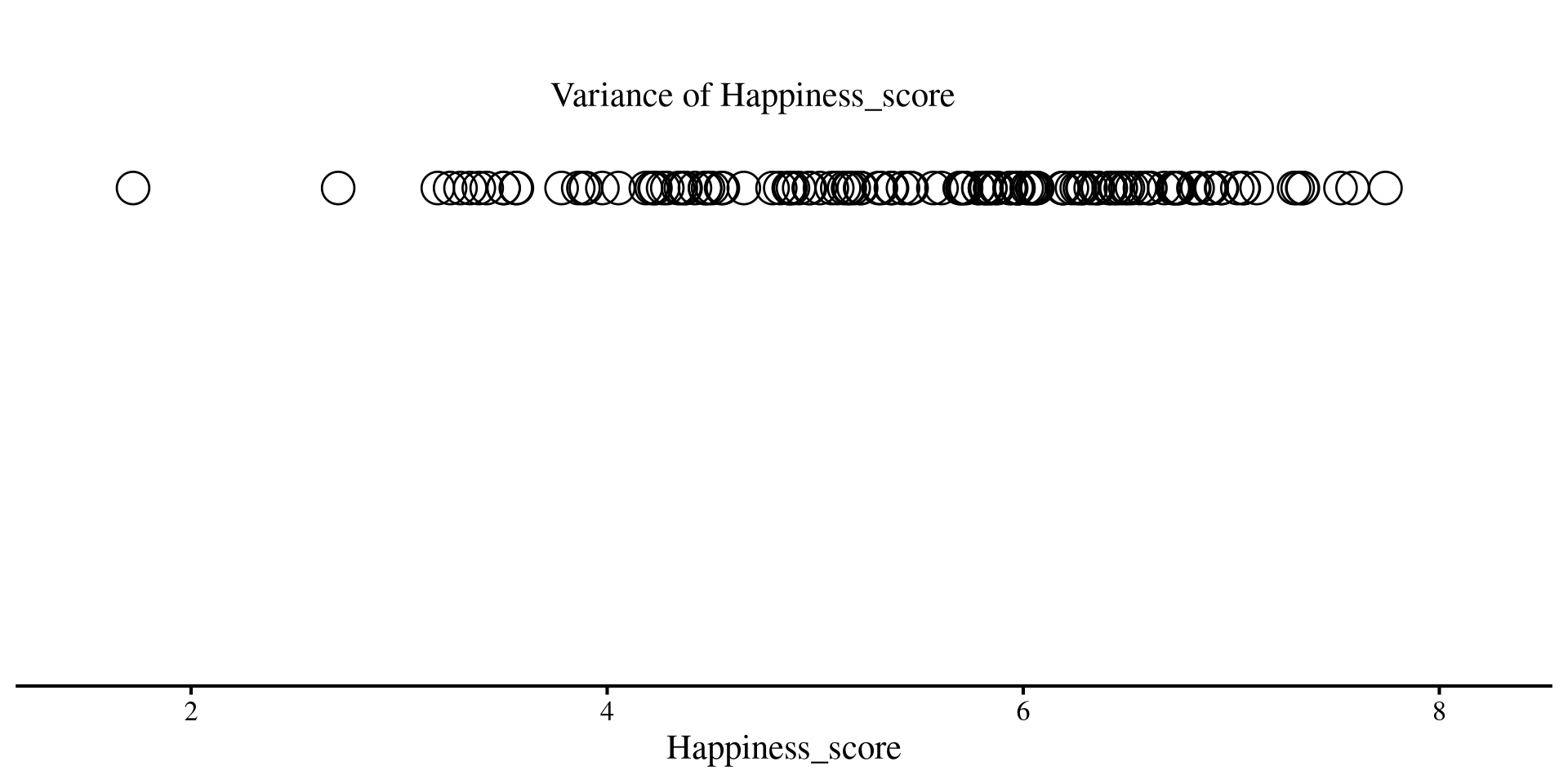
You can think of variance as how unpredictable something is. Higher variance means more unpredictability. At the same time, no variance means perfect predictability!

For example, if you generate data for a variable that has 0 variance, you always get the mean

rnorm(n = 5, 
      mean = 2, 
      sd = 0)
[1] 2 2 2 2 2

Here, if we predict 2 we are always right, because the variable has no variance and is perfectly predictable.

Let’s return to our 1D scatterplot, and let’s visualize the variance of the Happiness_score

Code
ggplot(reg_vars,  
       aes(x = Happiness_score, y = 0)) +
       geom_point(shape = 1, 
                  size=6.5) +
      annotate("text", x = 4.7, y = .02, 
             label = "Variance of Happiness_score") +
xlim(1.5, 8.2) +
    ylim(-.1, .03) +
  theme(axis.title.y=element_blank(),
        axis.text.y=element_blank(),
        axis.ticks.y=element_blank(),
        axis.line.y =  element_blank())
Variance of Residuals after regression

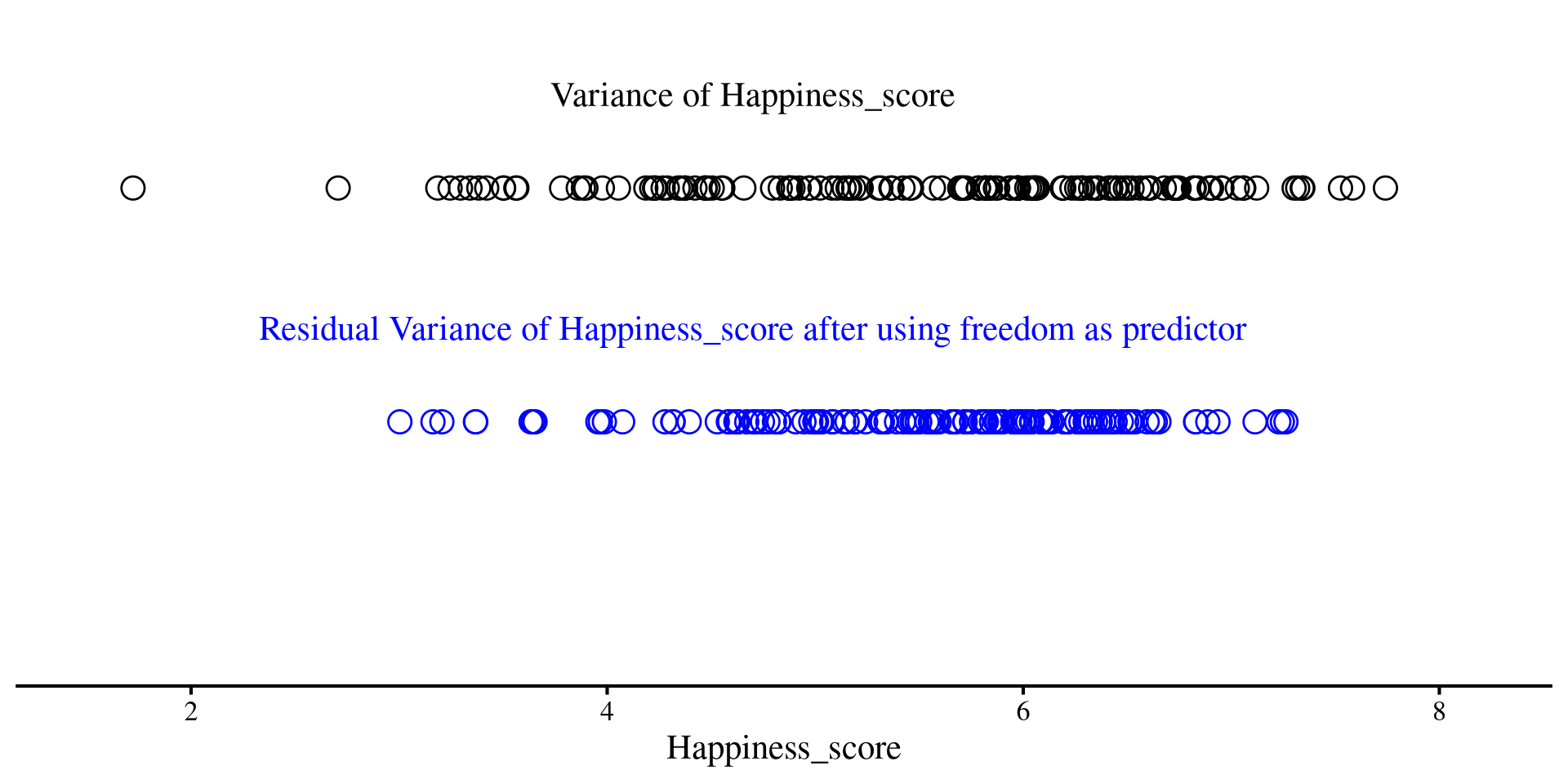
Although this may not sound very intuitive, you should think of residuals as a new version of your \(Y\) variable, but with some unpredictability taken out thanks to our regression line. Less unpredictability means lower variance

On the right, we have the residuals of Happiness_score after using freedom as predictor

Code
ggplot(reg_vars,  
       aes(x = Happiness_score, y = 0)) +
       geom_point(shape = 1, 
                  size=4.5) +
      annotate("text", x = 4.7, y = .02, 
             label = "Variance of Happiness_score") +
  geom_point(aes(x = residuals(reg_free) + 
                       # add mean to have residuals on same scale as 
                       # previous graph (variance remains the same)
                         mean(reg_vars$Happiness_score), 
                     y = -.05),
             shape = 1,
             size = 4.5, color = "blue") +
        annotate("text", x = 4.7, y = -0.03, 
             label = "Residual Variance of Happiness_score after using freedom as predictor", color = "blue") +
xlim(1.5, 8.2) +
    ylim(-.1, .03) +
  theme(axis.title.y=element_blank(),
        axis.text.y=element_blank(),
        axis.ticks.y=element_blank(),
        axis.line.y =  element_blank())

Much less spread out, right?
Variance of Residuals after Regression

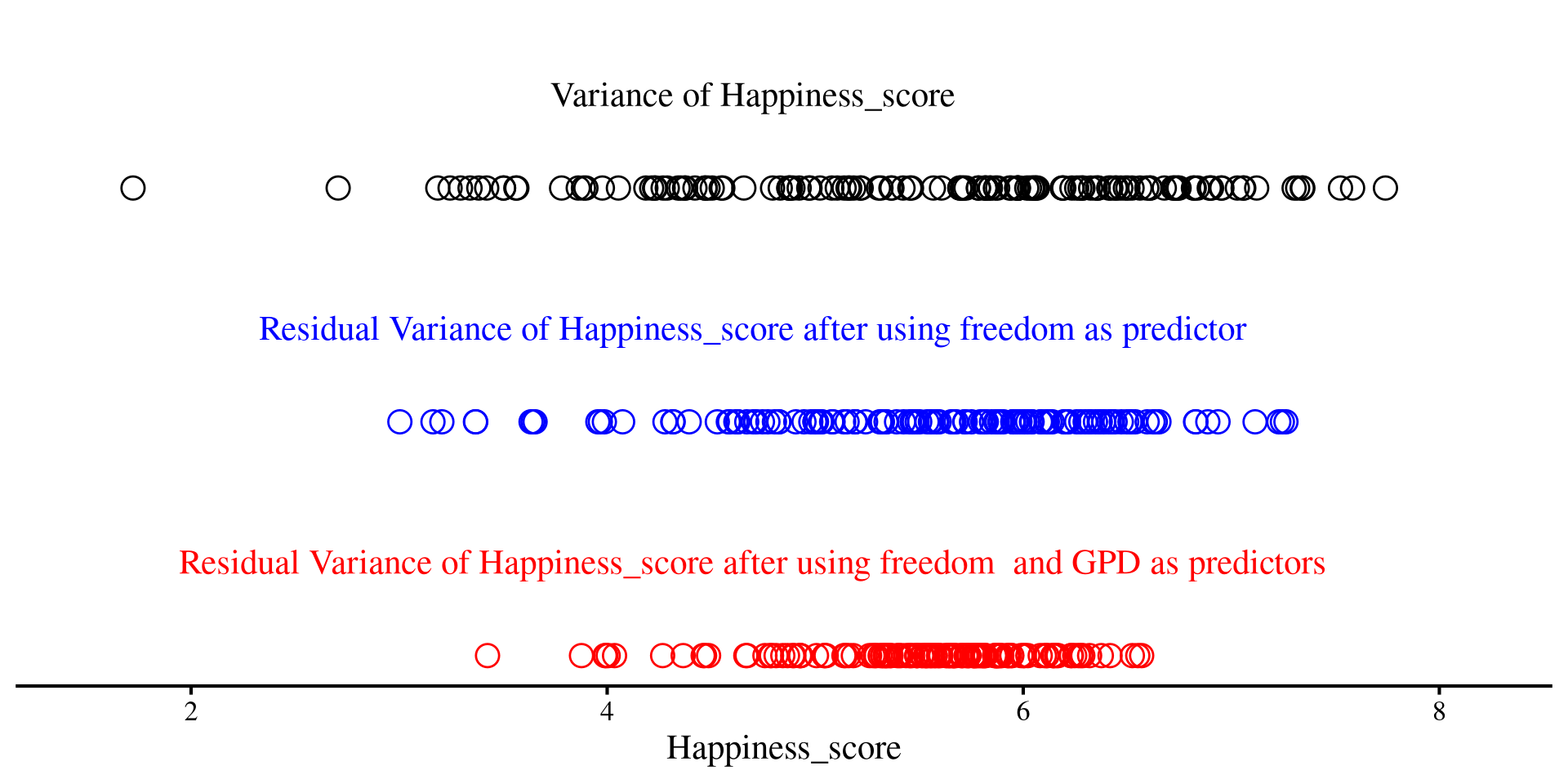
Although this may not sound very intuitive, you should think of residuals as a new version of your \(Y\) variable, but with some unpredictability taken out thanks to our regression line. Less unpredictability means lower variance

Now, after we add both freedom and GDP as predictors, we see that the dots are even less spread out

Code
ggplot(reg_vars,  
       aes(x = Happiness_score, y = 0)) +
       geom_point(shape = 1, 
                  size=4.5)+
      annotate("text", x = 4.7, y = .02, 
             label = "Variance of Happiness_score") +
  geom_point(aes(x = residuals(reg_free) + 
                       # add mean to have residuals on same scale as 
                       # original variable (variance remains the same)
                         mean(reg_vars$Happiness_score), 
                     y = -.05),
             shape = 1,
             size = 4.5, color = "blue")  +
        annotate("text", x = 4.7, y = -0.03, 
             label = "Residual Variance of Happiness_score after using freedom as predictor", color = "blue") +
  geom_point(aes(x = residuals(reg_full) + 
                       # add mean to have residuals on same scale as 
                       # original variable (variance remains the same)
                         mean(reg_vars$Happiness_score), 
                     y = -.1),
             shape = 1,
             size = 4.5, color = "red") +
  annotate("text", x = 4.7, y = -0.08, 
             label = "Residual Variance of Happiness_score after using freedom  and GPD as predictors", color = "red") +
xlim(1.5, 8.2) +
    ylim(-.1, .03) +
  theme(axis.title.y=element_blank(),
        axis.text.y=element_blank(),
        axis.ticks.y=element_blank(),
        axis.line.y =  element_blank())

The red dots are even less spread out than the blue ones!
Variance Explained

As we saw previously, the more variables we added, the less spread out our residuals were. A part of the variance of the original variable was explained by our predictors.

The variances of the three lines of dots were respectively:

  1. Variance of happiness_score
  2. var(reg_vars$Happiness_score)
    [1] 1.395344
  3. Variance of happiness_score after using freedom as a predictor was
  4. var(residuals(reg_free))
    [1] 0.8158336
  5. Variance of happiness_score after using both freedom and GDP as a predictors was
  6. var(residuals(reg_full))
    [1] 0.3925608

We can easily calculate \(R^2\) by hand

  • \(R^2\) after using freedom as a predictor
  • 1 - (0.8158336/1.395344)
    [1] 0.4153172
  • \(R^2\) after using freedom and GDP as predictors
  • 1 - (0.3925608/1.395344)
    [1] 0.7186638

    and we can check that our hand calculation match the regression output

    summary(reg_free)$r.squared
    [1] 0.4153173
    summary(reg_full)$r.squared
    [1] 0.7186638

Significance For R 2

As mentioned in Lab 3, significance testing targets the sampling distribution of a statistic. For regression coefficients, the sampling distribution is a \(t\)-distribution. For \(R^2\), we use an \(F-\)distribution.

Now, why we use an \(F-\)distribution takes a few steps to explain, so I will go on a bit of a tangent.

  1. As we just saw, \(R^2\) tells you the percentage of variance (i.e., unpredictability) that was taken out of \(Y\) by using all the predictors in a regression. How do we tests that the \(R^2\) is not \(0\) (null hypothesis)?
  2. Some smart people have figured out that we can do a “transformation” of \(R^2\),

    \[F = \frac{\mathrm{df_{residual}}\times R^2}{k(1 - R^2)},\] Where \(k\) is the number of predictors, and if \(N\) is the sample size, \(\mathrm{df_{residual}} = N - k - 1\).
  3. And it also turns out that if \(R^2\) is truly \(0\) and \(H_0\) is true, we would expect to see \(F = \frac{\mathrm{df_{residual}}}{\mathrm{df_{residual}} - 2}\). this is usually around \(F = 1\).
  4. Look at the formula for \(F\) and plug in some \(R^2\) values, you will see that \(F\) increases as \(R^2\) increases. And by the way, what happens to \(F\) if \(R^2 = 1\)?

Why \(F\) and not \(R^2\) Directly?

Why do we got thorough all this trouble to calculate \(F\) and confuse students taking regression courses?

The formula for \(F\) on the previous slide accounts for a very important fact that we will return to in Lab 6: \(R^2\) always increases when you add additional predictors, even if the new predictors are completely unrelated to \(Y\).

The denominator of \(F\), \(k(1 - R^2)\) accounts for that through the \(k\) part. The raw \(R^2\) does not.

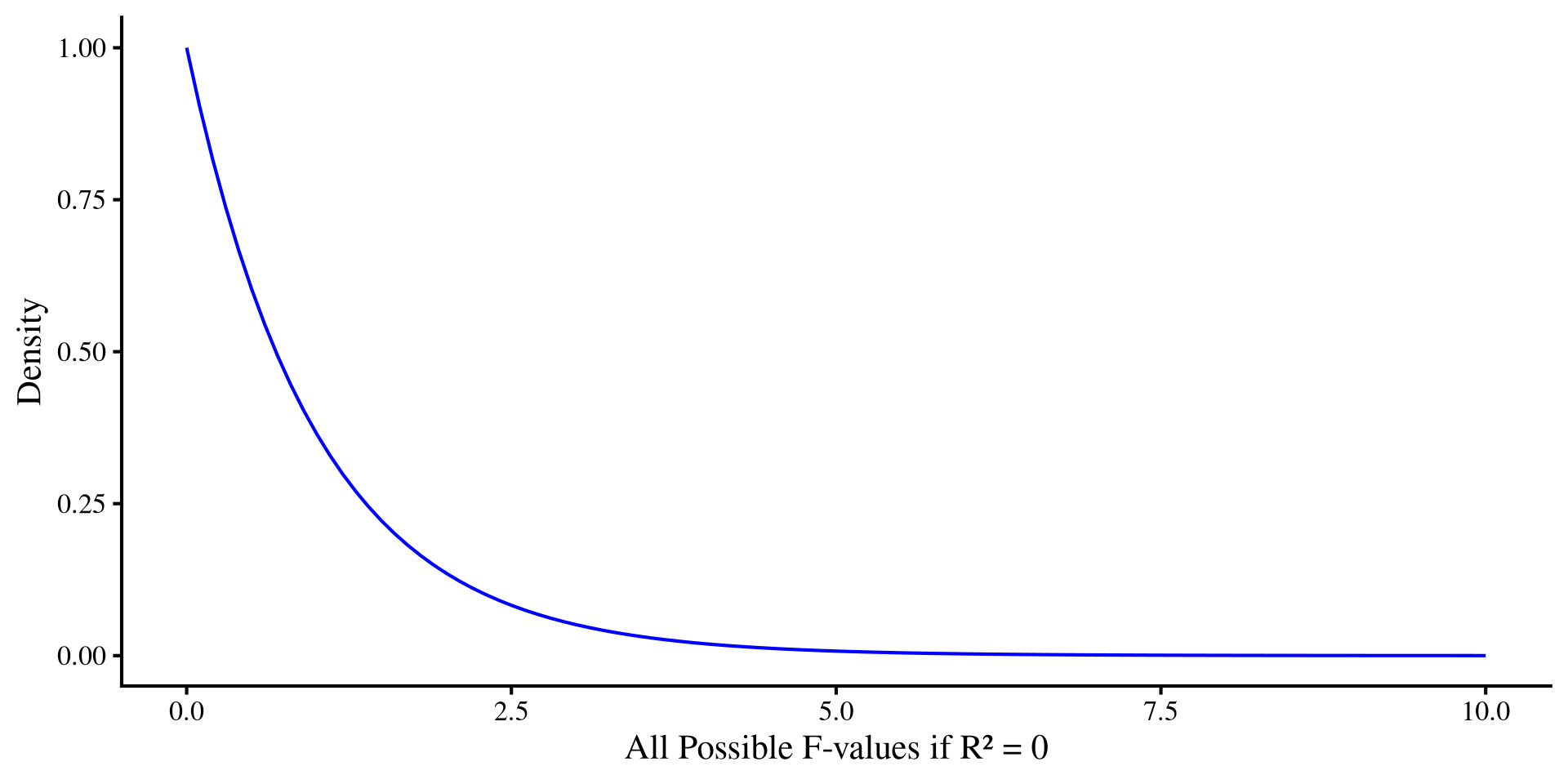
The sampling distribution for an \(F\)-statistic calculated when \(H_0\) is true and \(R^2 = 0\) is, as the name suggests, an \(F\)-distribution with \(\mathrm{df}_1 = k\), and \(\mathrm{df}_2 = \mathrm{df_{residual}}\).

For significance testing, the further an \(F\)-value is from 1, the smaller the \(p\)-value will be.

ANOVA and all the \(F\)s

If you remember looking at ANOVA results, you should remember seeing a whole bunch of \(F\)-statistics. As we will see, ANOVA is a regression, but it focuses on variance explained (\(R^2\)!) by its predictors rather than regression coefficients. That is why all you will see from ANOVA are \(F\)-statistics.

P-value from the \(F\)-distribution

We want to calculate how likely it is to get our \(F\)-value from an \(F\)-distribution with \(\mathrm{df}_1 = k = 2\), and \(\mathrm{df}_2 = \mathrm{df_{residual}} = 137\).

If we look at our full regression, our \(F\)-value was \(\frac{\mathrm{df_{residual}}\times R^2}{k(1 - R^2)} = \frac{137\times .63}{2(1 - .63)} \approx 175\)

You can see that \(175\) is way off to the right. The probability of getting \(175\) or more from this distribution is the \(p\)-value:
# the probability for the F-distribution
pf(175, df1 = 2, df2 = 137, lower.tail = FALSE)
[1] 1.86048e-38
So, extremely unlikely (\(p = 1.86\times10^{-38}\)) to see \(F = 175\) from the distribution on the right if \(R^2 = 0\). We reject \(H_0\).
Plot Code
ggplot() +
  geom_function(
    fun = df, 
    args = list(df1 = 2, df2 = 137), 
    col = "blue") + 
  labs(x = "All Possible F-values if R\U00B2 = 0", 
       y = "Density") +
  xlim(0, 10)
Looking at the regression Ouput

If we look at the regression output again, we will see that \(\mathrm{df}_1 = 2\), \(\mathrm{df_{residual}} = 137\), \(F = 175\), and \(p = 1.86\times10^{-38}\) are in the line below the \(R^2\) value.

summary(reg_full)

Call:
lm(formula = Happiness_score ~ Log_GDP + Freedom, data = reg_vars)

Residuals:
     Min       1Q   Median       3Q      Max 
-2.10592 -0.23908  0.09905  0.34516  2.68875 

Coefficients:
            Estimate Std. Error t value Pr(>|t|)    
(Intercept)   1.4372     0.2327   6.175 7.05e-09 ***
Log_GDP       1.6821     0.1384  12.154  < 2e-16 ***
Freedom       2.8592     0.3621   7.897 8.28e-13 ***
---
Signif. codes:  0 '***' 0.001 '**' 0.01 '*' 0.05 '.' 0.1 ' ' 1

Residual standard error: 0.6311 on 137 degrees of freedom
Multiple R-squared:  0.7187,    Adjusted R-squared:  0.7146 
F-statistic:   175 on 2 and 137 DF,  p-value: < 2.2e-16

In APA style you would report this at the end of the regression results as:

…the model explained a significant porportion of variance in country happiness, \(R^2 = .72\), \(F\)(2, 137) = 175, \(p < .001\).

What does the \(F\)-distribution look like?

Where degrees of freedom come from is a very complex question (see here). The practical effect that they have in significance testing is to tell the sampling distribution to adapt to sample size and/or number of predictors.

We can see what the \(F\)-distribution looks like when we change degrees of freedom

\(\mathrm{df}_1\), representing number of variables, is much more influential on the shape compared to \(\mathrm{df}_2\), which represents the sample size.

Note that \(F\)-values are always positive.

Simulating Experiments where \(H_0\) is true

The idea of sampling distributions can be a bit abstract. To convince myself that smart math people are not lying to me, I sometime simulate things; simulating a large (not quite infinite) number of experiments if pretty straightforward in R!
sample_size <- 300

# object where we save F-statistic
F_statistics <- c()

for(i in 1:2000){
  
X <- rnorm(sample_size, mean = 0, sd = 1)
# the regression coefficient of X is exactly 0
Y <- rnorm(sample_size, mean = 0*X, sd = 1)

reg_YX <- lm(Y ~ X)

# store F-statistic at every iteration
F_statistics[i] <-  as.numeric(summary(reg_YX)$fstatistic[1])
}

ggplot() +
  geom_density(aes(x = F_statistics)) +
      scale_y_continuous(expand = c(0, 0))
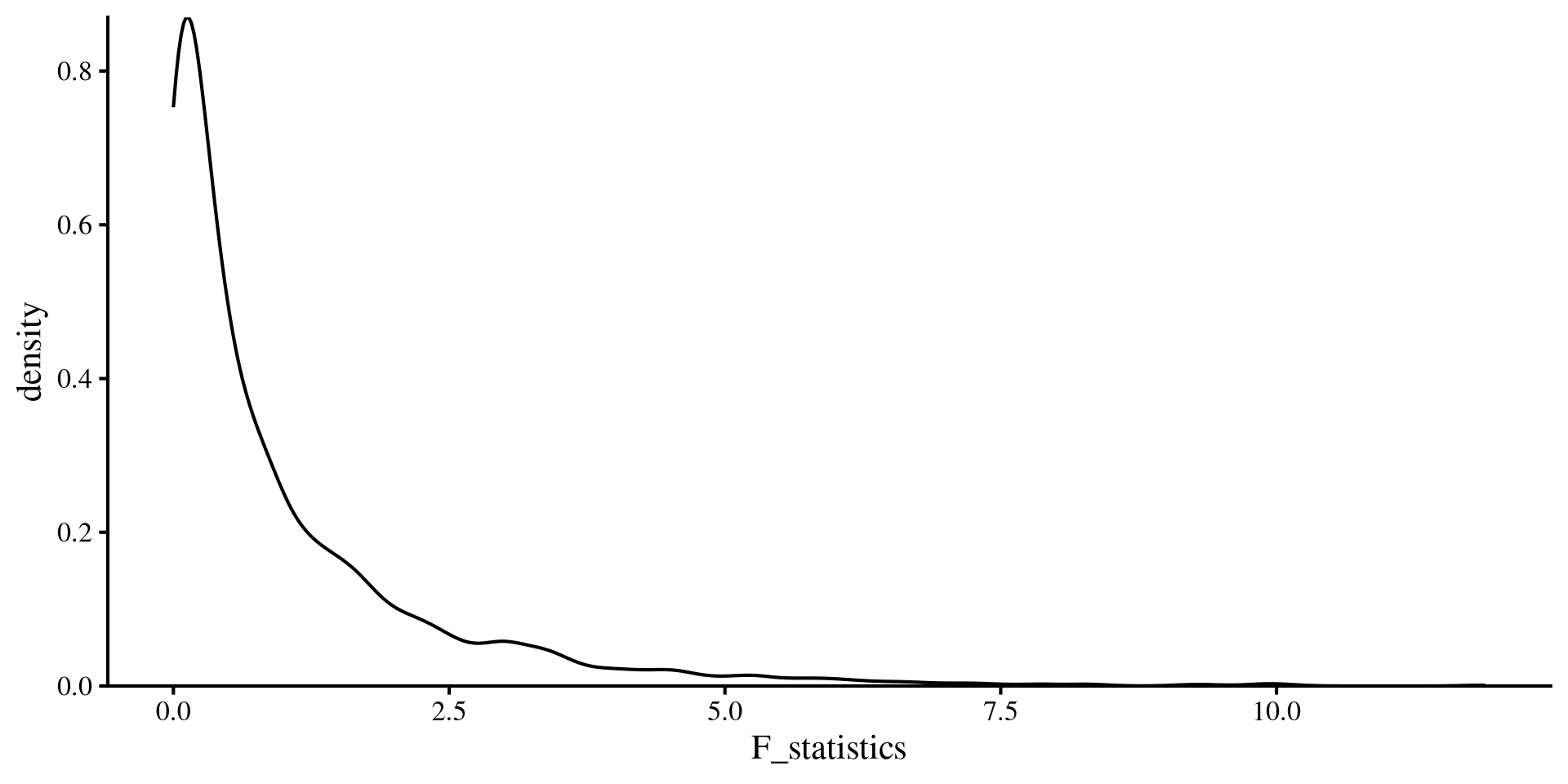
On the left, there is code that simulates 2000 “experiments” with one predictor and \(N = 300\) where \(R^2 = 0\). If we save the \(F\)-values from each experiment and plot them, you will see that the plot matches an \(F\)-distribution with \(\mathrm{df}_1 = 1\) and \(\mathrm{df}_2 = 298\). Check with the plot on the previous slide! (make sure the range of the x-axis match)

References

Schloerke, B., Cook, D., Larmarange, J., Briatte, F., Marbach, M., Thoen, E., Elberg, A., Toomet, O., Crowley, J., Hofmann, H., & Wickham, H. (2024). GGally: Extension to ’Ggplot2’ (Version 2.2.1) [Computer software]. https://cran.r-project.org/web/packages/GGally/index.html
Sievert, C., Parmer, C., Hocking, T., Chamberlain, S., Ram, K., Corvellec, M., Despouy, P., Brüggemann, S., & Inc, P. T. (2024). Plotly: Create Interactive Web Graphics via ’plotly.js’ (Version 4.10.4) [Computer software]. https://cran.r-project.org/web/packages/plotly/index.html

Appendix: nice_3D_plot() Showcase

Example with World Happiness Data

You can also add groups to the dots of the 3D plot. Here I am using Region.

nice_3D_plot(y = reg_vars$Happiness_score,
             x1 = reg_vars$Log_GDP,
             x2 = reg_vars$Freedom,
             dot_labels = WH_2024$Country_name,
             # add groups
             groups = WH_2024$Region,
             axis_names = c("Happiness", 
                            "GDP", 
                            "Freedom"),
             plane_res = 20,
             reg_plane = FALSE)

There are a bit too many regions, so this is not very practical in this case, but this just an example.

Example with iris Data

A more practical example with the iris dataset, Let’s start with just providing 3 variables.

nice_3D_plot(y = iris$Sepal.Length,
             x1 = iris$Petal.Length,
             x2 = iris$Petal.Width)

Name Axes

Let’s name our axes:

nice_3D_plot(y = iris$Sepal.Length,
             x1 = iris$Petal.Length,
             x2 = iris$Petal.Width,
             axis_names = c("SL", "PL", "PW"))

Add Groups

Let’s add colors for the 3 different species of flowers:

nice_3D_plot(y = iris$Sepal.Length,
             x1 = iris$Petal.Length,
             x2 = iris$Petal.Width,
             axis_names = c("SL", "PL", "PW"),
             groups = iris$Species)

Add Regression Plane

Let’s add a regression plane:

nice_3D_plot(y = iris$Sepal.Length,
             x1 = iris$Petal.Length,
             x2 = iris$Petal.Width,
             axis_names = c("SL", "PL", "PW"),
             groups = iris$Species,
             reg_plane = TRUE)

Pass Arguments to plot_ly()

You can also pass arguments to the plot_ly() function. Let’s make the dots more transparent by passing the opacity = argument to plot_ly():

nice_3D_plot(y = iris$Sepal.Length,
             x1 = iris$Petal.Length,
             x2 = iris$Petal.Width,
             axis_names = c("SL", "PL", "PW"),
             groups = iris$Species,
             reg_plane = TRUE,
             opacity = .3)

See here for what “passing arguments” to a function within a function means in R.

Add Interaction Term to Regression Plane

You can also specify an interaction between the two predictors and get an interaction plane. You will see that the reression plane now bends:

nice_3D_plot(y = iris$Sepal.Length,
             x1 = iris$Petal.Length,
             x2 = iris$Petal.Width,
             axis_names = c("SL", "PL", "PW"),
             groups = iris$Species,
             reg_plane = TRUE,
             opacity = .3,
             interaction = TRUE)

See Lab 9 if you are curious to know what is happening.