Lab 3: Significance Tests and Reporting Results

PSYC 7804 - Regression with Lab

Fabio Setti

Spring 2025

Today’s Packages and Data 🤗

Install Packages Code
install.packages("flextable")
install.packages("devtools")
devtools::install_github("quinix45/FabioFun")

# Tidyverse should be already installed
# install.packages("tidyverse")
library(flextable)
library(devtools)
library(FabioFun)
library(tidyverse)
theme_set(theme_classic(base_size = 16, 
                        base_family = 'serif'))


The flextable package (Gohel et al., 2024) helps create pretty tables from R. Can also be used to create publication ready APA style tables.

The devtools package (Wickham et al., 2022) helps developing R packages. It is more commonly used to download R packages from github.

This is a package where I save functions that I either use a bunch or that I think may be useful in the future. Run devtools::install_github("quinix45/FabioFun") to install it.

Data


insurance <- rio::import("https://github.com/quinix45/PSYC-7804-Regression-Lab-Slides/raw/refs/heads/main/Slides%20Files/Data/insurance.csv")

# let's peak at our variables
str(insurance)
'data.frame':   1338 obs. of  7 variables:
 $ age     : int  19 18 28 33 32 31 46 37 37 60 ...
 $ sex     : chr  "female" "male" "male" "male" ...
 $ bmi     : num  27.9 33.8 33 22.7 28.9 ...
 $ children: int  0 1 3 0 0 0 1 3 2 0 ...
 $ smoker  : chr  "yes" "no" "no" "no" ...
 $ region  : chr  "southwest" "southeast" "southeast" "northwest" ...
 $ charges : num  16885 1726 4449 21984 3867 ...

Predicting Insurance Charges

Let’s find out whether body mass index (bmi) predicts health insurance charges (charges)

reg <- lm(charges ~ bmi, insurance)
summary(reg)

Call:
lm(formula = charges ~ bmi, data = insurance)

Residuals:
   Min     1Q Median     3Q    Max 
-20956  -8118  -3757   4722  49442 

Coefficients:
            Estimate Std. Error t value Pr(>|t|)    
(Intercept)  1192.94    1664.80   0.717    0.474    
bmi           393.87      53.25   7.397 2.46e-13 ***
---
Signif. codes:  0 '***' 0.001 '**' 0.01 '*' 0.05 '.' 0.1 ' ' 1

Residual standard error: 11870 on 1336 degrees of freedom
Multiple R-squared:  0.03934,   Adjusted R-squared:  0.03862 
F-statistic: 54.71 on 1 and 1336 DF,  p-value: 2.459e-13

The resulting predicted charge is:

\(\widehat{\mathrm{Charges}}_i = \$1192.94 + \$393.87 \times \mathrm{BMI}_i\)

Is the intercept meaningful in this case?


In practice, before we interpret anything, we need to check the p-values associated with our output.

p-values

Some guy named R.A. Fisher came up with the idea of p-values. The set up goes something like this:

  1. I collected this sample and found that BMI predicts how much insurance will charge. But do these results tell me anything about the population? I can’t really measure the entire population 🫤
  2. 💡 Let’s resample from the population and repeat my experiment in exactly the same way an infinite number of times and see how often I get my result, a slope of 393.87, or more. Let me also assume that in reality there truly is no relation between BMI and insurance charge, and the slope is exactly 0 in reality (\(H_0\), the null hypothesis)
  3. Under the assumptions that the true population slope is exactly 0, the p-value is the proportion of times that I find a slope of 393.87 or more if I were to repeat exactly the same experiment an infinite number of times.

Fisher, being really good at math and knowing the central limit theorem , realized that we don’t have to repeat experiments an infinite number of times (ok, thank you Fisher 😌).


R. A. Fisher (1890-1962), really good with the maths and stats, but also a pretty bad person

Sampling Distributions

Given most statistics, we can figure out what a distribution of the results of an infinite number of experiments will look like. This is known as the sampling distribution, and is the target of significance testing.

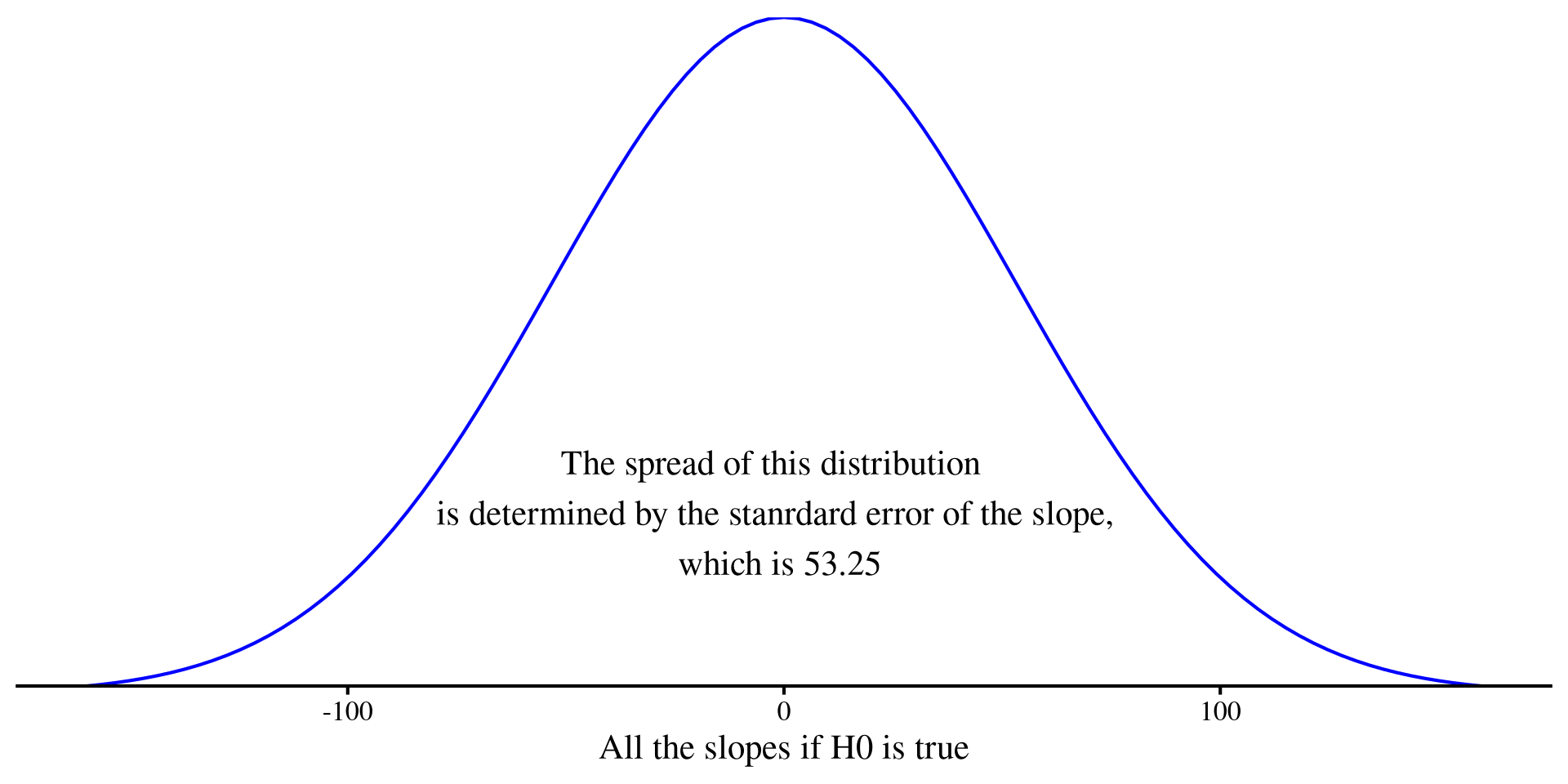
If we assume the our slope really should be 0 (i.e., we assume \(H_0\) is true), the sampling distribution should look something like the plot on the right:

  • Our value for the slope was \(393.87\), which is way far off to the right. That means \(393.87\) is extremely unlikely to come from a sampling distribution where \(H_0\) is true.
  • The p-value, which is \(2.46*10^{-13}\), represents the probability of getting our slope (or a value more extreme), from the plot on the right (i.e., if \(H_0\) is true). p-values say nothing about how likely/unlikely \(H_1\) is.
Plot code
# you need to install this package 
library(extraDistr)

ggplot() +
  geom_function(fun = dlst, args = list(mu = 0, sigma = 53.25, df = 1336), color = "blue") +
  labs(x = "All the slopes if H0 is true") +
  xlim(-(53.25*3), (53.25*3)) +
  scale_y_continuous(expand = c(0,0)) +
    annotate("text", x = -2, y = .002, 
             label = "The spread of this distribution \n is determined by the stanrdard error of the slope, \n which is 53.25") +
  theme(axis.title.y=element_blank(),
        axis.text.y=element_blank(),
        axis.ticks.y=element_blank(),
        axis.line.y =  element_blank())

Where’s the T 🍵?

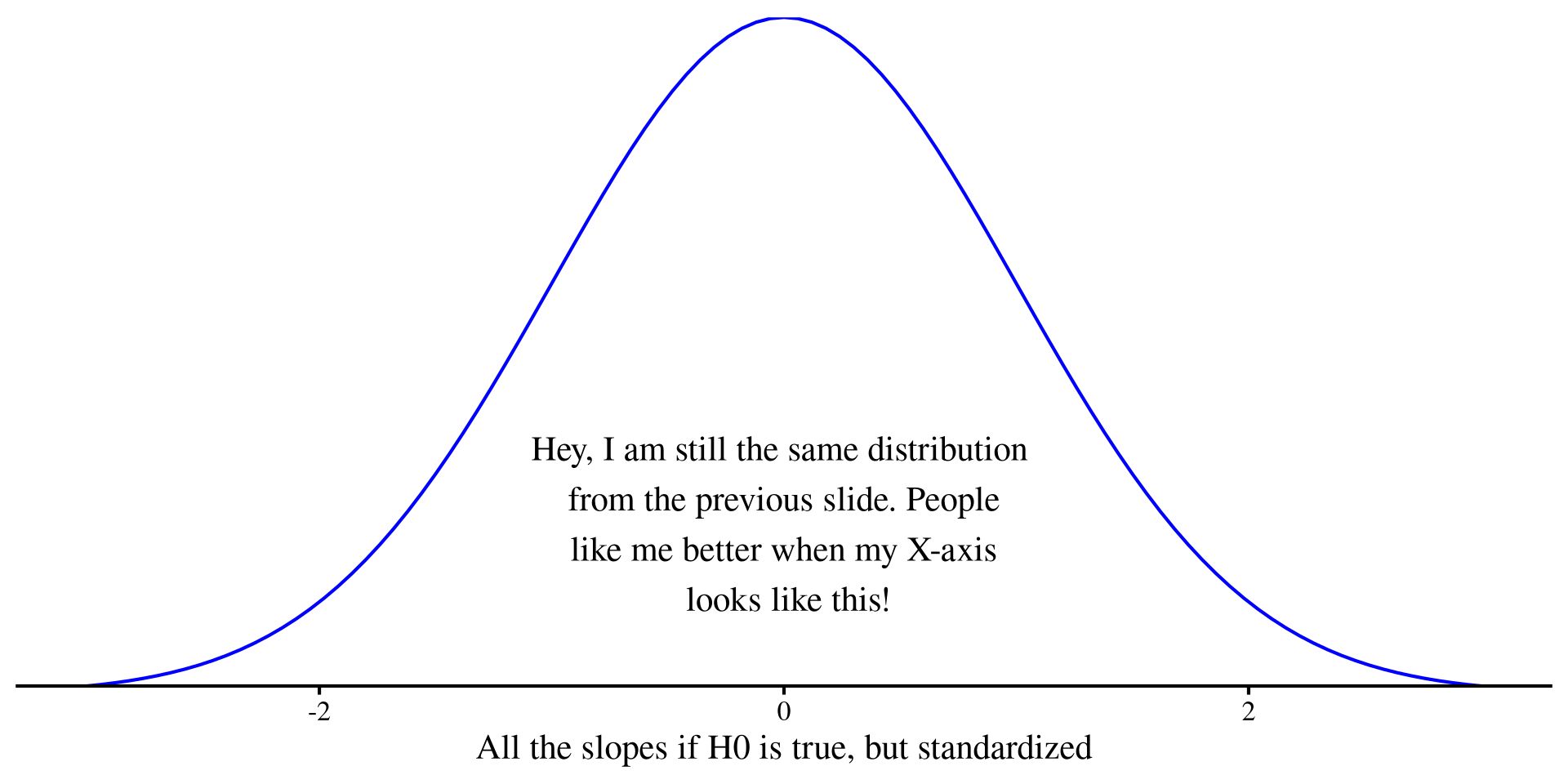
How did I get a p-value without any t-value? Although the plot on the previous slide looked like a normal distribution, it was actually a t-distribution with \(\mu = 0\), \(\sigma = 53.25\) and \(df = 1336\). Just like any normal distribution, the units can be standardized such that \(\sigma = 1\), resulting in the graph below to the right.
This implies also rescaling our slope to get a value that can be place it on the new x-axis, thus we compute the t-statistic:

\[t = \frac{b_1}{SE_{b_1}} = \frac{393.87}{53.25} = 7.397 \]

pt(7.397, df = 1336, lower.tail = FALSE)*2
[1] 2.451523e-13

The p-value is the same as the regression output.

Plot code
ggplot() +
  geom_function(fun = dt, args = list(df = 1336), color = "blue") +
  labs(x = "All the slopes if H0 is true, but standardized") +
    annotate("text", x = 0, y = .1, 
             label = "Hey, I am still the same distribution \n from the previous slide. People \n like me better when my X-axis \n looks like this!") +
  xlim(-3, 3) +
  scale_y_continuous(expand = c(0,0)) +
  theme(axis.title.y=element_blank(),
        axis.text.y=element_blank(),
        axis.ticks.y=element_blank(),
        axis.line.y =  element_blank())

…And the intercept

Usually, we don’t really care about the intercept, but here it illustrate where t-values fall when the corresponding p-value is high.
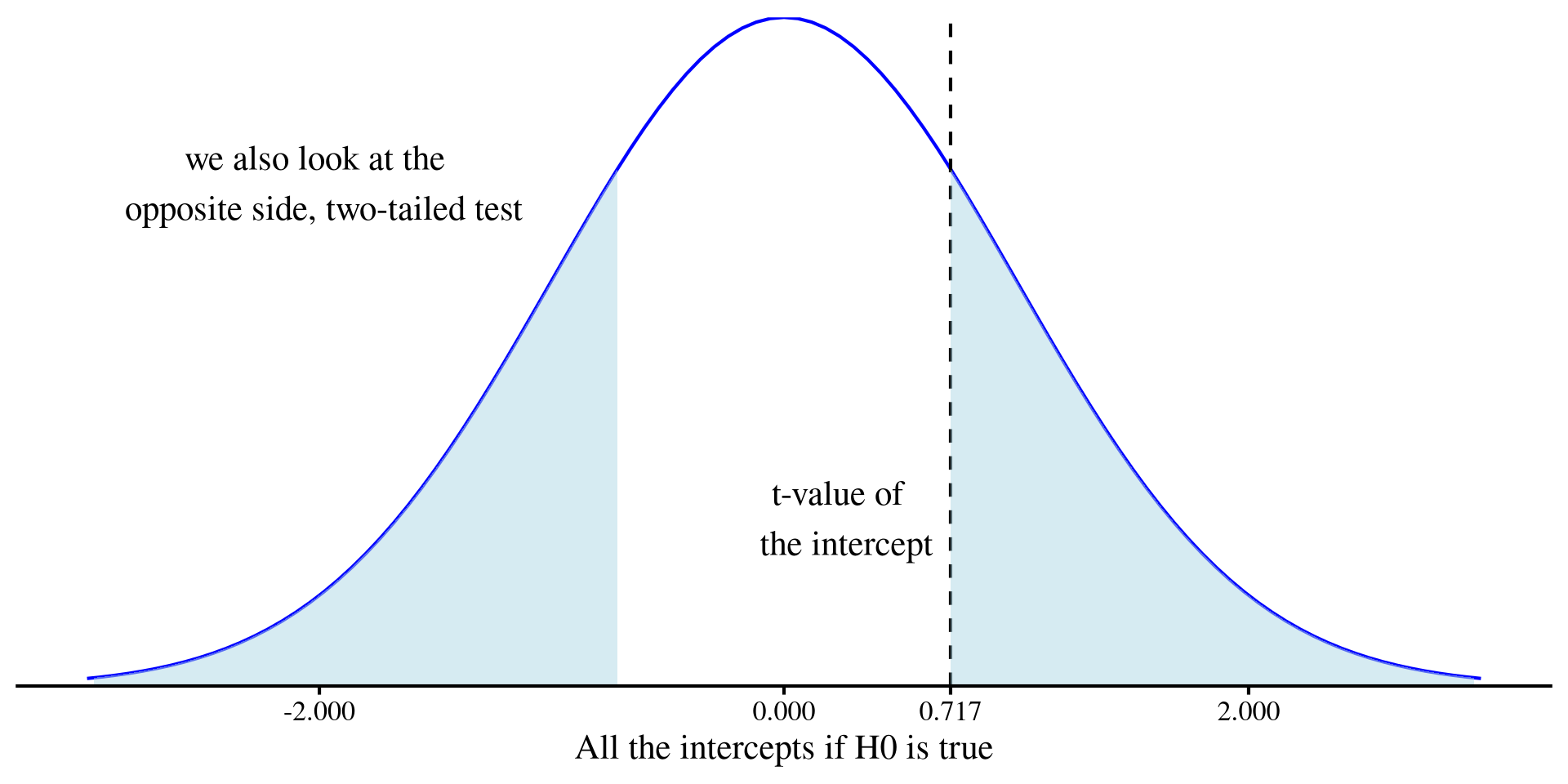
Form the outptut, \(t = \frac{b_0}{SE_{b_0}} = \frac{1192.94}{1664.80} = 0.717\). This time, the t-value is pretty close to the center of the plot
pt(.717, df = 1336, lower.tail = FALSE)*2
[1] 0.4734994
  • So, even by random chance, there is about a \(47\%\) chance of getting a value of \(1192.94\) or more extreme.
  • NOTE: the total area under the curve is \(1\), and the shaded area is \(0.473\), the p-value.
Plot code
ggplot() +
  geom_function(fun = dt, args = list(df = 1336), color = "blue") +
  labs(x = "All the intercepts if H0 is true") +
  geom_vline(xintercept = 0.717, linetype = 2) +
  xlim(-3, 3) +
  annotate("text", x = .25, y = .1, label = "t-value of \n the intercept") +
  annotate("text", x = -2, y = .3, label = "we also look at the \n opposite side, two-tailed test") +
    geom_ribbon(data = data.frame(x = seq(0.717, 4, length.out = 100)), 
              aes(x = x, ymin = 0, ymax = dt(x, df = 1336)), 
              fill = "lightblue", alpha = 0.5) +
  geom_ribbon(data = data.frame(x = seq(-0.717, -4, length.out = 100)), 
              aes(x = x, ymin = 0, ymax = dt(x, df = 1336)), 
              fill = "lightblue", alpha = 0.5) +
  scale_y_continuous(expand = c(0,0)) +
  scale_x_continuous(limits = c(-3, 3), breaks = c(-2, 0, 0.717, 2)) +
  theme(axis.title.y=element_blank(),
        axis.text.y=element_blank(),
        axis.ticks.y=element_blank(),
        axis.line.y =  element_blank())

Type I Error Rate and Significance

p-values have meaning even without any significance test. Significance tests happen only once we choose to make binary decisions based on p-values. At some point some folks decided that \(p < .05 =\) significant. But,

surely, God loves the .06 nearly as much as the .05 (Rosnow & Rosenthal, 1989, p. 1277)

Type I error rate (\(\alpha\)) is thus not a bug of significance testing; it’s a feature. Turning p-values into binary decisions (accept/reject \(H_0\)) implies that there is always a non-zero chance (the p-value being that chance) that our results come from \(H_0\) (i.e., we are wrong).

So, significance testing is like gambling 🎰, where we think a 1 in 20 or less chances of being wrong is good odds. Sometimes we end up on the wrong side of chance, and we make the wrong conclusion.

And slightly unsettling is the fact that you cannot know which of your decisions based on p-values is the “wrong” one 😧.

Confidence Intervals

We can also easily extract \(95\%\) confidence intervals (CIs) for our intercept and slope:

confint(reg)
                 2.5 %    97.5 %
(Intercept) -2072.9743 4458.8487
bmi           289.4089  498.3372

Confidence intervals carry the same information as p-values. The respective p-value will be significant if the confidence interval does not include 0.

Now, as mention in the main lecture:

  • Incorrect interpretation: “There is a 95% chance that the true value is within the confidence interval.”
  • Correct interpretation: “If I were to repeat the experiment an infinite number of times, 95% of my observed values would be within the confidence interval.”

I will not elaborate further, but see here for more.

APA Style Report

…ok, I am done rambling, here’s how you report the results in APA style:

summary(reg)

Call:
lm(formula = charges ~ bmi, data = insurance)

Residuals:
   Min     1Q Median     3Q    Max 
-20956  -8118  -3757   4722  49442 

Coefficients:
            Estimate Std. Error t value Pr(>|t|)    
(Intercept)  1192.94    1664.80   0.717    0.474    
bmi           393.87      53.25   7.397 2.46e-13 ***
---
Signif. codes:  0 '***' 0.001 '**' 0.01 '*' 0.05 '.' 0.1 ' ' 1

Residual standard error: 11870 on 1336 degrees of freedom
Multiple R-squared:  0.03934,   Adjusted R-squared:  0.03862 
F-statistic: 54.71 on 1 and 1336 DF,  p-value: 2.459e-13

APA style report

Simple linear regression analysis indicated that BMI significantly positively predicted insurance charges, b = 393.87, t(1336) = 7.4, p < .001, 95%CI [289.41; 498.34]. The predictor explained a significant proportion of variance in insurance charges, R2 = .04, F(1, 1336) = 54.71, p < .001.

Although not discussed in this lab, we will return to \(R^2\) soon.

ANOVA Output

If for some reason you prefer the ANOVA-type outputs, you can also get that for any type of lm() regression


anova(reg)
Analysis of Variance Table

Response: charges
            Df     Sum Sq    Mean Sq F value    Pr(>F)    
bmi          1 7.7134e+09 7713391237  54.709 2.459e-13 ***
Residuals 1336 1.8836e+11  140988645                      
---
Signif. codes:  0 '***' 0.001 '**' 0.01 '*' 0.05 '.' 0.1 ' ' 1


Later in the course, we will learn all about how ANOVA is a regression is disguise 🥸.


For now, notice that this ANOVA output provides the same F-statistic and p-value that were in the output for the \(R^2\) on the previous slide.

Creating APA Style regression tables

To not have to manually recreate result tables over and over, I created a function that generates APA style regression tables ✨. The function code is here if you are curious.

# any regression model
reg_model <- lm(charges ~ bmi + sex, insurance)

# create the table
table <-  FabioFun::regression_flextable(reg_model)

# save the table to as a word doc. You should see the files in the `path` argument appear in your working directory
save_as_docx(table, path = "reg_table.docx")
  • The save_as_... functions that save the table to a file come from the flextable package (really good package 😍). My function also uses functions from flextable to format the regression table.

regression_flextable() Arguments

  1. lm_object: An lm() regression model , title = ““, var_names = NULL, intercept = TRUE
  2. title = "": The table title (must be a character).
  3. var_names = NULL: Names for first column of the table (the variables). Must be a character vector of the same length of the table rows.
  4. intercept = TRUE: Set to FALSE if the intercept is not wanted (e.g., for standardized regression).

Table Output

If you open the reg_table.docx document that was just saved to your working directory, you should hopefully see a table like the one below

Usually, you don’t want the R variable names as row names. You can change them with the var_names = argument:


table <- FabioFun::regression_flextable(reg_model,
         var_names = c("BMI", 
                       "Sex"))

save_as_docx(table, 
       path = "reg_table_names.docx")

Variable

B

t

p

95%CI

R2

(Intercept)

739.43

0.44

0.66

[-2561.1; 4039.97]

bmi

389.43

7.31

<.001***

[284.95; 493.92]

sexmale

1166.99

1.8

0.073

[-106.99; 2440.98]

R2=0.04,F(2,1335)=29.01,p<.001R^2=0.04,F(2,1335)=29.01,p<.001***

  • Updated row names:

Variable

B

t

p

95%CI

R2

Intercept

739.43

0.44

0.66

[-2561.1; 4039.97]

BMI

389.43

7.31

<.001***

[284.95; 493.92]

Sex

1166.99

1.8

0.073

[-106.99; 2440.98]

R2=0.04,F(2,1335)=29.01,p<.001R^2=0.04,F(2,1335)=29.01,p<.001***

References

Gohel, D., ArData, Jager, C., Daniels, E., Skintzos, P., Fazilleau, Q., Nazarov, M., Robert, T., Barrowman, M., Yasumoto, A., Julian, P., Browning, S., Thériault, R., Jobert, S., & Newman, K. (2024). Flextable: Functions for Tabular Reporting (Version 0.9.7) [Computer software]. https://cran.r-project.org/web/packages/flextable/index.html
Rosnow, R. L., & Rosenthal, R. (1989). Statistical procedures and the justification of knowledge in psychological science. American Psychologist, 44(10), 1276–1284. https://doi.org/10.1037/0003-066X.44.10.1276
Wickham, H., Hester, J., Chang, W., Bryan, J., & RStudio. (2022). Devtools: Tools to Make Developing R Packages Easier (Version 2.4.5) [Computer software]. https://cran.r-project.org/web/packages/devtools/index.html
Wickham, H., & RStudio. (2023). Tidyverse: Easily Install and Load the ’Tidyverse (Version 2.0.0) [Computer software]. https://cran.r-project.org/web/packages/tidyverse/index.html