Lab 14: Regression Diagnostics

PSYC 7804 - Regression with Lab

Fabio Setti

Spring 2025

Today’s Packages and Data 🤗

No new packages for today!

library(tidyverse)
library(car)
theme_set(theme_classic(base_size = 16, 
                        base_family = 'serif'))
Data

We will use the 2024 world happiness report data, which we have already used in Lab 4:

WH_2024 <- rio::import("https://github.com/quinix45/PSYC-7804-Regression-Lab-Slides/raw/refs/heads/main/Slides%20Files/Data/World_happiness_2024.csv")

Let’s also name the rows with the country names. This helps later when we need to identify problematic data points:

rownames(WH_2024) <- WH_2024$Country_name

Regression Diagnostics

Regressions diagnostics are an umbrella term for methods that help you identify individual data points that may have an undue influence on the regression results. More often than not, these data points would be considered outliers (although, see info box below).

Before going over the many regression diagnostics that exist, I want to show how sample size is an important consideration when evaluating how concerned you should be about these regression diagnostics.

When should you be careful? In general, outliers influence results more than other data points. Thus, when you have a small sample size (I would say \(N < 100\)?), you want to be extra careful about interpreting your results if some regression diagnostics are off.

What is an outlier?

Determining whether a data point is an outlier is very subjective. Statistical methods may help you identify potential outliers, but you 🫵 have to ultimately decide what to do with those data points. Given what you know about your variables, would you considered those data points outliers? Do you want to remove them? If yes, why remove them? If not, why keep them? Statistics can point you in a direction, but you have to decide what to do and justify it.

Simulating some Data

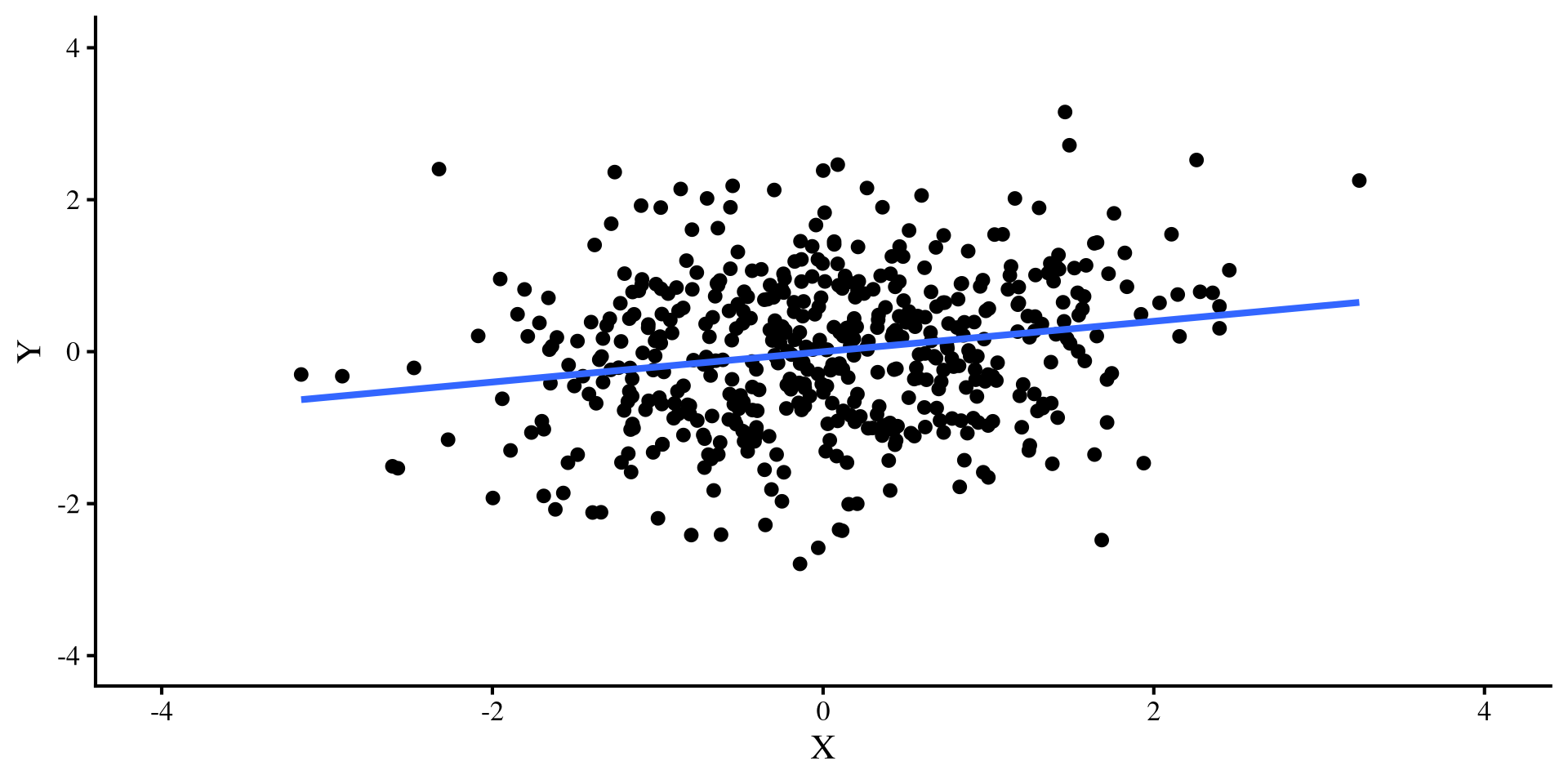
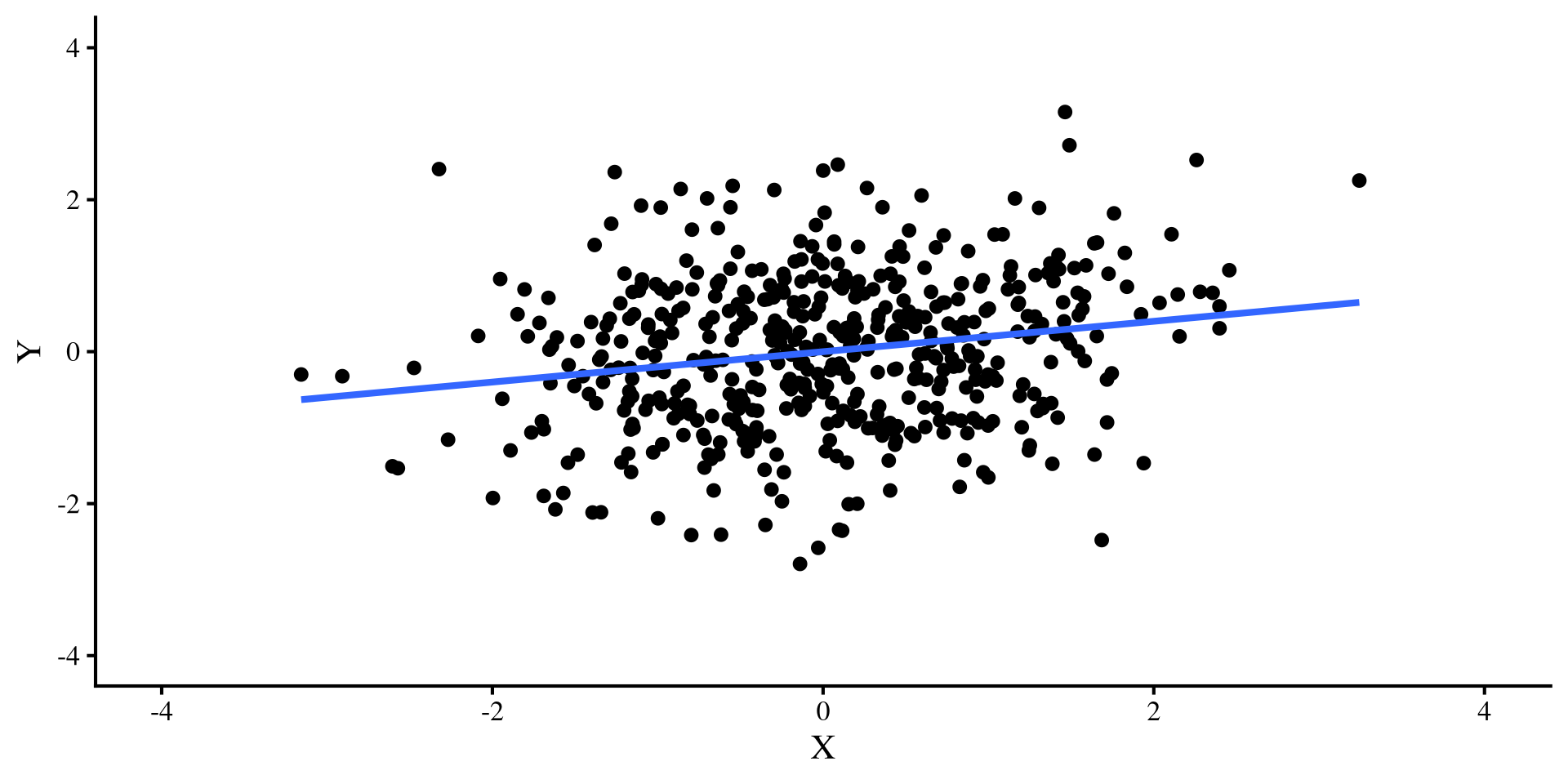
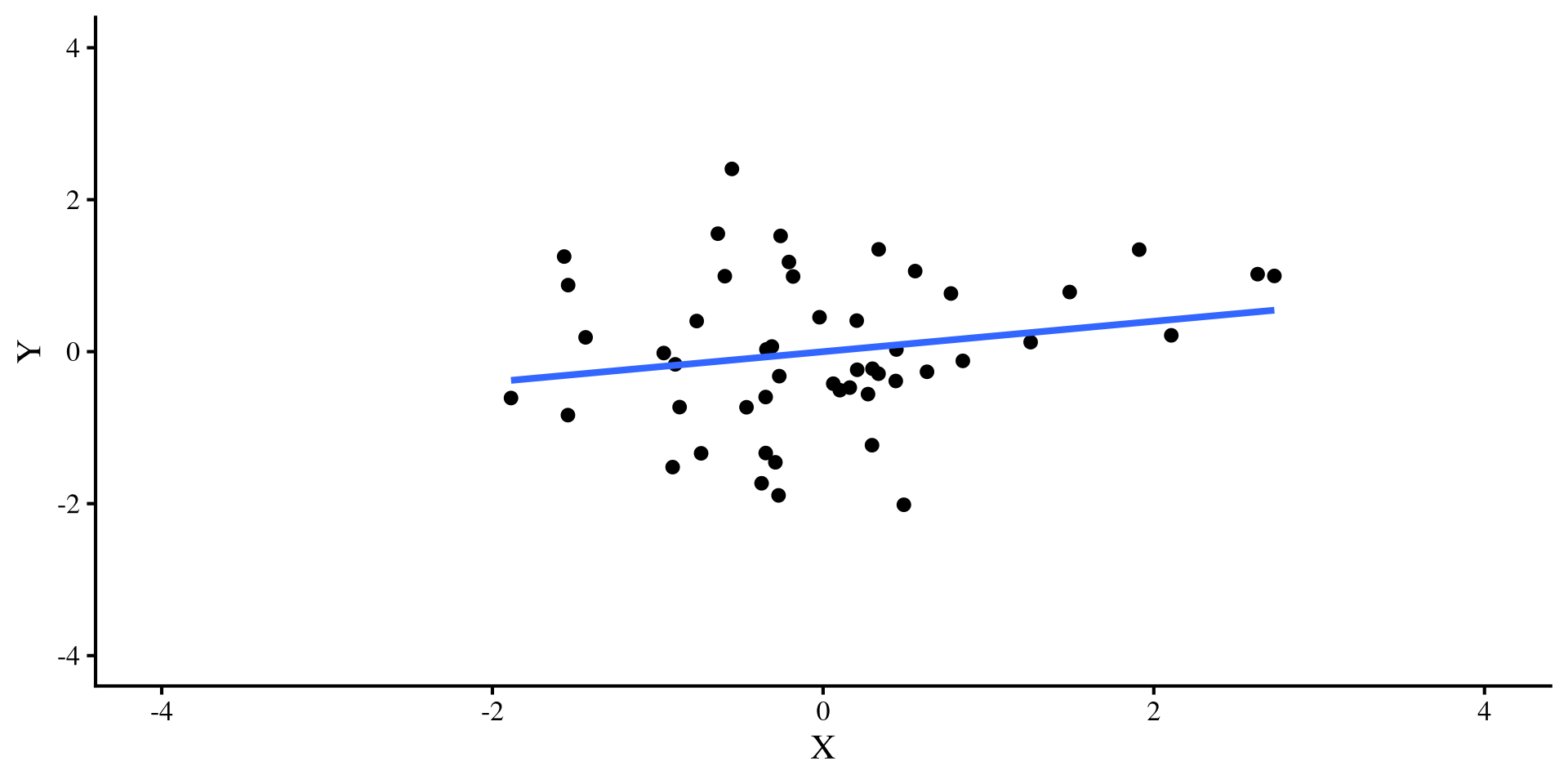
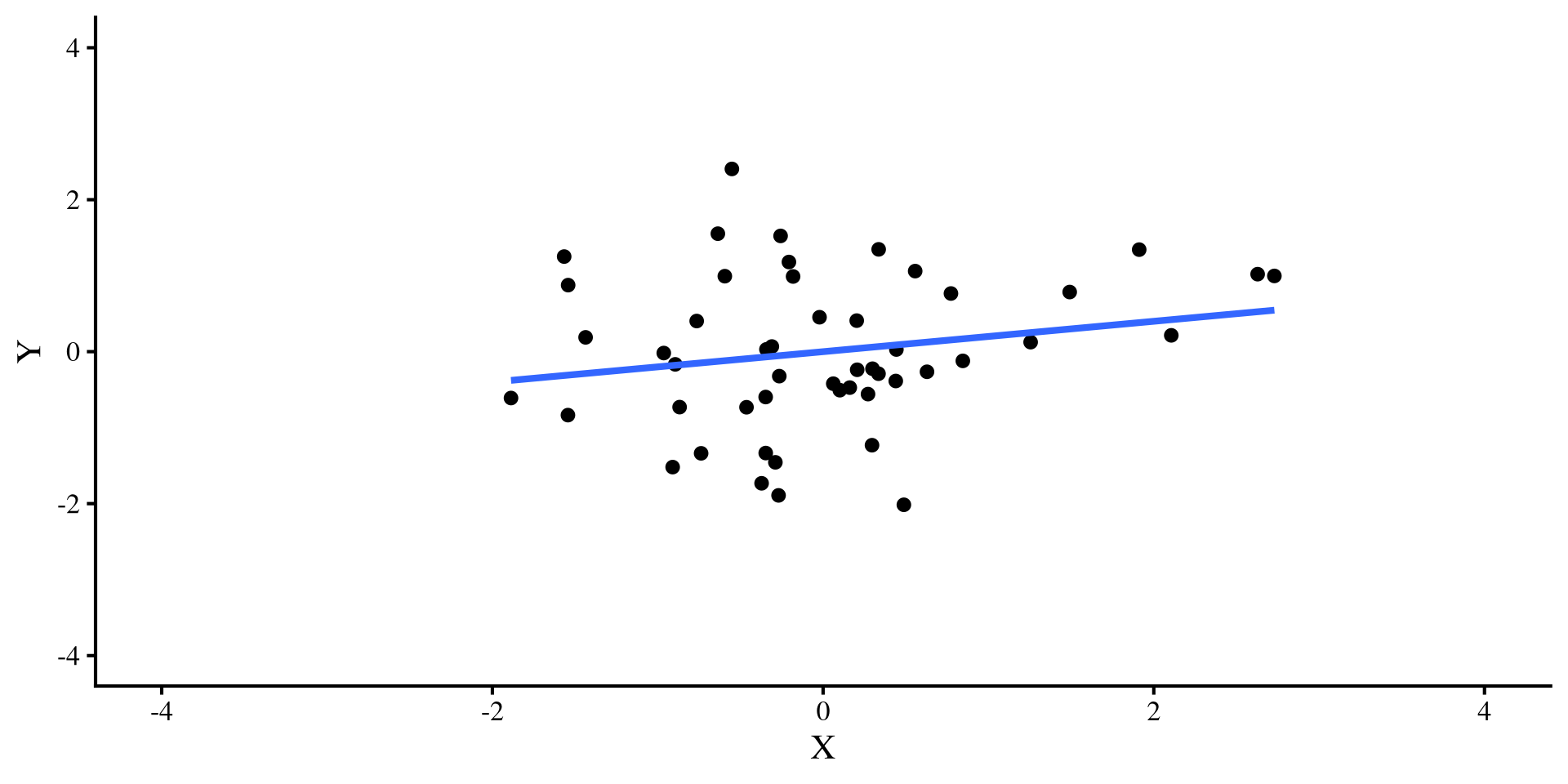
Let’s say that I simulate some \(Y\) and \(X\) variables that have a correlation of \(r = .2\). I do this for both a sample size of \(N = 50\) and \(N = 500\) and plot the regression lines:

simulate data
set.seed(28567)

cor_mat <- rbind(c(1, .2),
                 c(.2, 1))

sim_dat_50 <- data.frame(MASS::mvrnorm(n = 50, c(0, 0), Sigma = cor_mat, empirical = TRUE))
colnames(sim_dat_50) <- c("Y", "X")

sim_dat_500 <- data.frame(MASS::mvrnorm(n = 500, c(0, 0), Sigma = cor_mat, empirical = TRUE))
colnames(sim_dat_500) <- c("Y", "X")
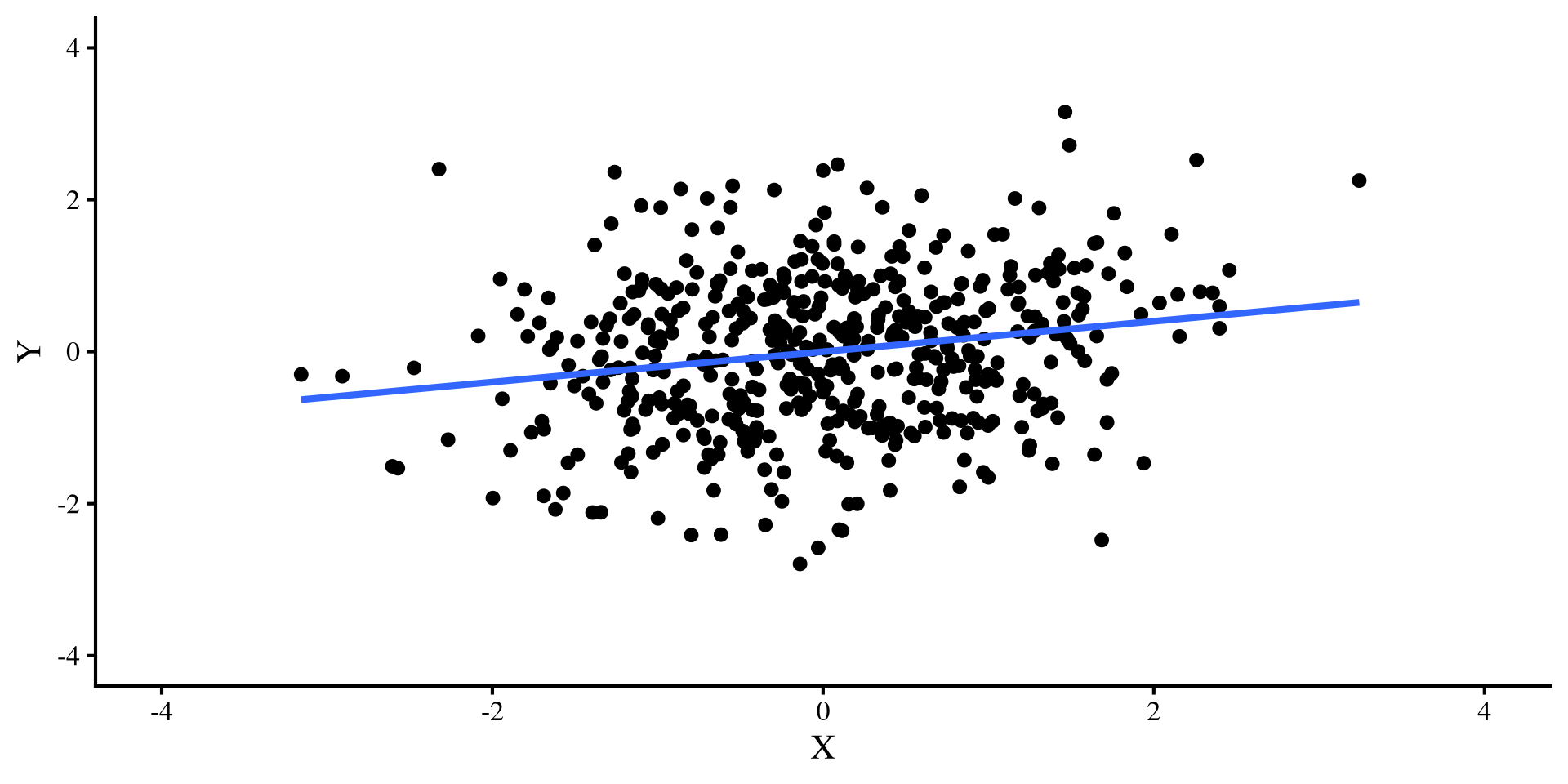
The regression line is the exact same for both plots, bet let’s see what happens once we add a pesky outlier…

Adding a Single Outlier

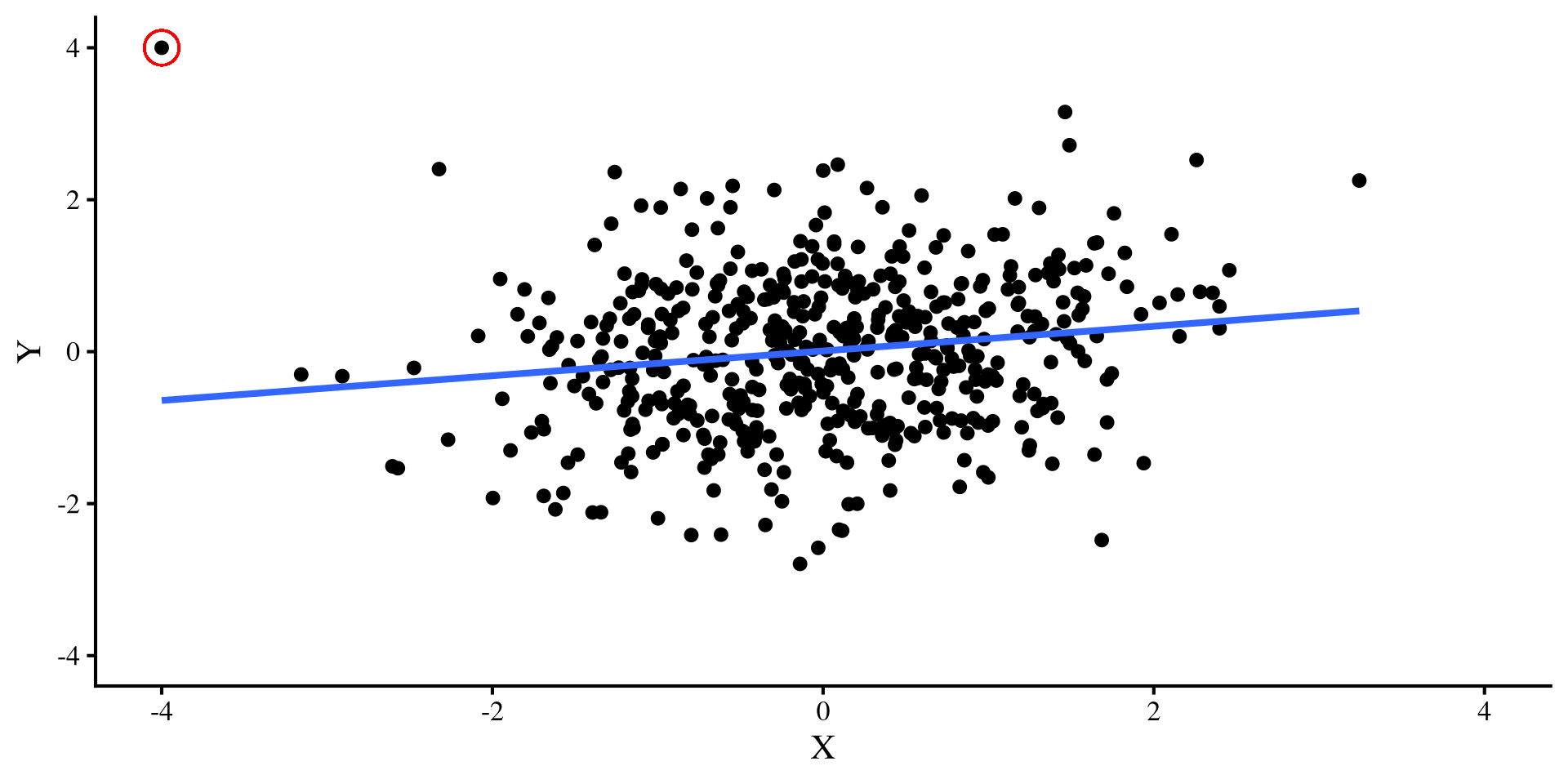
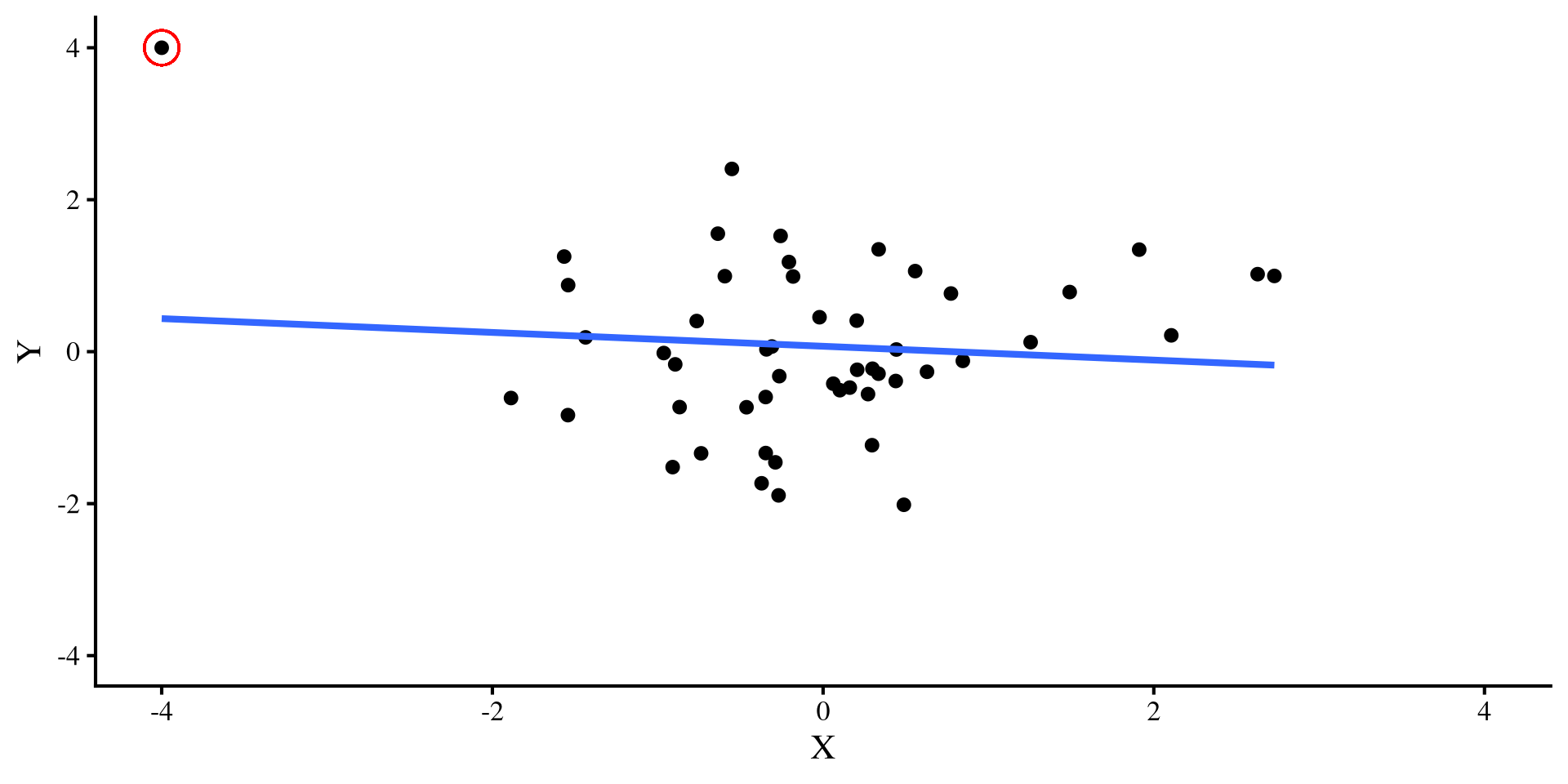
Now, let’s introduce a single outlier point that has extreme values on both variable, \(Y = 4\) and \(X = -4\). Check out what happens to the two regression lines:
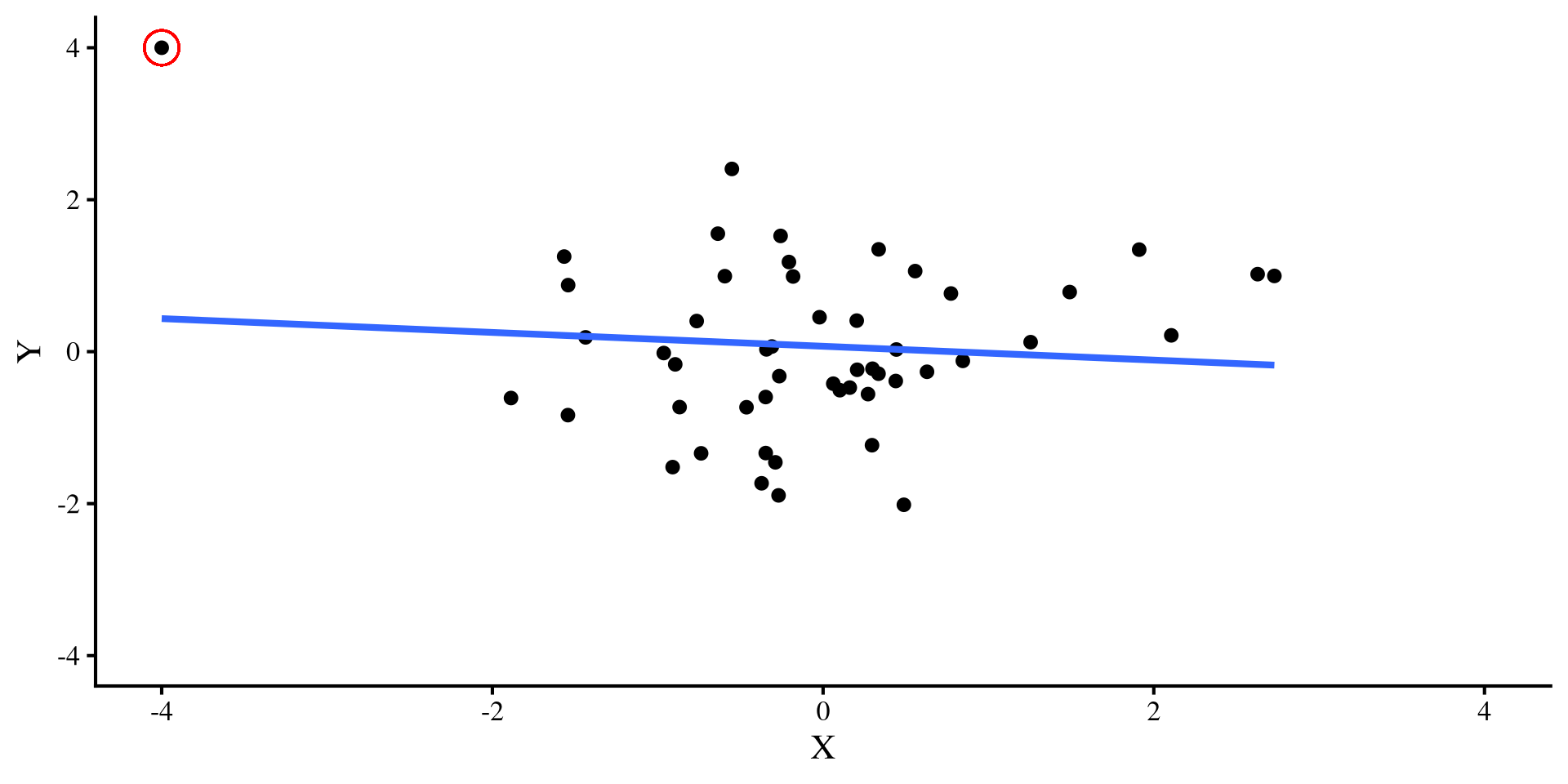
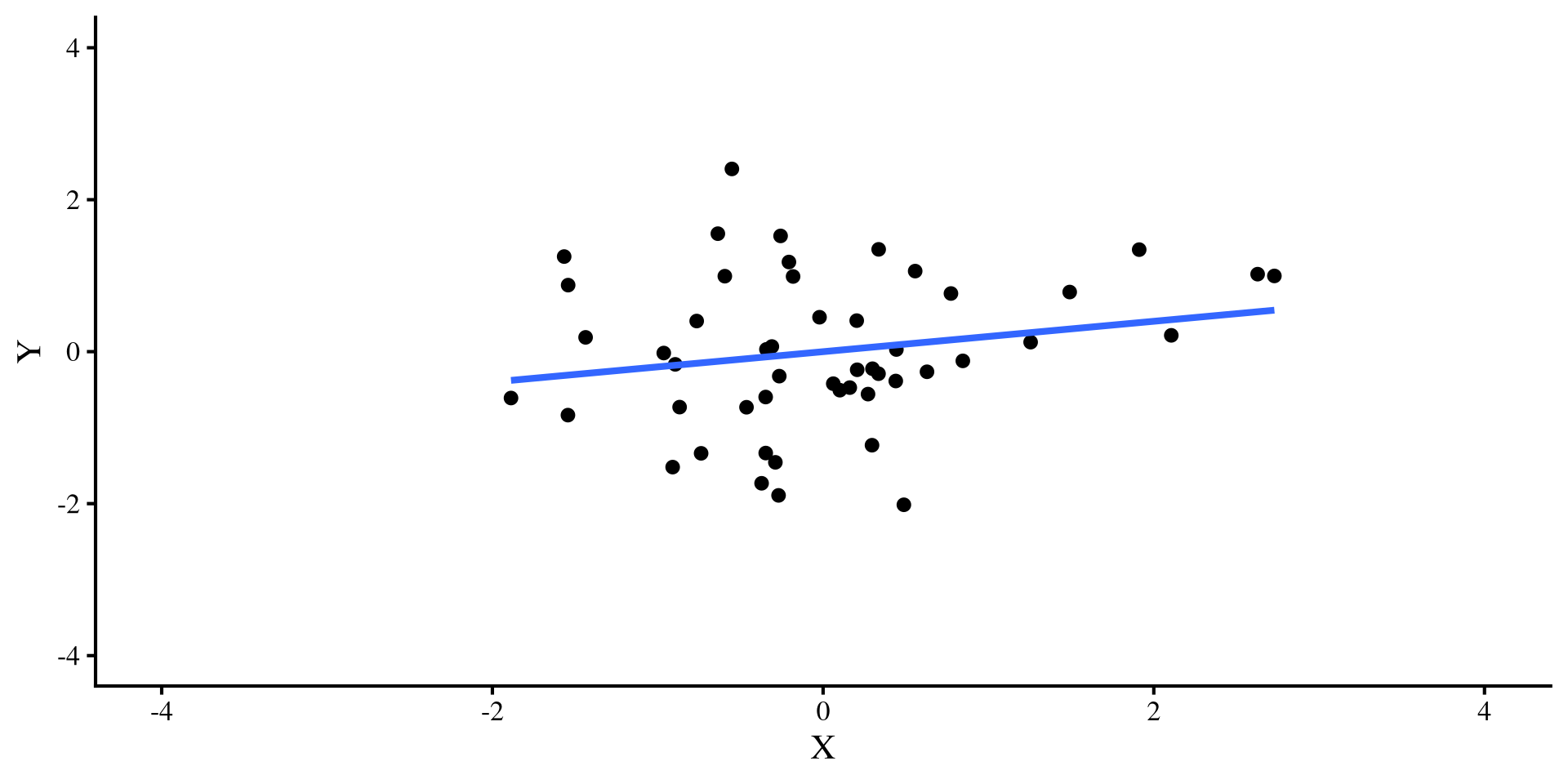
A single outlier flips the relation between \(X\) and \(Y\) when \(N = 50\) 😱 but it doesn’t do much when \(N = 500\) 😇

Moral of the story?

So, what’s the moral of the story?

Small sample sizes: In small sample sizes, you should always check regression diagnostics, and carefully evaluate how extreme points may be influencing your results. If leaving or removing a single extreme point changes your results significantly, I would not have much faith in the robustness of the results.

Large sample sizes: The larger the sample size, the less influential extreme points will be. you still want to check residual plots, but you (usually) don’t need to be as concerned about the impact that extreme points may have on your results (assuming you don’t have that many extreme points).
But wait! Not All Outliers Ruin your fun

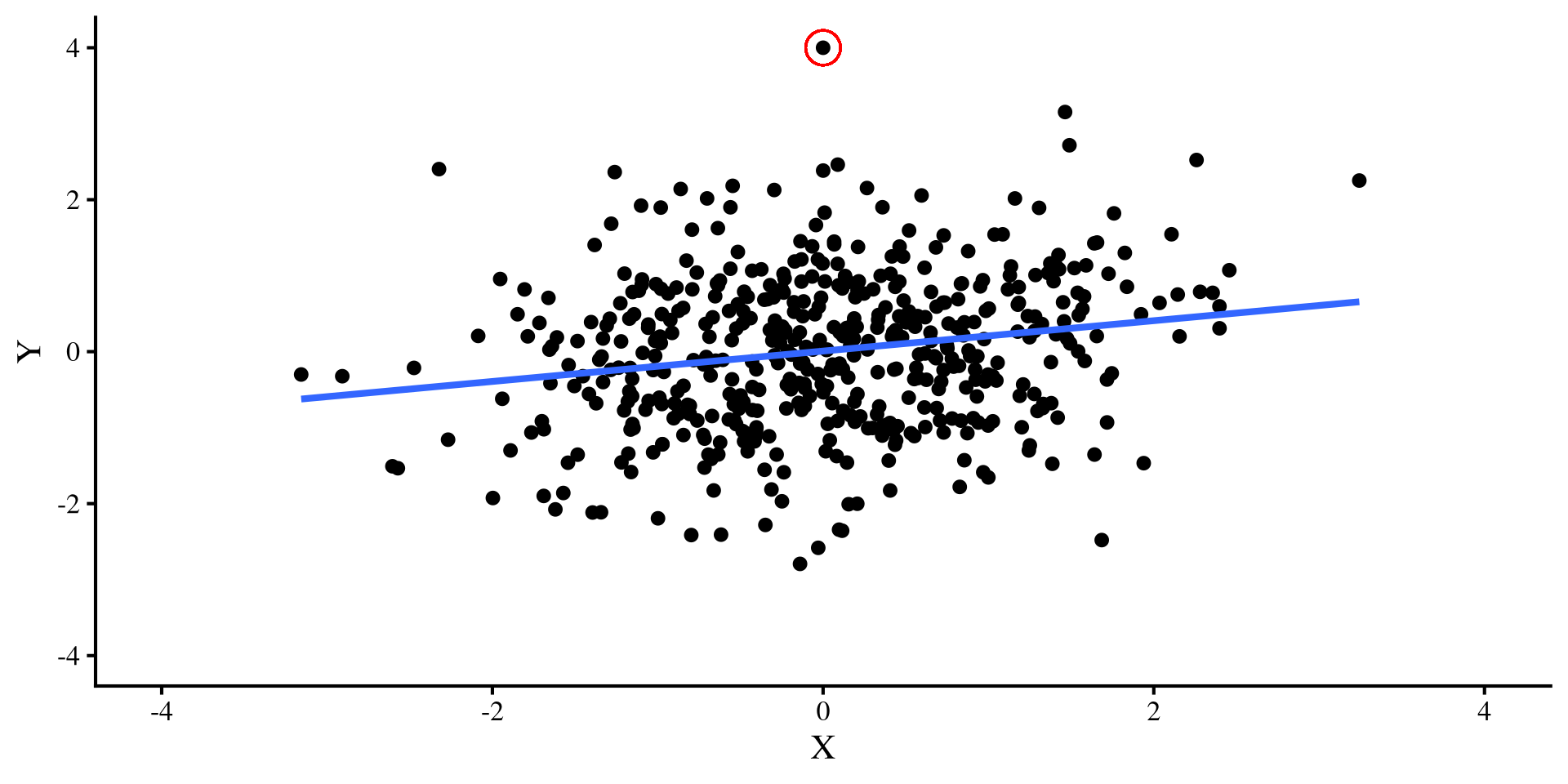
Let’s try a different outlier, that has values of \(Y = 4\) and \(X = 0\). Check out what happens to the two regression lines now:
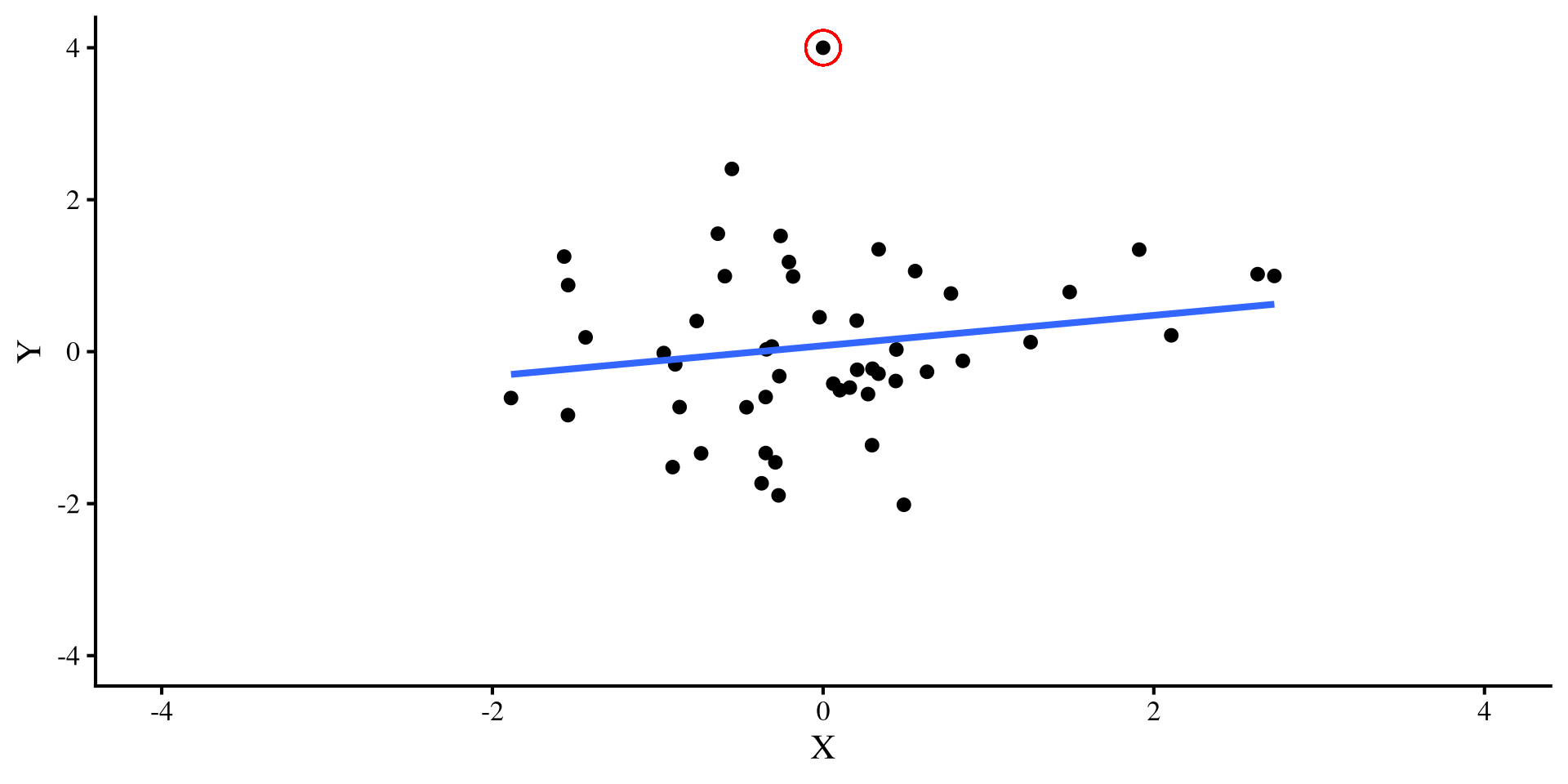
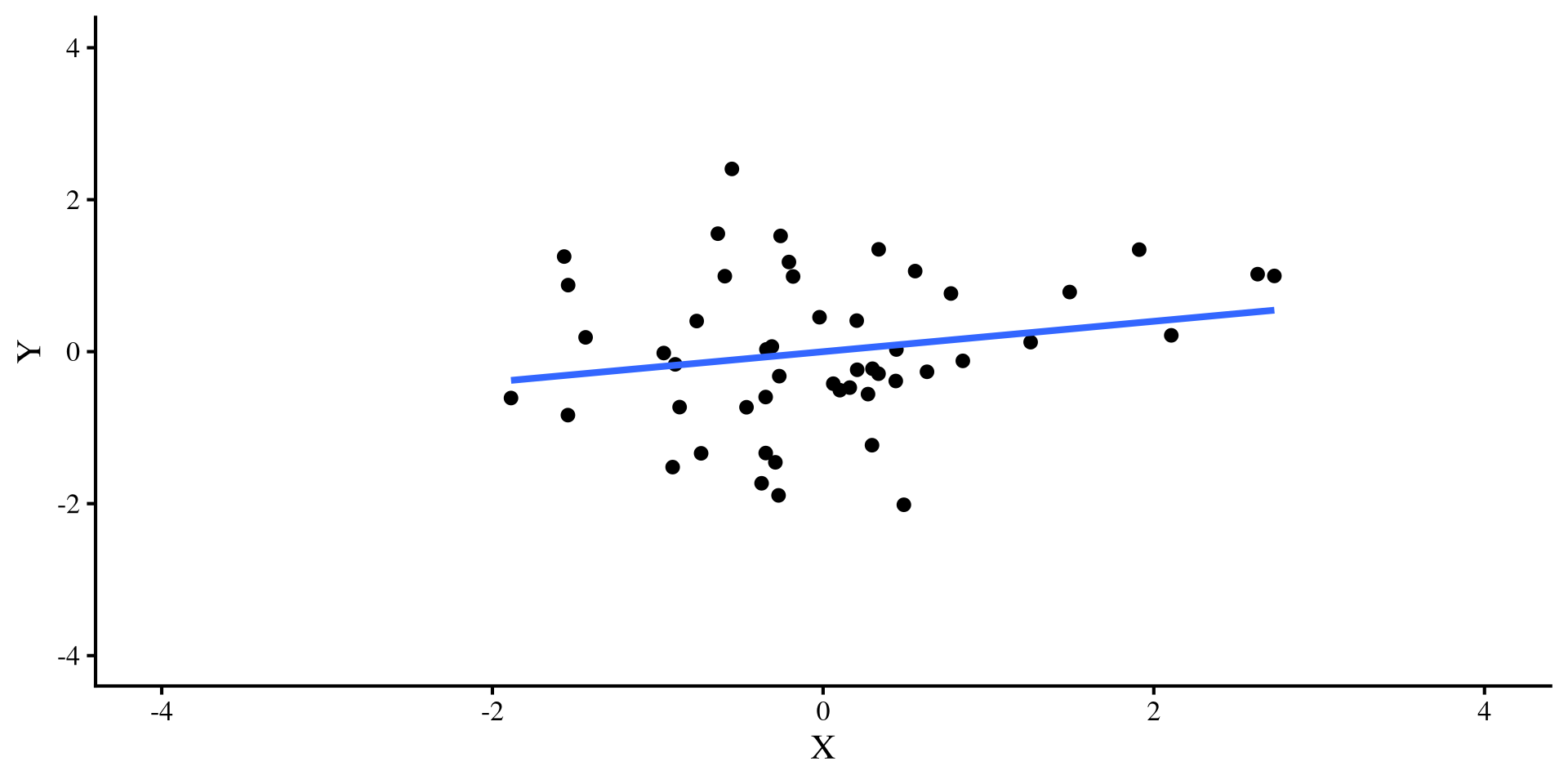
Ah, this outlier doesn’t do much to either regression 🤔 Actually, the only thing it does is slightly change the intercept, which is not a big deal usually.

Back to Regression Diagnostics

As we saw from the previous examples, there are outliers that are more or less “dangerous”. Regression diagnostics give us different information (some more useful than other) about our data points. There are 3 general categories of regression diagnostics:

Leverage

Leverage measures quantifies how unusual a certain observation given the full set of predictors. For example, if our predictors are age and whether a person is pregnant, it would not be unusual to separately see someone whose age is 55 and some pregnant individuals. However, it would be unusual to see someone who is both 55 and pregnant. Such an observation would have high leverage.

Distance

Distance measures how far away the observed value of \(Y\) is from the predicted value \(\hat{Y}\). Residuals are a measure of distance. However, raw residuals, \(Y - \hat{Y}\), are not the best way of measuring distance, so we will see more general measures later. Regardless, high distance is more concerning than high leverage.

Influence

In my opinion, the most important category of regression diagnostics. For each observation, influence measures tell you how much the values of your slopes would change if you removed that data point. The first outlier I created a few slides back had really large influence in the \(N = 50\) case, as it completely changed the slope when introduced.

You may see slightly different definitions for these 3 terms. I am drawing my definitions/examples from chapter 16 of Darlington & Hayes (2016).

Quick Regression Diagnostics Summary

Here is a quick summary of the regression diagnostics that we will look at today. In general, influence measures are more useful, because, for each data point, they tell you what would happen to your results if you deleted that data point.
  • Hat values: measure how unusual an observation is compared to the average observation. (leverage)
  • Studentized Residuals: For each data point, it measures how large the residual is on a standardized scale (distance).
  • DFFITS: For each data point, it measures how large the change in the predictions, \(\hat{Y}\), would be if that data point was removed (influence).
  • Cook’s D: This is very similar to DFFITS, because it also measures how large the change in the predictions, \(\hat{Y}\), would be if a data point was removed (influence).
  • COVRATIO: For each data point, it measures how large the average change in all the standard errors of the regression coefficients would be if that data point was removed (influence).
  • DFBETAS: For each data point, it measures how much each individuals regression coefficient will change if that data point would be if that data point was removed (influence).
DFBETAS () is my favorite measure because for each data point, it tells you how much each regression coefficient will change if that data point is removed. Other measures give some average, which, for most purposes, is not as informative in my opinion.

Our model

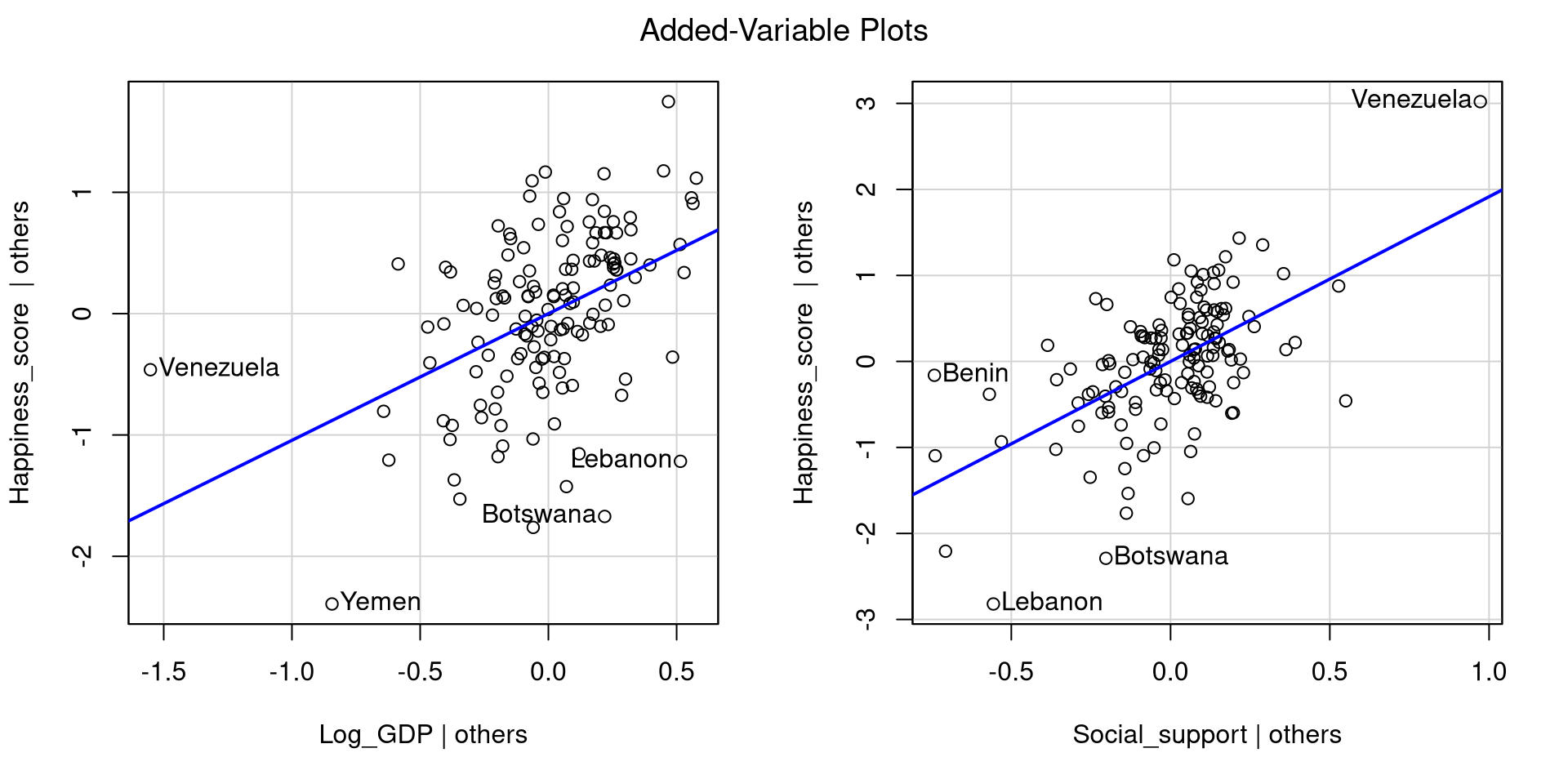
Let’s say that we want to look at how log_GDP and Social_support predict Happiness_score for each country. Let’s look at the added variables plots directly:

reg <- lm(Happiness_score ~ Log_GDP + Social_support, WH_2024)
avPlots(reg)
Graphical inspection is always a good start, and often is all you need to see that something may be off. Both variables positively predict Happiness, but there are some extreme points.
As mentioned all the way back in Lab 5, the avPlots() function also identifies the 2 points with the largest residuals and the largest leverage (for the single plot).
Hat values

Hat values measure how unusual an observation is compared to the average observation. They measure leverage, and the higher the values, the more unusual the observation given the set of predictors.

To compute hat values for all your observations you use the hatvalues() function. Here I only print the 5 largest values

hatvals <- hatvalues(reg)
sort(hatvals, decreasing = TRUE)[1:5]
  Venezuela Afghanistan       Benin  Bangladesh       Yemen 
 0.21265378  0.09809391  0.09120859  0.08473355  0.06862403 

Here are all the hat values:

Leverage is just a way of determining whether an observation is unusual, but it does not necessarily mean that the observation is problematic. I generally don’t like guidelines of “how big is too big” for regression diagnostics because they don’t generalize well to real world cases. Here, Venezuela’s hat value is more than twice as large as the second largest one, so somewhat big relative to all other data points.

Studentized Residuals

Studentized Residuals measure how large each residual is on a standardized scale (a t scale really, but makes no difference in practice). This is a measure of distance.

To compute hat values for all your observations you use the rstudent() function. Here I only print the 3 largest and smallest values

rstud <- rstudent(reg)
c(sort(rstud,)[1:3],
  sort(rstud, decreasing = TRUE)[1:3])
           Botswana             Lebanon           Sri Lanka               Benin 
          -3.186036           -2.984894           -2.820828            2.157962 
          Venezuela Congo (Brazzaville) 
           2.131176            1.945239 

Here are all the residuals:

We are talking about residuals, so they can be both positive (above the regression line) and negative (below the regression line). Because the residuals are on a standardize scale, around 0 is an average residual, where anything above 2 (2 standard deviations above the mean) is somewhat high.

Studentized Residuals? QQplot them

Studentized residuals are just the values of the standardized residuals. Some large residuals are expected and are usually not that big of a deal. The car package has a quick function to create a QQplot of studentized residuals

car::qqPlot(reg)
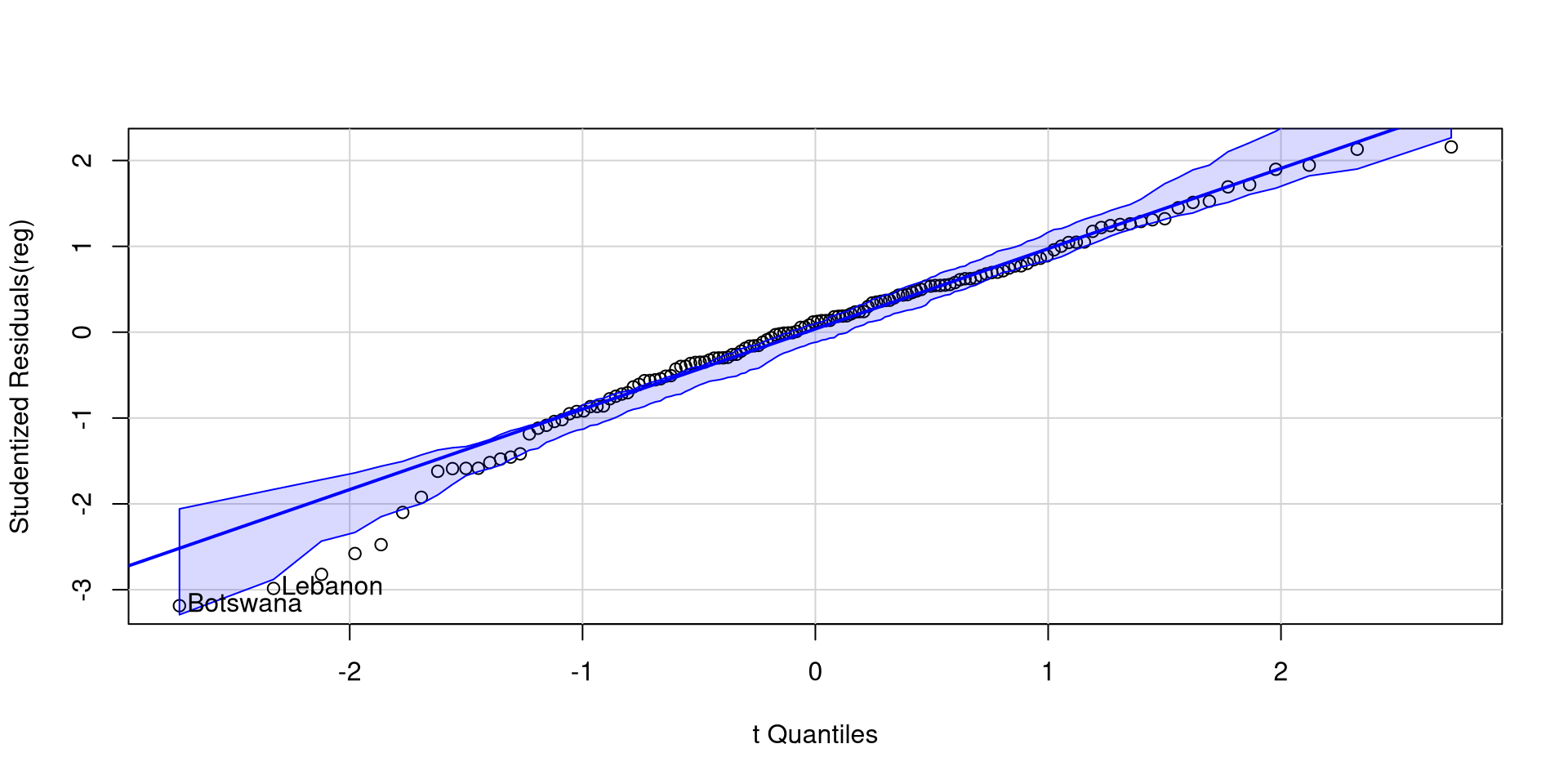
Botswana and Lebanon have somewhat low residuals, but there aren’t many residuals outside the confidence band.

The lower end of the residuals is a bit suspicious, but I wouldn’t be super concerned just by looking at this.

DFFITS

DFFITS measure how large the change in the predictions, \(\hat{Y}\), would be on average if that data point was removed (influence).

To compute DFFITS for all your observations you use the dffits() function. Here I only print the 3 largest and smallest values:

dffits <- dffits(reg)
c(sort(dffits)[1:3],
  sort(dffits, decreasing = TRUE)[1:3])
      Yemen     Lebanon Afghanistan   Venezuela       Benin  Mozambique 
 -0.6998446  -0.6820855  -0.4798498   1.1075748   0.6836434   0.3463596 

Here are all the residuals:

Predictions can change either positively or negatively, so we should look at extreme values both ways. You can think of DFFITS as a measure that summarizes how much the whole regression model changes when a data point is removed.

Cook’s D

Cook’s D is very similar to DFFITS because it also summarizes the change in the predictions, \(\hat{Y}\), given any data point if that data point was removed (influence). The differencer is that Cook’s D is always positive, and large values imply larger influence.

To compute Cook’s distance for all your observations you use the cooks.distance() function. Here I only print the 5 largest values:

cookD <- cooks.distance(reg)
sort(cookD, decreasing = TRUE)[1:5]
  Venezuela       Yemen       Benin     Lebanon Afghanistan 
 0.39860207  0.15679733  0.15173923  0.14661548  0.07613119 

Here are all the values:

Data points with large DFFITS (in magnitude) will have large Cook’s D, so the interpretation is similar. Because Cook’s distance is always positive, it may be easier to interpret from some. You can confirm that the the countries on this slide are the same countries with the largest DFFITS in magnitude on the previous slide.

COVRATIO

COVRATIO measures how large the average change in all the standard errors of the regression coefficients would be if that data point was removed. It’s a measure of influence.

To compute COVRATIO values for all your observations you use the dffits() function. Here I only print the 5 largest and smallest values

covrat <- covratio(reg)
c(sort(covrat)[1:5],
  sort(covrat, decreasing = TRUE)[1:5])
   Botswana   Sri Lanka     Lebanon    Eswatini       Egypt   Venezuela 
  0.8345086   0.8684843   0.8891520   0.9051094   0.9379370   1.1764633 
 Bangladesh Afghanistan     Comoros  Kyrgyzstan 
  1.1097978   1.0820780   1.0814376   1.0743889 

Here are all the values:

You may notice that COVRATIO values hover around 1. In fact, \(\mathrm{COVRATIO} = 1\) means that removing the point has no impact whatsoever on the standard errors. On the other hand, \(\mathrm{COVRATIO} < 1\) means that removing the point will make standard errors smaller, while \(\mathrm{COVRATIO} > 1\) means that removing the point will make standard errors larger.

DFBETAS

DFBETAS represent the change in the intercept and slopes if if that data point was removed (influence).

To compute DFBETAS we use the dfbetas() function:

dfbetas(reg)

DFBETAS provide more information than the other measures. Removing a data point may have stronger influence on one of the slopes, but not as much influence on another slope or the intercept.

You can click on the column names in the table on the left to order the table by each column and see the more extreme values for each column.

The change is in standard deviation units, so, for example, removing Venezuela changes the slope of Log_GDP by -1.083 standard deviations and that of Social_support by .865 standard deviations. This is a pretty large change.

Influence plot with car

The influencePlot function from the car package also offers a nice visualization for studentized residuals, hat values, and Cook’s D at the same time

car::influencePlot(reg)
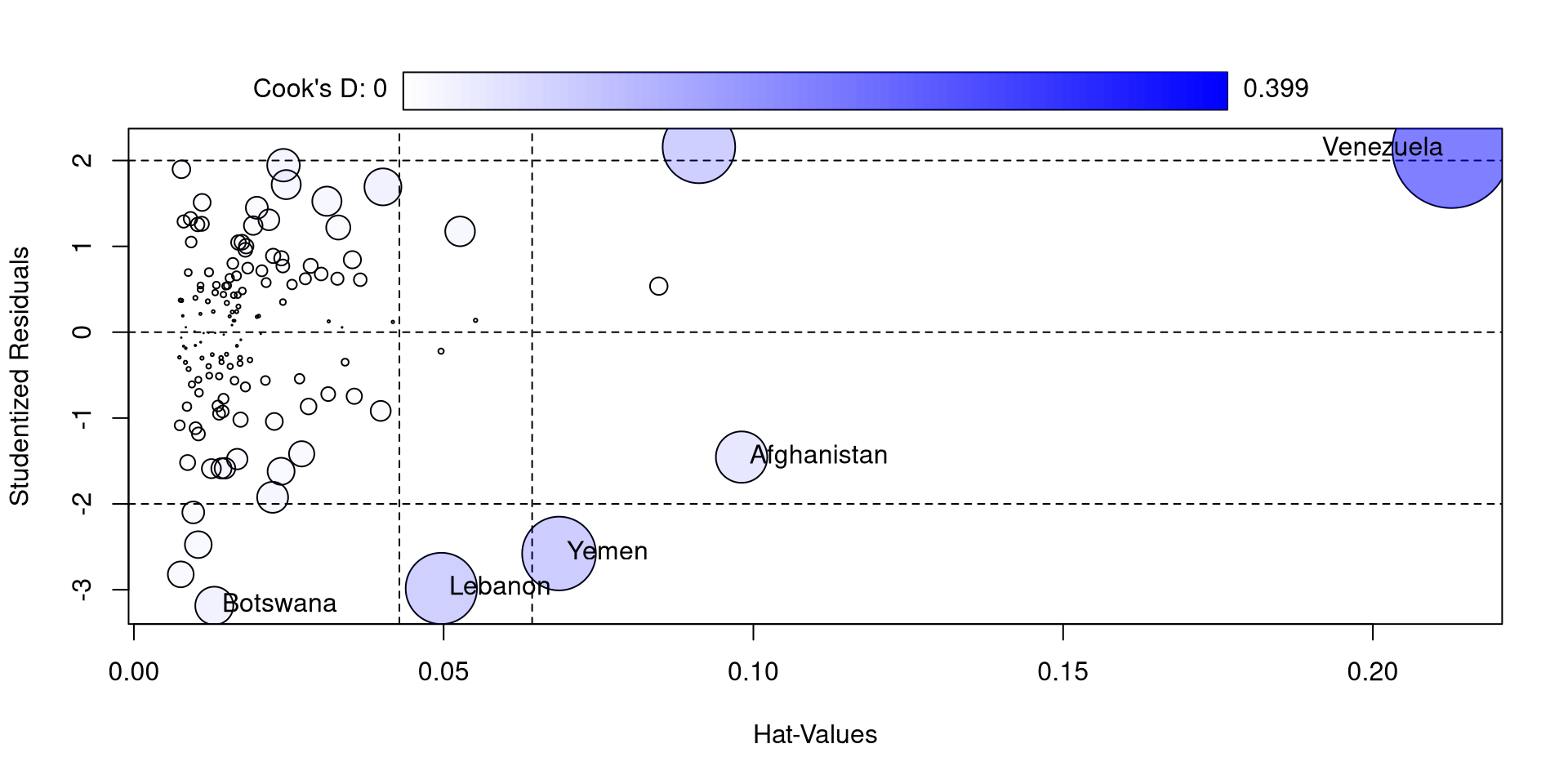
So, compared to the other countries, Venezuela is really high in all of these measures. If you look at the log_GDP and Happiness_score values for Venezuela you may find something a bit strange (maybe proof that money is not needed for happiness)

I also feel like the function is not very aptly named because only Cook’s D is a measure of influence 🫣

Another Neat car Plot

The influenceIndexPlot function offers a visualization of a bunch of regression diagnostics. This helps visualizing what observations are extreme relative to other observations

influenceIndexPlot(reg)
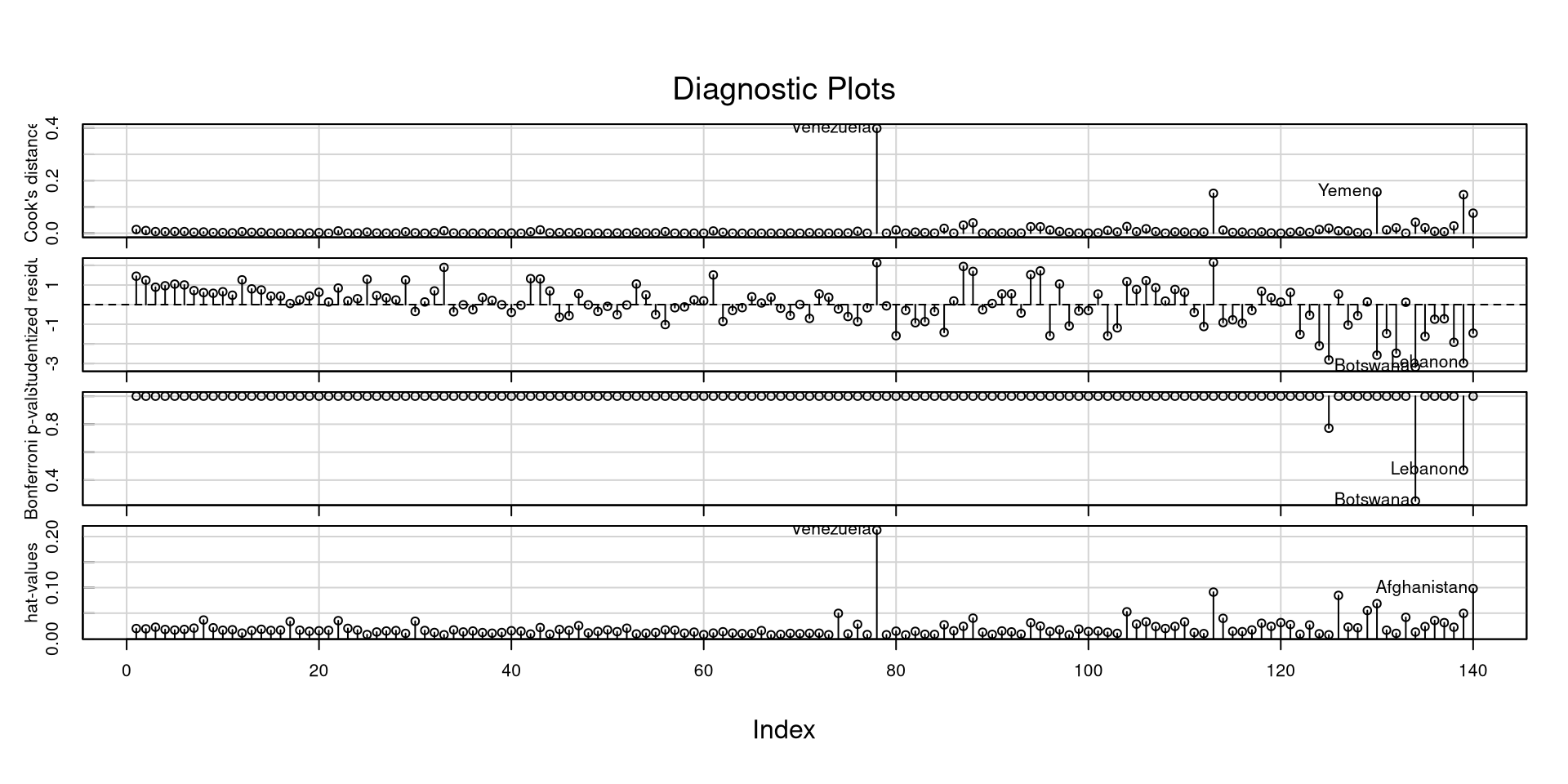
With a good deal of these measures, I would not look at “suggested cutoffs”. Following cutoffs blindly (1) leads you to not think about what you are doing, and (2) leads you to make bad decisions and mistakes in many scenarios.

Especially for some of these measures, you want to look at how large they are relative to all other observations.

References

Darlington, R. B., & Hayes, A. F. (2016). Regression analysis and linear models: Concepts, applications, and implementation. Guilford Publications. https://books.google.com?id=YDgoDAAAQBAJ
Fox, J., Weisberg, S., Price, B., Adler, D., Bates, D., Baud-Bovy, G., Bolker, B., Ellison, S., Firth, D., Friendly, M., Gorjanc, G., Graves, S., Heiberger, R., Krivitsky, P., Laboissiere, R., Maechler, M., Monette, G., Murdoch, D., Nilsson, H., … R-Core. (2024). Car: Companion to Applied Regression (Version 3.1-3) [Computer software]. https://cran.r-project.org/web/packages/car/index.html
Wickham, H., & RStudio. (2023). Tidyverse: Easily Install and Load the ’Tidyverse (Version 2.0.0) [Computer software]. https://cran.r-project.org/web/packages/tidyverse/index.html